
Uptimia's probes check from the public internet. A target they cannot open a connection to cannot be watched with an uptime monitor. That rules out an internal app, a staging box behind a VPN, a nightly cron job, a queue consumer, or a server with no public service. Point an uptime monitor at one and you get a monitor that is permanently down. Heartbeat, Server and Real User monitors work the other way around. A target the probes can already reach, but that asks for a login, needs a credential rather than a workaround.
Before You Start
- Heartbeat monitors need a plan above Free: Free 0, Trial 50, Basic 10, Professional 100, Enterprise 1,000.
- Server monitors need a plan above Free: Free 0, Trial 50, Basic 1, Professional 10, Enterprise 100. Monitoring → Server appears in the sidebar only when your plan's server allowance is above 0.
- Real User monitors need a page you can add a script tag to: Free 0 websites, Trial 50, Basic 1, Professional 10, Enterprise 100.
What a Probe Can and Cannot Reach
A probe is a machine in a datacenter that opens a connection to your target from the outside, exactly as a stranger's browser would. It resolves your hostname in public DNS and connects over the public internet. Three things put a target out of reach:
- A hostname that does not resolve publicly.
- A private address (
10.x,172.16–31.x,192.168.x,127.0.0.1). - A firewall that drops traffic from anything but your office range.
Then every probe reports the target as down, so you get a false outage rather than a measurement.
Needing a credential is a different problem from needing network access. If the probe can open the connection, give the monitor the credential (the credentials table below names each field). If the probe cannot open the connection at all, no credential helps.
Choosing the Right Answer
| What you need to watch | Use | Why it works |
|---|---|---|
| A cron job, backup, batch import, queue consumer, ETL run | Heartbeat | Your job calls Uptimia. Nothing of yours has to be reachable. |
| A host with no public service (CPU, memory, disk, load) | Server | An agent on the host reports outbound over HTTPS. No inbound rule. |
| Real page-load timing for an intranet app your staff use | Real User | Timings come from your staff's browsers, not from a probe. |
| An endpoint that is public but needs a login or a token | Uptime, API or Transaction with credentials | The probe can reach it; it only needs to identify itself. |
| An internal-only web page, from the outside | Nothing | No probe can reach it. Use a heartbeat sent from inside your network. |
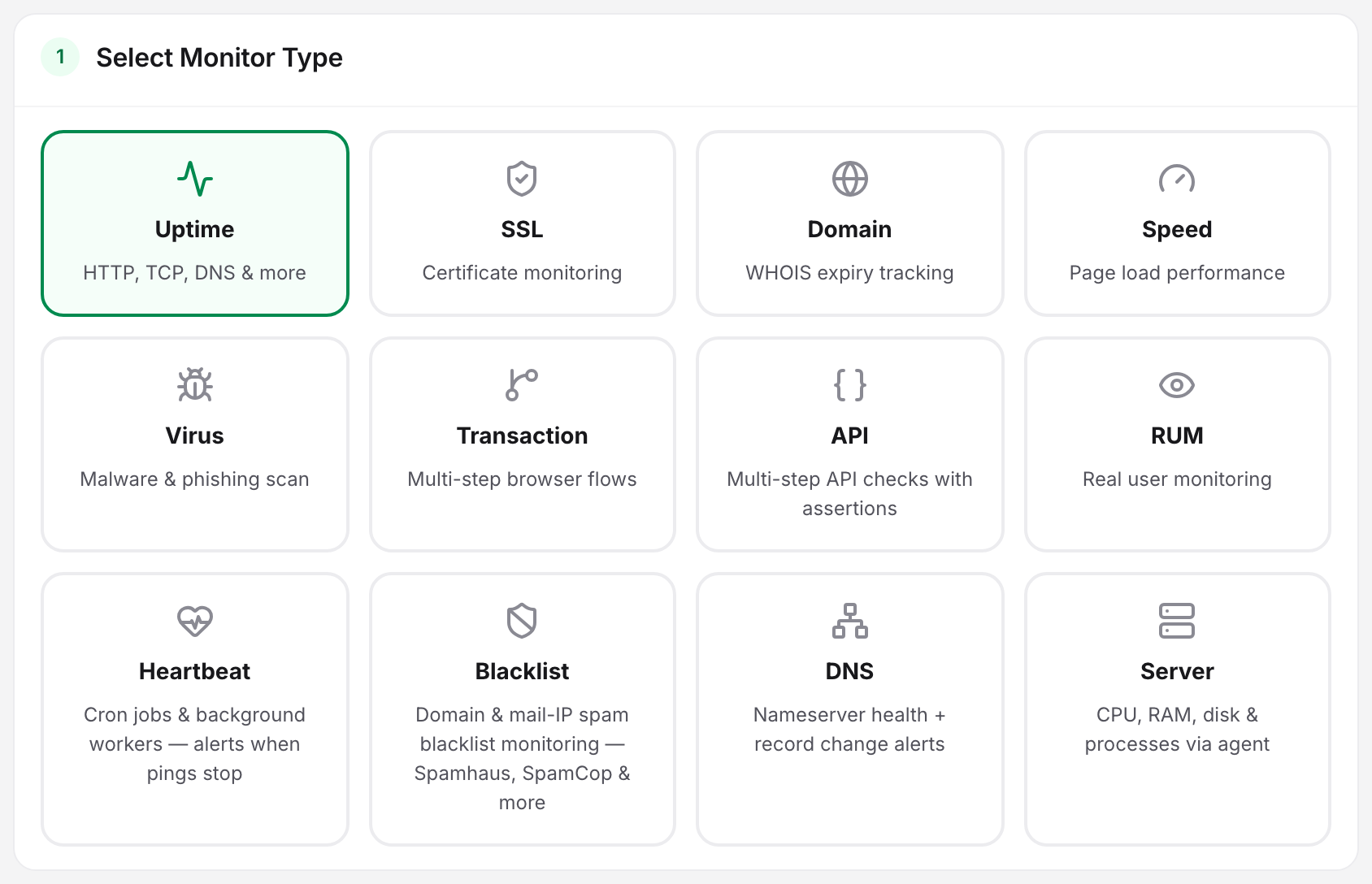
Jobs and Internal Schedules: Heartbeat
A heartbeat monitor is a dead-man's switch. Uptimia creates a ping URL, and your job calls it when it finishes. If a ping does not arrive inside the schedule you set, Uptimia alerts you. Your job connects out to Uptimia, so it can sit anywhere that can make a single HTTPS request: a laptop, a Kubernetes cluster, an air-gapped box with one outbound hole.
The URL carries a token in the form hb_ followed by 32 hexadecimal characters, and that token is the entire credential. Treat it like a password: anyone holding it can ping the monitor. Any of GET, POST and HEAD works, so a one-line curl in a crontab is enough:
curl -fsSL -m 10 --retry 3 -o /dev/null https://www.uptimia.com/p/hb_5c8f1e0a4d7b2396af10c53e6b8d24f7
Two extra signals turn a "did it run" check into a "did it work" check:
/startbefore the job begins enables run-duration tracking./failafter a non-zero exit raises the alert immediately, instead of waiting out the grace period.
The monitor's Actions → Ping setup modal, headed Add it to your job, carries copy-paste snippets for Crontab, Bash wrapper, PowerShell, GitHub Actions and PHP, each already wired to the right signals.
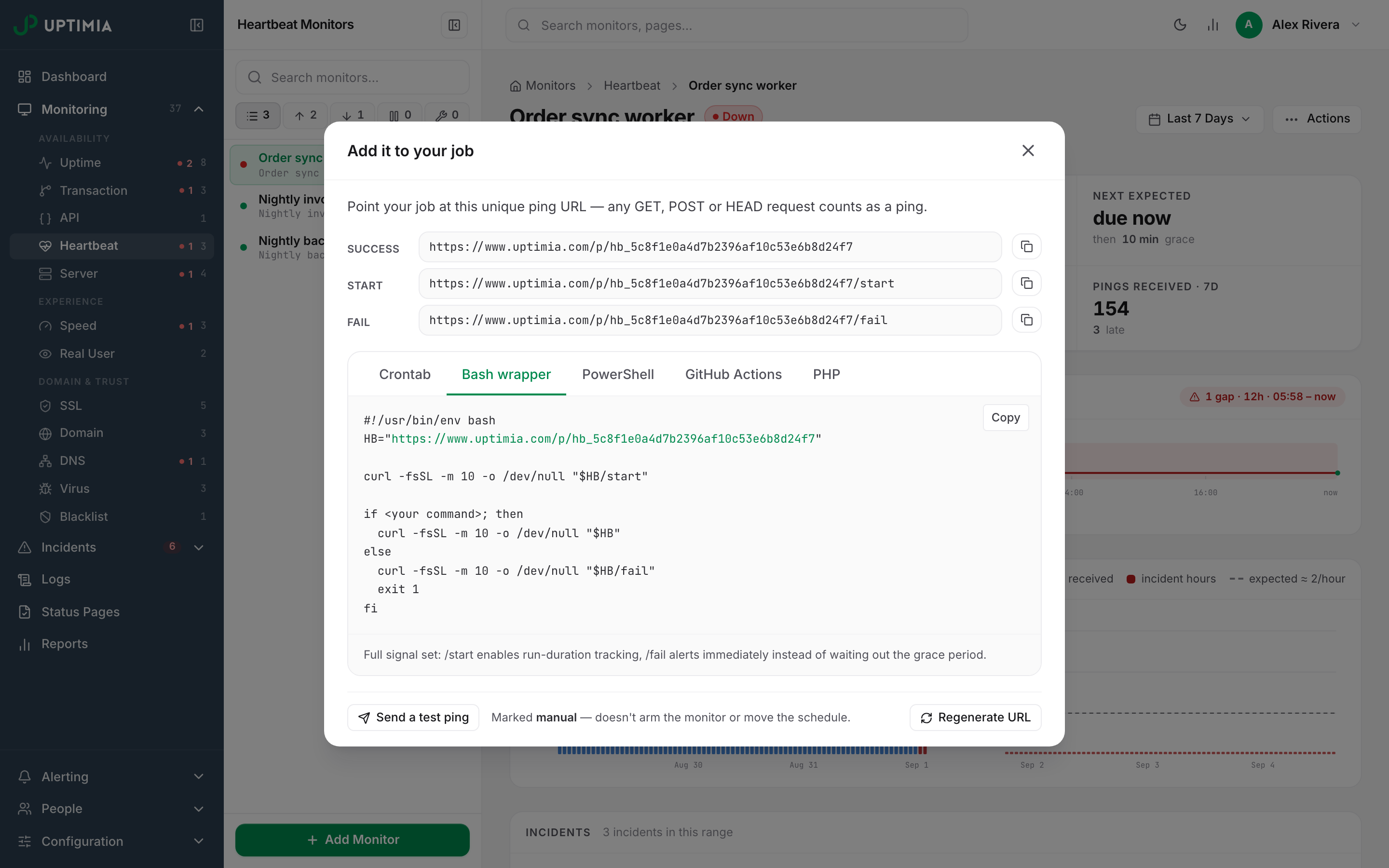
A new heartbeat stays silent until its first real ping arrives; the detail page shows Waiting for the first ping… until then. A monitor created ahead of a deployment cannot page anyone. Setup, schedules, grace periods and the alerting behavior are in Heartbeat Monitoring.
Warning: the ping URL is a secret. Do not paste it into a chat channel or a public repository. Uptimia ignores pings that carry a known link-preview or mail-security User-Agent. A fetcher it does not recognize is another matter: if that fetcher re-fetches the URL on a schedule, the monitor keeps looking healthy while the job is dead.
Hosts with No Public Service: The Server Agent
A server monitor works the same way. You install a small agent on the host: a bash script on Linux and macOS, a PowerShell script on Windows. The agent reads CPU, memory, disk, load, process and network figures from the operating system and sends them to Uptimia over HTTPS, and all of that traffic is outbound, so there is no inbound firewall rule to open, no port to expose and no address to publish.
The Linux agent needs only bash and curl. A one-line command installs it as a systemd timer, with a cron fallback where systemd is absent. The agent reports every 30 seconds by default, and the reporting interval can also be set to 60 seconds, 2 minutes or 5 minutes. The macOS and Windows agents install by hand. If Uptimia is briefly unreachable, the agent stores the readings on the host and sends them oldest first once it reconnects, so a short network problem does not leave a hole in your charts.
The Linux one-line install command sits on the server monitor's page, under the Install the monitoring agent on your server banner. The first check-in turns the banner green. If a minute passes with no report, the banner offers a Still not seeing data? Troubleshoot link. Outbound HTTPS is the third thing it asks you to check. The steps, key rotation and uninstall are in Installing the Uptimia Server Agent, while thresholds, offline detection and the metric charts all live in Server Monitoring.
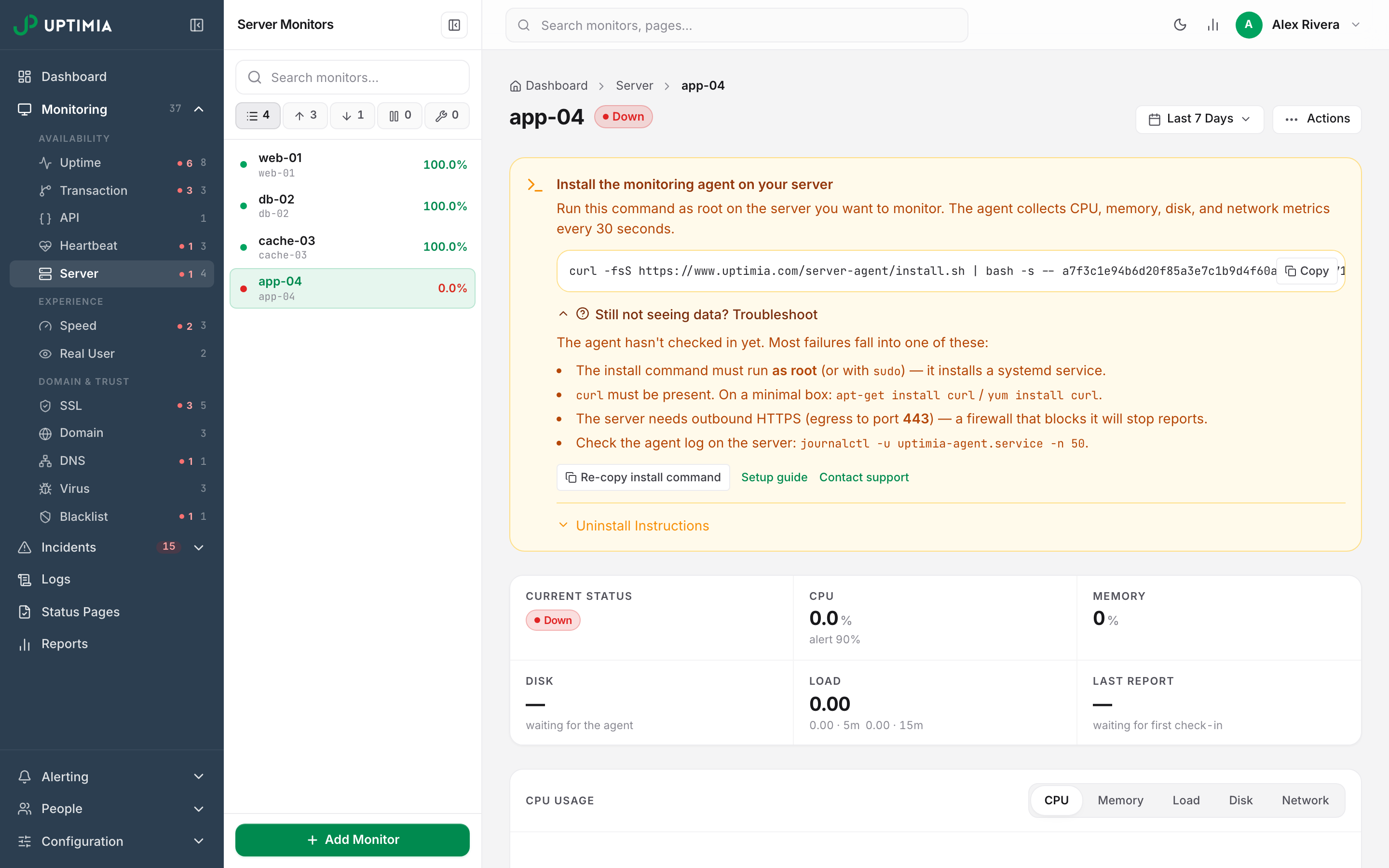
The agent reports the health of the box rather than the health of the service running on it. If the application has no public endpoint, pair the agent with a heartbeat the application sends itself.
Front-End Timing for an Internal App: Real User Monitoring
A Real User monitor is a script tag you add to your pages. Every load reports its own timings from the visitor's browser, so the measurement comes from inside your network even though Uptimia never touches the app, and you get page-load times, geography, browser and device breakdowns and JavaScript errors. Nothing is scheduled. There is no availability check, because there is nowhere to check from.
The requirement falls on the browser, not on the server: it has to be able to load https://www.uptimiarum.eu/rum.min.js and post back to it. Staff on a locked-down network with no outbound internet access will report nothing. See Real User Monitoring (RUM).
Reachable but Protected: Credentials Instead of Network Access
If a probe can open the connection and only an authentication layer turns it away, skip everything above and give the monitor the credential.
| Target | Where the field lives |
|---|---|
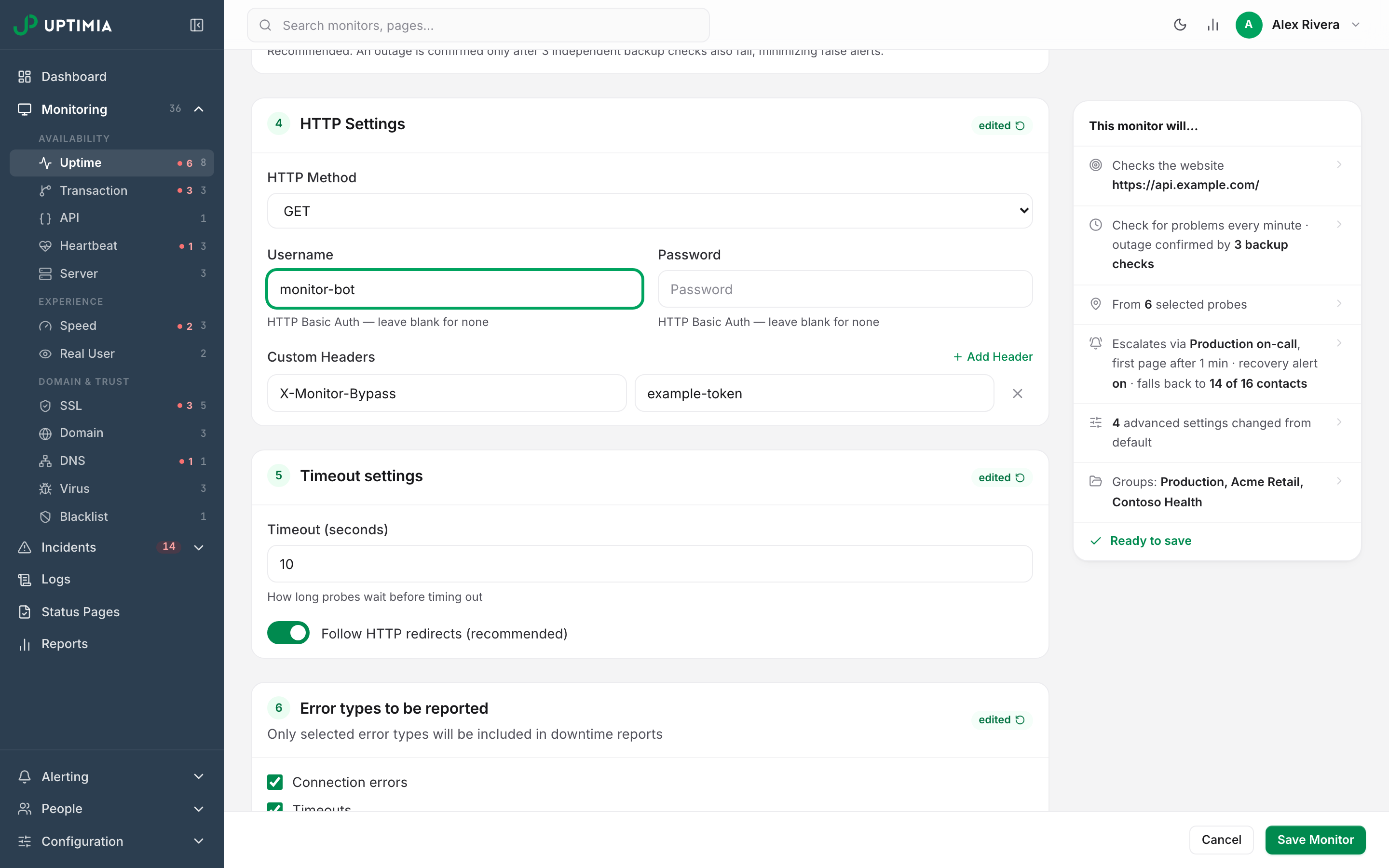
| A URL behind HTTP Basic Auth | Uptime editor, Advanced tab, HTTP Settings card: Username and Password, hinted HTTP Basic Auth — leave blank for none |
| A URL behind an API key or a bypass header | Same card, Custom Headers: click Add Header and enter the header name and value |
| A multi-step API chain needing a token | API monitor Variables card: reference values in any step as {{name}}, and mark credentials as secrets so they are stored write-only and masked after saving |
| A browser journey behind a login form | Transaction monitor: use the Fill in password field step, which masks the value |
Create a dedicated low-privilege account for monitoring rather than reusing a staff login. A leaked credential then costs you nothing, and an audit log shows which sign-ins are synthetic. Exempt that one account or header from rate limits and MFA on your side, rather than weakening either for everyone.
Assertions, variables and secret handling are covered in Assertions, Extractions and Variables. The login-flow steps live in Transaction Monitoring.
Staging and Pre-Production
An IP-restricted staging environment is an allowlist problem. Add Uptimia's probe addresses to the restriction rather than exposing the environment. Whitelisting Uptimia's Probe IPs has the current addresses and the direction each family connects in.
Keep staging and production on separate monitors and separate alerting. A staging deploy that takes the environment down for 4 minutes should not page the on-call rotation. It should not drag your production availability figure down either: the dashboard's overall availability average counts a noisy staging monitor as heavily as a critical one.
Keeping the Results Private
Two controls limit who sees the results.
- Status pages carry three visibility modes: Public, Password protected and Private (IP allowlist). A shared password must be at least 10 characters, and rotating it signs every current visitor out. A private page takes IP addresses and CIDR ranges. Establishing or rotating protection needs a plan above Free; removing it never does. See Status Page Visibility.
- Inside the account, Editor and Read-only members can be limited to specific monitor groups, so a contractor sees one client's monitors and nothing else. The server enforces that boundary, so those rows are out of reach. See Limiting a Member to Monitor Groups.
What Still Cannot Be Done
- There is no VPN, tunnel or private probe for HTTP checks. Uptimia does not install a checking agent inside your network. An internal-only web page cannot be checked from outside. The closest equivalent is a heartbeat: run a script inside the network that curls the page itself and pings on success.
- The server agent measures the host, not the app. It has no HTTP check of its own.
- A heartbeat proves a job ran, not that a page is up. It watches the ping schedule you set, not whether anything is reachable.
- Alerts cannot be delivered to a private address. Uptimia refuses to save a webhook, Slack, Discord, Microsoft Teams or Mattermost URL that resolves to a private or reserved address. Terminate the delivery on something publicly reachable and forward inward from there.