
Assertions decide whether a step passed. Extractions pull a value out of one response and hand it to a later step, while monitor variables hold the values that every step in the chain shares. Both kinds of value are referenced as {{name}}. For the chain itself (steps, methods, per-step options, running a test), see API Monitoring.
Before You Start
- An API monitor with at least one request step, and an Owner, Admin or Editor seat to edit it.
- Assertions and extractions live inside a step. On the editor's Request chain card, click a step row to expand it, then open the Assertions or Extract tab.
- Monitor variables sit in the Variables sub-section of the same card, above the steps.
Assertion Types
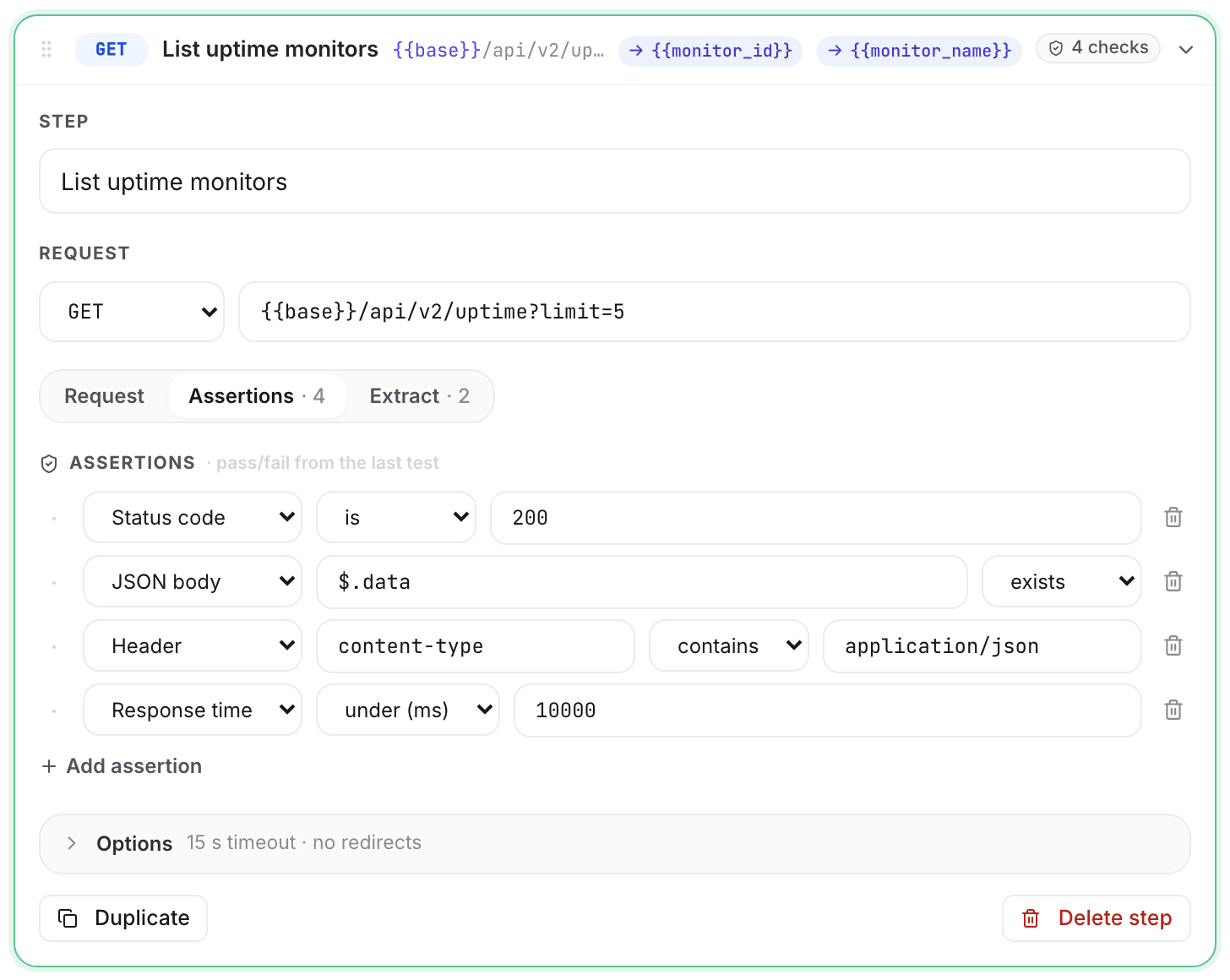
A step passes when every assertion on it passes. Each row is a type, a condition, and for some types a path and an expected value. The value box disappears for exists and is 2xx, which need nothing to compare against.
| Type | Conditions | Path field | Value field | What it looks at |
|---|---|---|---|---|
| Status code | is · is one of · is 2xx | — | 3-digit code, or a comma list of them | The step's HTTP status code |
| Response time | under (ms) | — | Whole number of milliseconds | The step's own round-trip time |
| JSON body | exists · equals · contains · is one of | JSONPath, e.g. $.data.status |
Expected value | One value inside the parsed JSON response |
| Header | exists · equals · contains | Header name, e.g. content-type |
Expected value | One response header |
| Body text | contains · does not contain | — | The text to look for | The raw response body, as sent |
A new assertion row starts as Status code · is · 200.
How Each Comparison Works
- Status code · is 2xx passes on any code from 200 to 299.
- Response time · under (ms) is a strict comparison: a step that takes exactly the threshold fails. The failure line reports the measured time,
got 2140 ms. - JSON body · equals compares a JSON number against your typed value as decimal text.
5matches5, and an id beyond 2^53 is compared digit for digit, so it never loses precision. A JSON string compares literally:"01234"does not equal1234.true,falseandnullmatch those words. - JSON body · contains is a substring test against the value's text form, so it works on strings and on numbers.
- is one of splits your value on commas and trims each piece.
200, 201, 204is valid. - Body text is a case-sensitive substring test on the raw response, before any JSON parsing. A value that resolves to nothing fails the step with
got empty match value, rather than silently passing. - If the response is not JSON, every JSON body assertion on that step fails with
got response is not JSON. - Responses are read up to 1 MB. A larger body is checked on its first 1 MB and marked
body_truncated. That is only a note: the step still passes. - Assertion values accept
{{name}}placeholders on JSON body, Header and Body text rows, resolved before the comparison. A Status code or Response time value has to be literal digits, so a placeholder there is refused on save. Paths never take a placeholder: a{{name}}in a header name stays literal, and in a JSONPath it is refused asinvalid_jsonpath.
A Step With No Assertions Passes on Any 2xx
A step with an empty Assertions tab is still checked. It passes on any 2xx response and fails on anything else, with expected a 2xx status, got 500. The editor says so under an empty list: No assertions — any 2xx response counts as passing.
That is the right setting for a step whose only job is to happen: a cleanup DELETE, a token refresh, a warm-up call. Assert on the steps whose content you care about.
Header Assertions: Names Ignore Case, Values Do Not
Header names match case-insensitively, so Content-Type, content-type and CONTENT-TYPE find the same header. Header values compare exactly as sent: ETags, tokens and version strings are case-sensitive. equals trims surrounding whitespace on both sides; contains does not.
Repeated response headers, Set-Cookie most often, are folded into one value joined with , . That happens before assertions and extractions run, so every value is visible to a contains test.
Extracting a Value Into a Variable
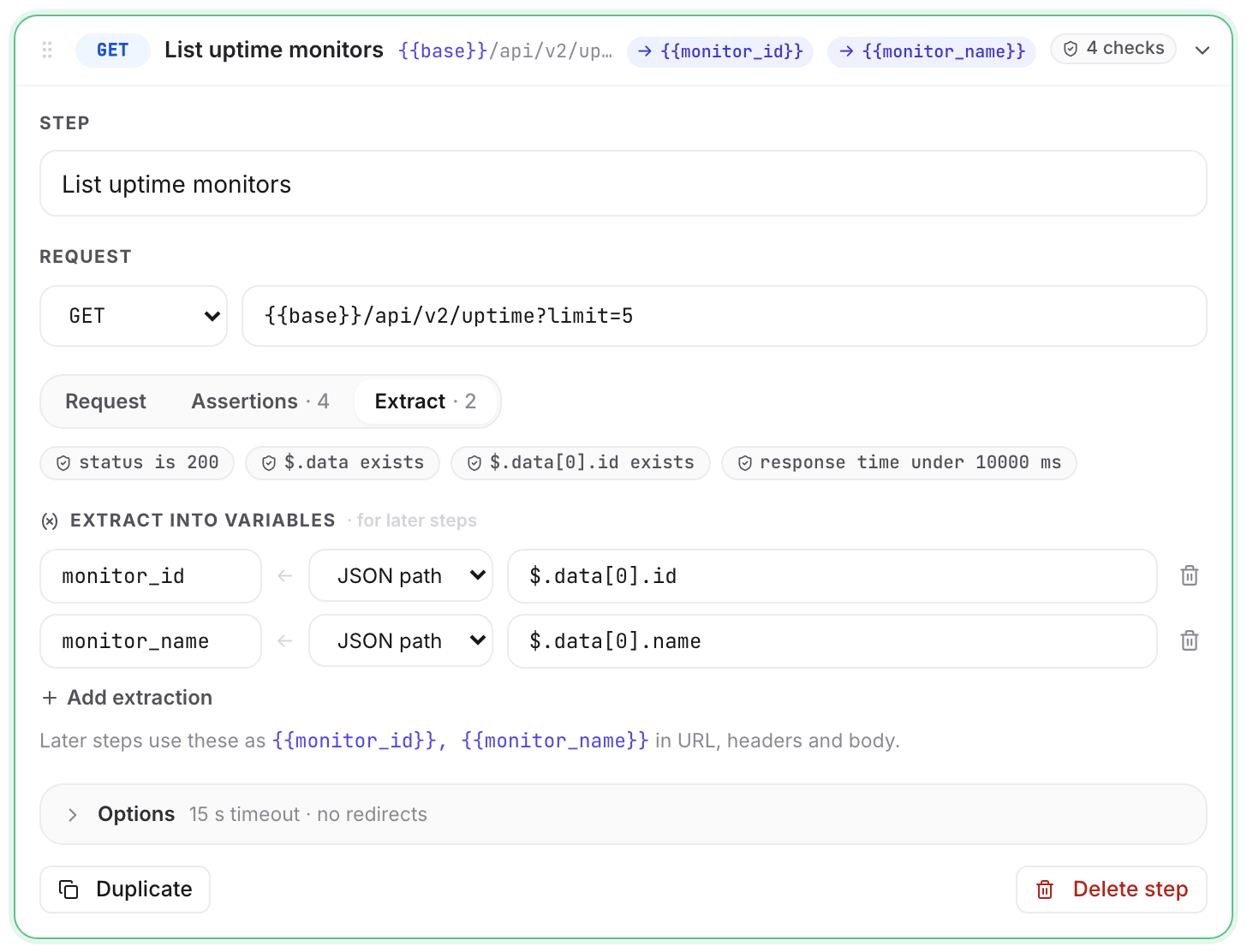
An extraction row is a variable name, a source, and an expression. On the Extract tab, the row reads variable_name ← JSON path / Header / Regex ← the expression.
| Source | Expression | Result |
|---|---|---|
| JSON path | A JSONPath into the parsed body, e.g. $.data.access_token |
The value at that path. Only single values are usable; an object, an array or null fails the extraction |
| Header | A response-header name, e.g. x-request-id |
The header's value, matched case-insensitively |
| Regex | A pattern, e.g. "csrf":"([a-f0-9]+)" |
The first capture group, or the whole match when the pattern has no group |
Rules that decide whether your chain works:
- Extracted values feed later steps only. A step's own extractions happen after its request, so they cannot appear in that step's own URL, headers or body.
- A failed extraction fails the step. It reports one or more extractions found no value, with the code
extract_failed. A later step that referenced the missing variable would run against nothing. - Extractions still run when an assertion on the same step failed, so the test rail still shows what the step pulled. The value only reaches later steps when the step is marked Optional step. A failed assertion on a normal step stops the chain there. When both go wrong, the step is reported as
assertion_failed. - Re-extracting an existing name overwrites it. Use that to refresh a token mid-chain.
- Carriage returns and line feeds are stripped from every extracted value, so a value cannot split a header in a later step.
- A regex that has to try too many combinations before matching counts as no match.
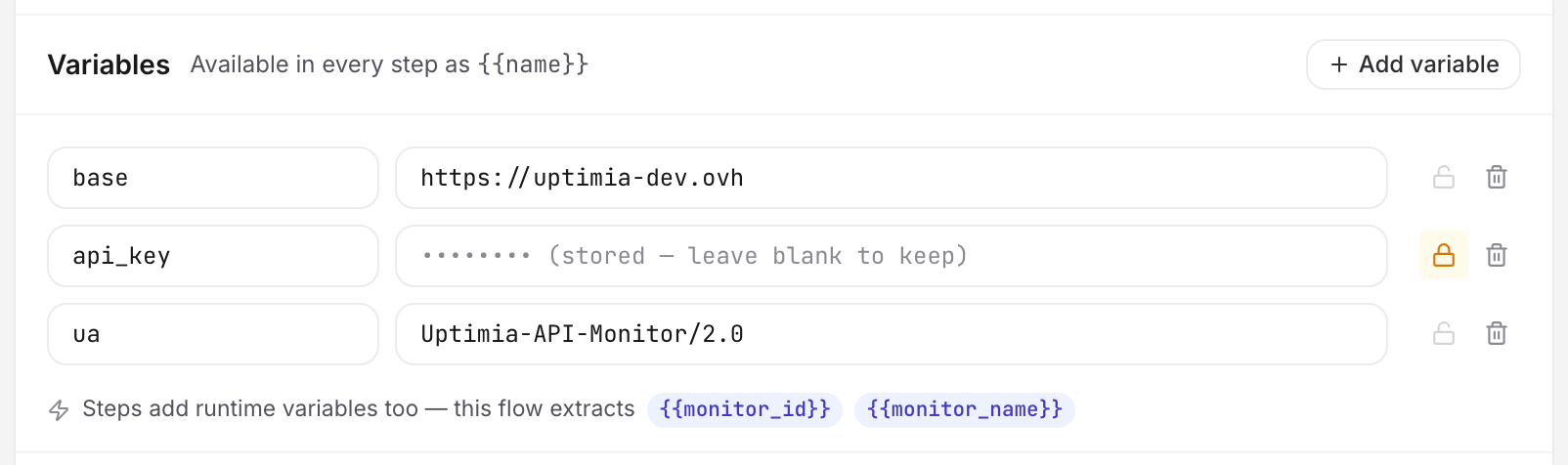
A step with a named extraction shows a → {{token}} chip on its chain row. The Variables sub-section lists the runtime names the chain produces underneath your own.
The JSONPath Subset Uptimia Supports
Uptimia supports only a small part of JSONPath. The probe and the editor's save check apply the same rules.
| Supported | Example |
|---|---|
$ root |
$ |
| Dot member access | $.data.status |
| Bracket member access, single or double quotes | $['user-id'] · $["user id"] |
| Array index, negative allowed | $.items[0] · $.items[-1] |
A final .length() |
$.items.length() |
.length() returns the element count of an array or object, and the character count of a string. It must be the last thing in the expression.
Everything else is rejected: wildcards ($.items[*]), filters ($.items[?(@.id==5)]), slices ($.items[0:2]) and recursive descent ($..id). A rejected expression fails the save with invalid_jsonpath, in an assertion path or an extraction expression alike.
Note: The editor accepts a bad JSONPath while you type and rejects it at save, with the toast Invalid API monitor configuration. If a save is refused and the "Before you can save" list is empty, check your JSONPath expressions and your regex patterns first.
Referencing a Value With {{name}}
{{name}} is replaced with the variable's value in five places on every step:
- The URL.
- Header names.
- Header values.
- The request body.
- Assertion values on JSON body, Header and Body text rows. A Status code or Response time value has to be literal digits.
Inner spaces are tolerated: {{ base_url }} and {{base_url}} are the same reference.
Placeholders are never resolved in a JSONPath, in a header name used as an assertion path, or in an extraction expression, all of which take the text exactly as you type it. A JSON path is stricter still. {{ is not part of the JSONPath grammar, so $.{{field}} is refused on save with invalid_jsonpath rather than kept literally.
Names follow one rule everywhere: a letter or underscore, then letters, digits and underscores. order_id and _token are valid; order-id and 2fa are not.
Monitor Variables
Variables sit above the steps, headed Variables, with the note Available in every step as {{name}}. Each row is a name and a value, and Add variable appends one.
| Constraint | Value |
|---|---|
| Variables per monitor | 30 |
| Value length | 4,096 characters |
| Line breaks in a value | Rejected; a CR or LF would split a request line |
| Duplicate names | Rejected |
Use them for anything that appears in more than one step, or that you want to change in one place. Examples: {{base_url}}, an account id, a fixed payload fragment.
Secret Variables
Click the lock on a variable row to mark it a secret. The row's value box becomes a password field, and the tooltip reads Secret — stored write-only, masked after save.
What that buys you:
- The value never comes back. After saving, the row's value box reads
•••••••• (stored — leave blank to keep). - Leave it blank to keep it. Saving a secret row with an empty value keeps the stored value; type a new one to replace it.
- Turning the lock off keeps the value too, and shows it in the editor again after you save and reload the page, because it is no longer a secret.
- The probe redacts secrets in everything it echoes back. A secret's value is replaced with
•••before it reaches the test rail, the check log or an alert. That covers the URL, response headers, the body snippet, error text, an assertion'sgotand an extracted value. Redaction reaches the JSON-escaped and URL-encoded forms too, so a secret inside a JSON body or a query string is caught. - A secret pasted literally into a step is rewritten on read to that variable's own
{{name}}placeholder. The step runs identically, so loading, editing and re-saving a monitor never overwrites the credential.
Warning: a step field that still contains the literal ••• mask is rejected on save with contains_redacted_secret. That happens when a browser tab has been open across a change to the monitor. Reload the editor before saving; otherwise you store bullets in place of a working credential.
Resolution Order, and Why an Undefined Placeholder Fails a Step
The probe resolves monitor variables first, then adds each extracted value as its step produces it. An extraction that reuses the name of a monitor variable replaces it for the steps that follow.
A placeholder with no value fails the step immediately, with the error code undefined_variable and the text undefined variable(s): name. The incident itself reads Step N · GET /path — undefined variable(s): name. The down alert email spells it out: It referenced a variable that no earlier step had produced: name, so the request could not be built.
The editor's defined-before-use check normally prevents this. It refuses to save a chain where a placeholder is used before a monitor variable or an earlier step's extraction defines it. One case survives it. On a step marked Optional step, a failed extraction does not stop the chain, so a later step reaches a name that was never set. Mark a step optional only when nothing downstream depends on what it extracts.
A Worked Example
A chain that logs in, creates an order, reads it back and cleans up. Two variables: base_url = https://api.example.com, and api_password, locked.
Step 1: Log in. POST {{base_url}}/auth/login, header Content-Type: application/json, body:
{"email": "monitor@example.com", "password": "{{api_password}}"}
Assertion: Status code · is · 200. Extraction: token ← JSON path ← $.data.access_token.
Step 2: Create the order. POST {{base_url}}/orders, header Authorization: Bearer {{token}}. Assertions: Status code · is · 201; JSON body · $.status · equals · pending; Response time · under (ms) · 2000. Extraction: order_id ← JSON path ← $.id.
Step 3: Read it back. GET {{base_url}}/orders/{{order_id}}, same Authorization header. Assertions: Status code · is · 200; JSON body · $.items.length() · equals · 2; Header · content-type · contains · application/json; Body text · does not contain · "error".
Step 4: Clean up. DELETE {{base_url}}/orders/{{order_id}}, same header, and no assertions, so any 2xx passes.
Run the chain from the builder and read each step in the response inspector. The Body tab highlights the values that step extracted, so you can confirm $.data.access_token picked the field you meant, and below it every assertion carries a tick or a cross. A failed one shows what came back: $.status equals pending got processing.
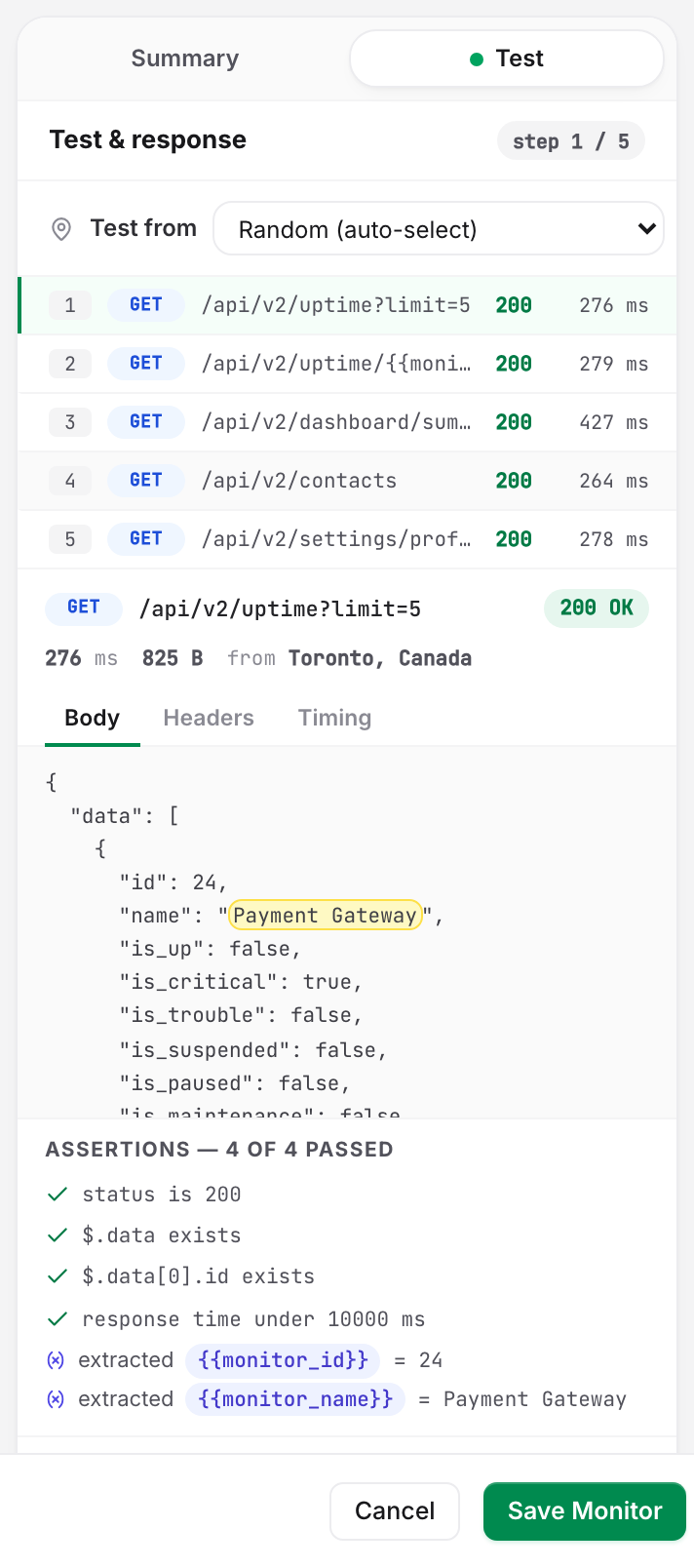
When a step fails in production, the incident reads the same way: Step 2 · POST /orders — assert #2 (json equals) failed — got processing. The Check log card on the monitor page keeps every run, with a per-step breakdown; see Monitoring Logs.
Secrets and Monitor Templates
Saving an API monitor as a template stores its whole chain and its variable names, but never a secret's value. Using the template says so: Secret variable values are not stored in templates — re-enter them on the new monitor afterwards. Set the value on the new monitor before its first scheduled run, or the login step fails and opens an incident.
Errors the Editor Catches Before You Save
These appear in the Before you can save list in the summary rail while you edit, and block the save.
| Message | What it means |
|---|---|
Step N assertion A needs a JSON path / needs a header name |
A JSON body or Header assertion has an empty path box |
Step N assertion A needs a value |
The condition needs an expected value and the box is empty |
Step N assertion A: status must be a 3-digit code |
Status code · is takes exactly three digits |
Step N assertion A: use a comma list of 3-digit codes |
Status code · is one of takes 200,201,204 |
Step N assertion A: response-time threshold must be a number of ms |
Response time takes a whole number |
Step N extraction X needs a variable name |
An extraction row has no name |
Step N extraction X: "name" is not a valid variable name (letters, digits, underscore; not starting with a digit) |
An extraction name broke the naming rule |
Step N extraction X needs an expression |
The expression box is empty |
Variable name "n" is invalid — use letters, digits and underscores, not starting with a digit |
A variable name broke the naming rule |
Variable name "n" is defined more than once |
Two variable rows share a name |
{{name}} is used before it is defined (step N) |
No monitor variable and no earlier extraction produces that name |
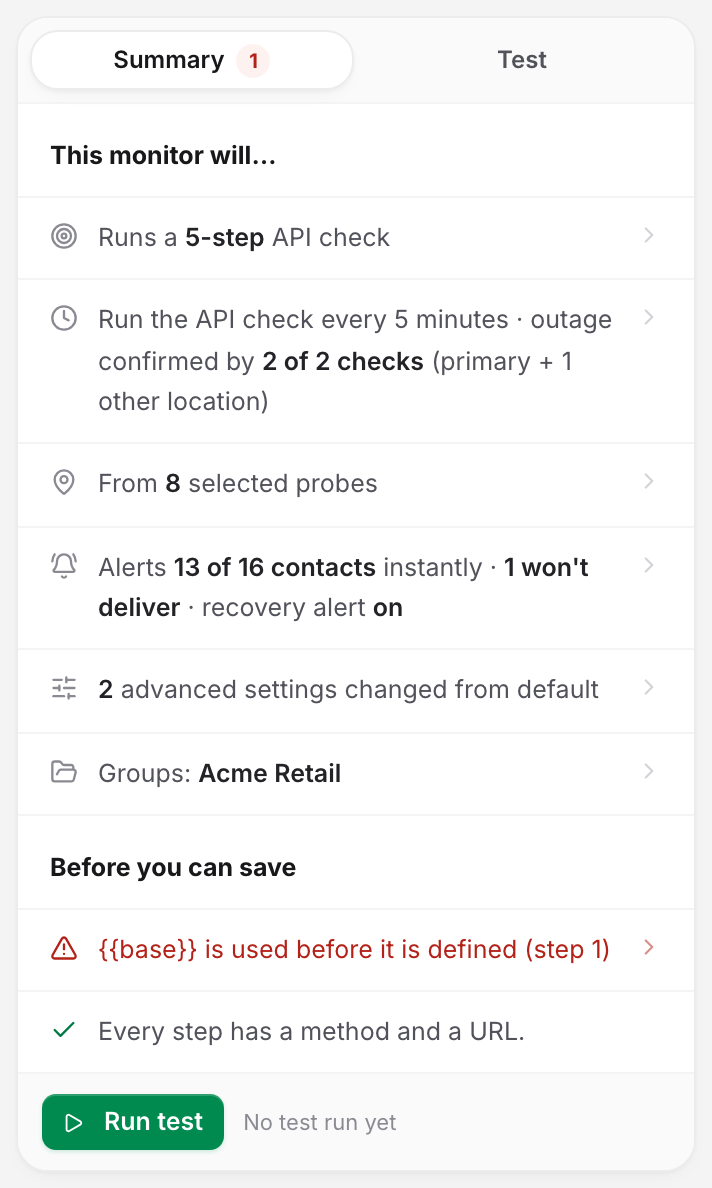
When the chain is clean the same list turns green: Every step has a method and a URL, Variable chain checks out — {{token}} is extracted before first use. A failed last test warns instead of blocking the save: Last test failed at step N — you can save, but the monitor will alert until the API (or the assertion) is fixed.
Four kinds of check run only on the server. Each one shows the toast Invalid API monitor configuration:
- An unsupported JSONPath (
invalid_jsonpath). - A regex that will not compile (
invalid_regex). - A step field still carrying the
•••mask (contains_redacted_secret). - A length cap the editor does not police: a variable value over 4,096 characters (
variable_value_too_long), or a request body over 65,536 bytes (body_too_large). These caps apply whether you type the value in the editor or send it through the API.
The per-field codes come back in the API response body. See The Uptimia API v2 Endpoint Map.
Limits
| What | Limit |
|---|---|
| Assertions per step | 15 |
| Extractions per step | 10 |
| Monitor variables per monitor | 30 |
| Variable value | 4,096 characters |
| Response body evaluated | First 1 MB |
Add assertion, Add extraction and Add variable disappear or turn gray at the cap, so you hit the limit in the editor and not in a failed save.