
Everything you can do in the control panel has a route under /api/v2/. The groups below give each resource's base path, its extra actions and the paths whose names differ from the label on screen, and each group links to the hosted reference, which carries the parameter-by-parameter detail. If you have not made a first call yet, start with Getting Started with the Uptimia API.
Before You Start
- An API key, created at Settings → API Keys. Only the Owner and Admin roles can open that tab.
- The base URL for your account. For accounts on
www.uptimia.comit ishttps://www.uptimia.com; the API Documentation card inside a key's editor shows yours. - Every request carries
Authorization: Bearer <your key>. Requests are JSON in and JSON out. - Keys carry the role and monitor-group scope of the seat that minted them.
POST /api/v2/auth/tokenmints one from credentials. 401 and 403 arrive in two different envelopes. Getting Started with the Uptimia API covers all three.
curl -H "Authorization: Bearer YOUR_API_KEY" \
  https://www.uptimia.com/api/v2/uptime
Where the Full Reference Lives
The v2 reference is at https://www.uptimia.com/developers. It renders the live /api/v2/openapi.json spec with Redoc: 188 paths and 277 operations, grouped in a sidebar by resource. https://www.uptimia.com/api redirects to https://developers.uptimia.com/api, and the View API Documentation link on a key's editor page points at https://developers.uptimia.com, so both land on the older site, which still publishes the v1 (legacy) reference.
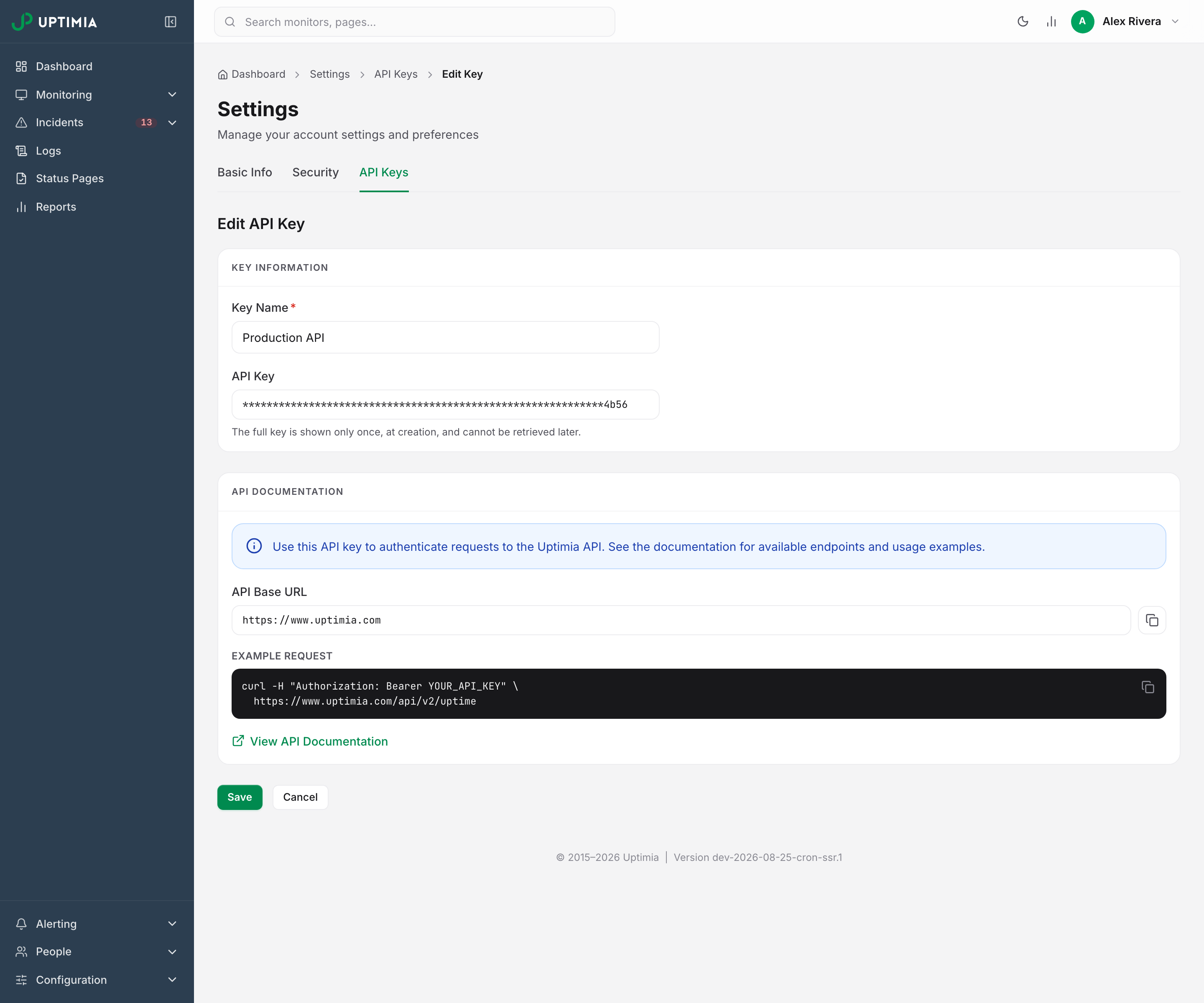
The spec behind it is also served raw, and the older site is still online:
| Address | What it is |
|---|---|
https://www.uptimia.com/api/v2/openapi.json |
The live OpenAPI 3 spec, generated from the running code. Feed it to your own client generator |
https://developers.uptimia.com |
The v1 (legacy) reference, still published and still where /api and the control panel's link land |
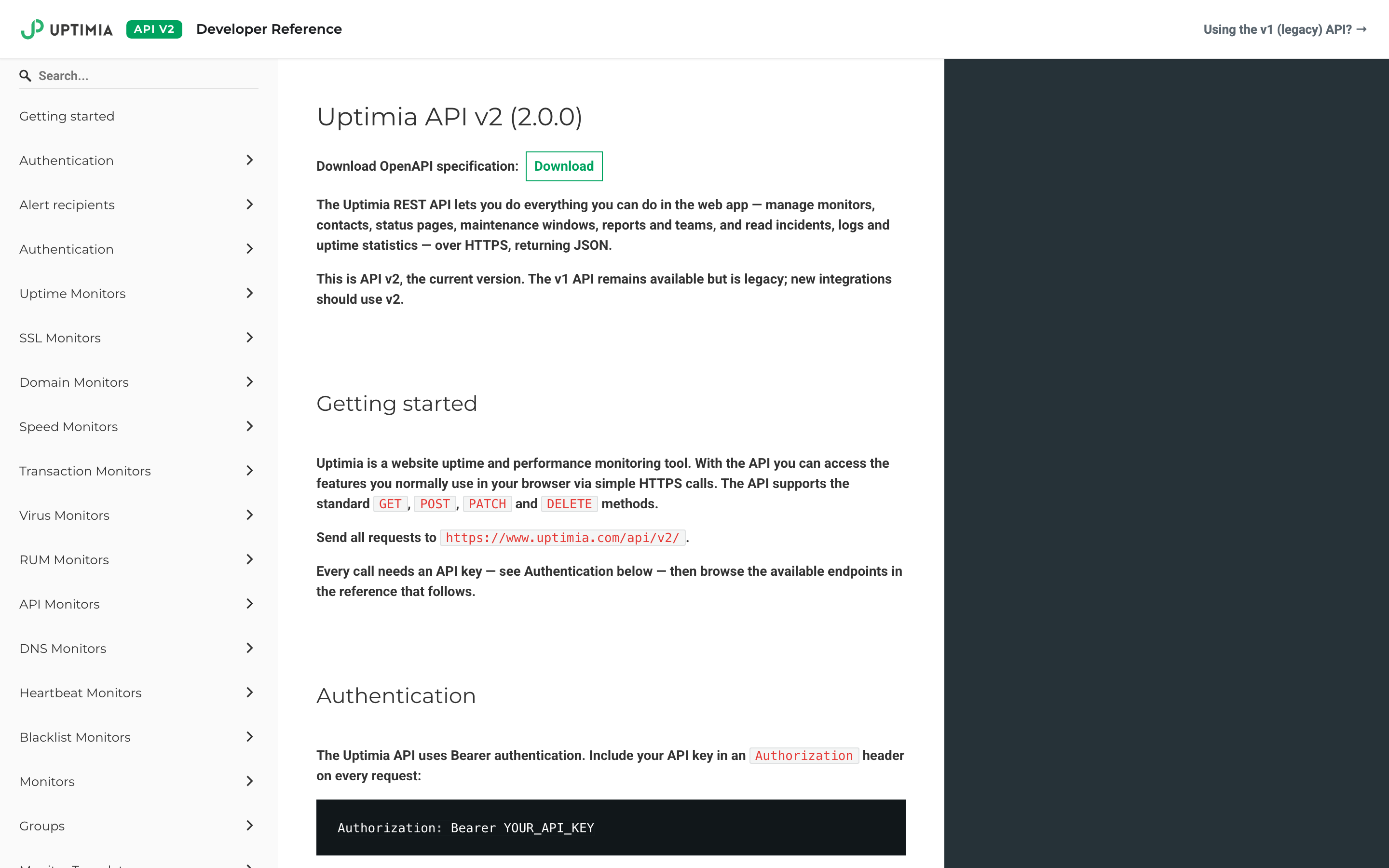
Two URLs that older documentation pointed at no longer resolve. https://www.uptimia.com/api/v2/ returns 404, because the version prefix has no index page, and /api/v2/keys returns 404 as well, because API keys live at /api/v2/api-keys.
Monitor Paths by Family
Each monitor family is its own resource with its own base path, and that path is not always the word you see in the control panel.
| Family (on-screen) | Base path | Type key in logs and incidents |
|---|---|---|
| Uptime | /api/v2/uptime |
uptime |
| Transaction | /api/v2/transaction |
transaction |
| API | /api/v2/api-monitor |
api |
| Heartbeat | /api/v2/heartbeat |
heartbeat |
| Server | /api/v2/server |
server |
| Speed | /api/v2/speed |
fpl |
| Real User | /api/v2/rum |
rum |
| SSL | /api/v2/ssl |
ssl |
| Domain | /api/v2/domain |
domain |
| DNS | /api/v2/dns |
dns |
| Virus | /api/v2/virus |
virus |
| Blacklist | /api/v2/blacklist |
blacklist |
Eleven of the twelve families answer the same five calls: GET the base path to list, POST it to create, then GET, PATCH and DELETE on /{id}. Server is the exception. Its list is GET /api/v2/server/list, and a GET on the bare path answers 405 (see Path Quirks). Four families also accept PUT on /{id} as an alias of PATCH: API, Heartbeat, DNS and Blacklist.
Families also carry their own actions:
| Path | Purpose |
|---|---|
POST /api/v2/heartbeat/{id}/regenerate-token |
Issue a new ping token; the old URL stops working |
POST /api/v2/heartbeat/{id}/test-ping |
Send a ping on the monitor's behalf |
POST /api/v2/heartbeat/cron-preview |
Validate a cron expression and list its next runs |
POST /api/v2/api-monitor/test · /{id}/test |
Run an unsaved chain, or re-run a saved one |
POST /api/v2/transaction/{id}/test · /test-all |
Queue an immediate test run |
POST /api/v2/dns/{id}/recheck · /blacklist/{id}/recheck |
Pull the next sweep forward |
POST /api/v2/dns/{id}/changes/{changeId}/ack · /dynamic |
Accept a record change into the baseline, or mark the record as dynamic |
GET /api/v2/rum/{id}/snippet · POST /{id}/check-code |
Fetch the tracking script, then verify it is installed |
GET /api/v2/rum/{id}/data/{summary|pages|js-errors|geographic|browsers|devices|os} |
The RUM analytics breakdowns |
GET /api/v2/speed/{id}/{vitals|averages|components|dead-elements|pagespeed} |
The Speed detail-page datasets |
GET /api/v2/domain/zone-lookup |
Resolve a hostname to its registrable zone before creating a monitor |
POST /api/v2/server/{id}/rotate-key |
Rotate a server agent's key |
Three actions work across families, with the family key in the path: POST /api/v2/monitors/{type}/{id}/pause, /resume and /copy. Bulk creation is POST /api/v2/monitors/bulk, with POST /api/v2/monitors/bulk/preview to dry-run the list first.
Reading History: Logs, Incidents, Timelines and Charts
The first two readers are account-wide; the rest are per-monitor.
| Path | Purpose |
|---|---|
GET /api/v2/logs |
Check results across ten families: uptime, speed, transaction, SSL, domain, virus, server, API, DNS and blacklist. Filter by date, monitor, status and probe location. RUM check logs never appear here; read them at /api/v2/rum/{id}/logs. Heartbeat pings come back only when the monitor filter names heartbeat monitors and nothing else |
GET /api/v2/logs/{type}/{id} |
One check result in full |
GET /api/v2/incidents/active · /history |
Open incidents, and closed ones |
GET /api/v2/incidents/{type}/{id} |
One incident. DELETE on the same path removes it |
GET /api/v2/{family}/{id}/logs · /logs/{logId} |
That monitor's own check log. RUM has the list but no per-record path. On API, Blacklist and DNS the per-record segment is the check's timestamp, /logs/{time}. Heartbeat and Server have neither; see the note under the table |
GET /api/v2/{family}/{id}/incidents |
That monitor's incidents |
GET /api/v2/{family}/{id}/timeline |
Up/down segments for the status bar. Every family except API, Heartbeat, DNS and Blacklist, which expose /summary instead |
GET /api/v2/{family}/{id}/charts/{availability|response-time|load-time|steps} |
Chart series, per family |
GET /api/v2/{family}/{id}/summary |
The detail-page header figures (API, Heartbeat, DNS and Blacklist) |
Two families are exceptions. Heartbeat's check history is GET /api/v2/heartbeat/{id}/pings, and Server's reader is GET /api/v2/server/{id}/data, the time-series metric samples the agent has sent. Neither family has a /logs route.
File exports live beside the JSON readers, two of them at GET /api/v2/logs/export/csv and GET /api/v2/incidents/export/csv. Per record, they are /export/pdf and /export/html under both /logs/{type}/{id} and /incidents/{type}/{id}, and POST /api/v2/logs/{type}/{id}/public-link and POST /api/v2/incidents/{type}/{id}/public-link mint a no-login share URL. Exporting Your Data covers the formats and what each one contains.
Your plan's readable window sets how far back a range can reach. On Uptime, Speed and Virus, a date_start earlier than that floor is silently raised to it rather than refused. Omitting the range does not get you everything either. GET /api/v2/uptime/logs falls back to the floor itself. Every other clamped endpoint falls back to its own default window, one of 24 hours, 7, 14, 30 or 90 days by route, and that default is raised to the floor only if the floor is more recent. The other families pass the range through unchanged, so they answer an older window as asked, as far back as their stored history reaches. See Data and Log Retention.
Publishing: Status Pages, Threads, Updates and Subscribers
| Path | Purpose |
|---|---|
GET, POST /api/v2/status-pages |
List and create pages |
GET, PATCH, DELETE /api/v2/status-pages/{id} |
One page |
GET, PATCH /api/v2/status-pages/{id}/settings |
Presentation settings for that page |
GET, POST /api/v2/status-pages/threads |
Incident threads; is_resolved=0 or 1 filters the list |
GET /api/v2/status-pages/threads/lookup |
Find the existing thread for a monitor or incident before opening a second one |
GET, PATCH, DELETE /api/v2/status-pages/threads/{id} |
One thread with its updates |
POST /api/v2/status-pages/threads/{threadId}/updates |
Post an update, advancing the thread's status |
PATCH, DELETE /api/v2/status-pages/updates/{id} |
Edit or remove one update |
GET /api/v2/status-pages/{id}/subscribers · DELETE /{subscriberId} |
The email subscriber list |
GET /api/v2/status-pages/notify-reach |
How many confirmed subscribers an update would reach |
Reporting: Scheduled Reports, Sends, Exports and Public Links
GET and POST /api/v2/reports list and create scheduled reports, and GET, PATCH and DELETE /api/v2/reports/{id} handle one. Send one immediately with POST /api/v2/reports/{id}/send. GET /api/v2/reports/{id}/export/{pdf|html|csv} downloads it, POST /api/v2/reports/{id}/public-link renders a shareable page, and POST /api/v2/reports/custom builds and delivers a one-off report without saving a schedule. GET /api/v2/reports/branding-themes lists the themes a report can use.
Maintenance Windows
| Path | Purpose |
|---|---|
GET, POST /api/v2/maintenance |
List windows and create one. horizon_days sets how many days of occurrences the list expands, clamped to 1–31 (default 14) |
GET, PATCH, DELETE /api/v2/maintenance/{id} |
One window |
POST /api/v2/maintenance/preview |
Expand a draft into its next occurrences without saving it |
GET /api/v2/maintenance/monitors |
The monitors that can be put into a window |
DELETE /api/v2/maintenance/expired |
Remove every past one-time window in one call |
preview always answers 200, so read data.valid rather than the status code. Automating Maintenance from Your Pipeline covers driving these from a deploy pipeline, including the ordering that avoids a false alert.
Alerting: Contacts, Integrations, Escalation Policies and Alert Groups
| Path | Purpose |
|---|---|
GET, POST /api/v2/contacts · GET, PATCH, DELETE /{id} |
The address book |
GET /api/v2/contacts/types |
The channel types this account can create, including its own integrations |
GET /api/v2/contacts/selected/{monitorId}/{type} |
Every contact with an is_selected flag, already expanded through teams and seats: the answer to "who gets alerted when this monitor goes down" |
POST /api/v2/contacts/{id}/request-confirmation · /confirm |
Send an SMS confirmation code, then verify it |
GET, POST /api/v2/integrations · GET, PATCH, DELETE /{id} |
Integration profiles |
POST /api/v2/integrations/{id}/test |
Send a test notification |
GET, POST /api/v2/integrations/webhooks · GET, PATCH, DELETE /{id} |
Outbound webhooks, on their own sub-path |
GET, POST /api/v2/escalation-policies · GET, PATCH, DELETE /{id} |
Escalation ladders. See Escalation Policies for the step limits |
GET /api/v2/alert-groups/active · GET /{id} |
Open alert groups and one group in detail |
POST /api/v2/alert-groups/{id}/ack · /unack |
Acknowledge and un-acknowledge |
GET, PATCH /api/v2/alerting-settings |
The seven account-wide grouping and acknowledgment settings |
Reusable Configuration
| Path | Purpose |
|---|---|
GET, POST /api/v2/groups · PATCH, DELETE /{id} |
Monitor groups: the ids the monitor endpoints' groups field expects |
GET, POST /api/v2/monitor-templates · PATCH, DELETE /{id} |
Saved monitor setups. See Monitor Templates |
POST /api/v2/monitor-templates/{id}/used |
Record that a template was used to create a monitor |
GET /api/v2/locations |
The probe catalog, grouped by region |
GET, POST /api/v2/location-profiles · PATCH, DELETE /{id} |
Saved probe sets. See Location Profiles |
POST /api/v2/location-profiles/{id}/apply |
Write a profile's probes into a list of monitors |
GET, POST /api/v2/branding · GET, PATCH, DELETE /{id} |
Branding themes, plus /{id}/duplicate and /{id}/logo |
Creating a monitor from a template is a client-side merge. Take the template's settings, overlay the new name and address, POST it to that family's create path, then call /{id}/used.
apply returns 200 even when every monitor failed, so read data.results[].ok per entry. If a profile ends up with fewer than 6 probes, every entry fails with too_few_locations and nothing is written.
Account: Users, Roles, Teams and Settings
| Path | Purpose |
|---|---|
GET, POST /api/v2/users · GET, PATCH, DELETE /{id} |
The seat roster and its lifecycle |
POST /api/v2/users/{id}/resend-invite · GET /{id}/invite-link |
Re-send or fetch a pending activation link |
POST /api/v2/users/{id}/reset-2fa |
Clear a locked-out member's second factor |
PATCH /api/v2/users/me |
The account owner's own alerting preferences |
GET /api/v2/roles |
The role and capability matrix, the same permissions the server enforces on every call |
GET, POST /api/v2/teams · GET, PATCH, DELETE /{id} |
Teams as alert recipients |
GET /api/v2/team/audit |
Recent access changes |
GET /api/v2/activity-log · /stats · /export |
The full account activity log |
GET, PATCH /api/v2/settings/profile · GET /api/v2/settings/timezones |
Profile and time zone list |
GET, POST /api/v2/api-keys · GET, PATCH, DELETE /{id} |
Manage keys over the API |
GET /api/v2/subscription/{plans|current|usage|quote} |
Plan and usage figures |
GET /api/v2/billing/{info|history|vat} · GET /invoice/{id}/pdf |
Billing records |
GET /api/v2/search |
Cross-resource search |
GET /api/v2/dashboard/{summary|availability|response-times|monitors} |
The dashboard's own datasets |
The hosted reference leaves out the account-management and control-panel-internal groups, so the paths above are the record for those. Server monitors, API keys, the activity log, dashboard, search, bulk creation, subscription, billing, payments and the account-security half of Settings are all live and callable, and none of them appear in the reference sidebar.
Path Quirks That Cause a 404
| You would guess | The path is |
|---|---|
/api/v2/api |
/api/v2/api-monitor (singular and hyphenated) |
/api/v2/keys |
/api/v2/api-keys |
/api/v2/server for the list |
/api/v2/server/list. A GET on /api/v2/server answers 405, because that path is POST-only |
/api/v2/heartbeat/{id}/logs |
/api/v2/heartbeat/{id}/pings |
/api/v2/alert-groups as a collection |
There is none. Use /api/v2/alert-groups/active |
/api/v2/fpl for Speed monitors |
The resource path is /api/v2/speed. Everywhere else the key is fpl: the type segment of log, incident, pause and resume paths, the type field of POST /api/v2/monitors/bulk, the monitors[fpl][] filters and the maintenance by_type flags. The incident readers, the exports and the /api/v2/dashboard/bulk/* actions also accept speed. Log paths, pause and resume do not |
Pagination differs by endpoint. Monitor lists take limit and offset, GET /api/v2/logs takes page and limit (default 20), and GET /api/v2/monitor-templates takes neither, returning a bare {"data": [...]} with no metadata envelope to read a total from. /api/v2/uptime/logs still exists alongside /api/v2/logs; new code should use the latter.
Rate Limits: What Is Throttled
Uptimia sets no global per-key request quota, and ordinary monitor reads and writes are not counted against one. Seven named actions carry their own limits. The first five each start real work; the last two are credential actions:
| Action | Limit | Counted per | Response when exceeded |
|---|---|---|---|
POST /api/v2/auth/token |
20 per 15 minutes | Client IP | 429 too_many_attempts |
POST /api/v2/api-monitor/test and /{id}/test |
10 per minute | Account | 429 rate_limited |
POST /api/v2/blacklist/{id}/recheck |
10 per minute | Account | 429 rate_limited |
POST /api/v2/dns/{id}/recheck |
10 per minute | Account | 429 rate_limited |
POST /api/v2/contacts/{id}/request-confirmation (SMS) |
1 per minute and 5 per hour, per phone number | Account and number | 429 too_many_requests |
POST /api/v2/settings/password |
5 per 15 minutes | Seat | 429 too_many_requests |
POST /api/v2/settings/resend-verification |
3 per hour | User | 429 too_many_requests |
Uptimia writes check results on the monitor's own schedule, so polling a log endpoint faster than the monitor checks returns the same rows.
Telling a 404 Apart From a 405
Uptimia renders routing-level 404s and 405s as HTML error pages, because the request never reaches a controller. A 404 raised inside a controller, for a record that is not yours, comes back as ordinary JSON. A client that calls response.json() unconditionally will throw on a typo in a path, so branch on the status code first.
| Status | Body | What it means |
|---|---|---|
| 404 | {"status":"error","code":"monitor_not_found","message":"..."} |
The path is real, but the record does not exist or does not belong to your account. The code names the resource: monitor_not_found, incident_not_found, contact_not_found, log_not_found and so on. A bare not_found is the exception, so branch on the status code, not the string |
| 404 | HTML | No such route. A typo in the path, or a path from an older version |
| 405 | HTML | The path exists under another method |
Probing a path from the terminal tells you which you hit:
curl -s -o /dev/null -w '%{http_code}\n' https://www.uptimia.com/api/v2/api-keys
401 means the route exists and needs authentication, 404 means it does not exist, and 405 means it exists with a different method. Error envelopes for 401, 403 and 400 are in Getting Started with the Uptimia API.