
The Uptimia REST API does everything the control panel does: create and edit monitors, manage contacts and teams, open maintenance windows, and read incidents, check logs and uptime statistics. It speaks HTTPS and answers in JSON. The recipient and contact behaviors below trip up most first integrations. For the route inventory by resource group, see The Uptimia API v2 Endpoint Map.
Before You Start
- The API Keys tab in Settings renders only for the Owner and Admin roles. An Editor, Read-only or Accounting / Billing seat cannot mint a key from the control panel. Those seats get one from
POST /api/v2/auth/tokeninstead. If you need a key that runs with a narrower identity, see Read-Only and Group-Limited API Keys. - The API is available on every plan, including Free. There is no plan gate on API access.
- A key works only against the host where it was created. Read the base URL section below before you hard-code anything.
Create an API Key
- Open the avatar menu (top right) → Settings, then the API Keys tab.
- Click Generate New Key. On an account with no keys yet, the empty table also offers a Generate First Key button that does the same thing.
- Enter a Key Name. It is a label for your own reference: "Production API Key", "CI deploy pipeline".
- Click Save. The API Key Created screen appears with the full secret.
- Copy the secret and store it in your secret manager now.
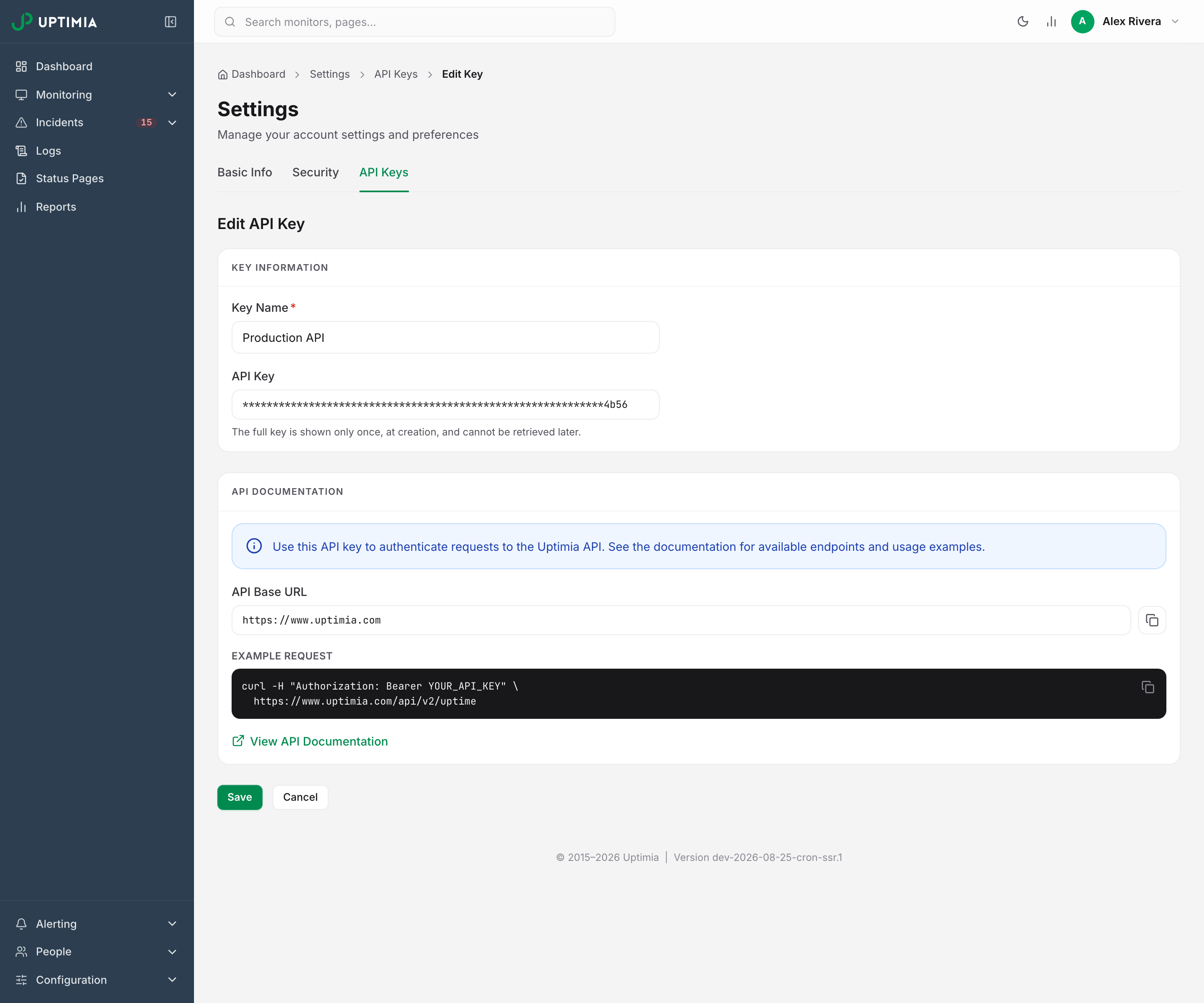
The secret is a 32-character alphanumeric string. The creation screen is the only place it is ever shown in full. The list, the key's own edit page and GET /api/v2/api-keys all return it masked, with only the last 4 characters visible, and there is no reveal control anywhere in the product. If you lose a key, delete it and generate a new one.
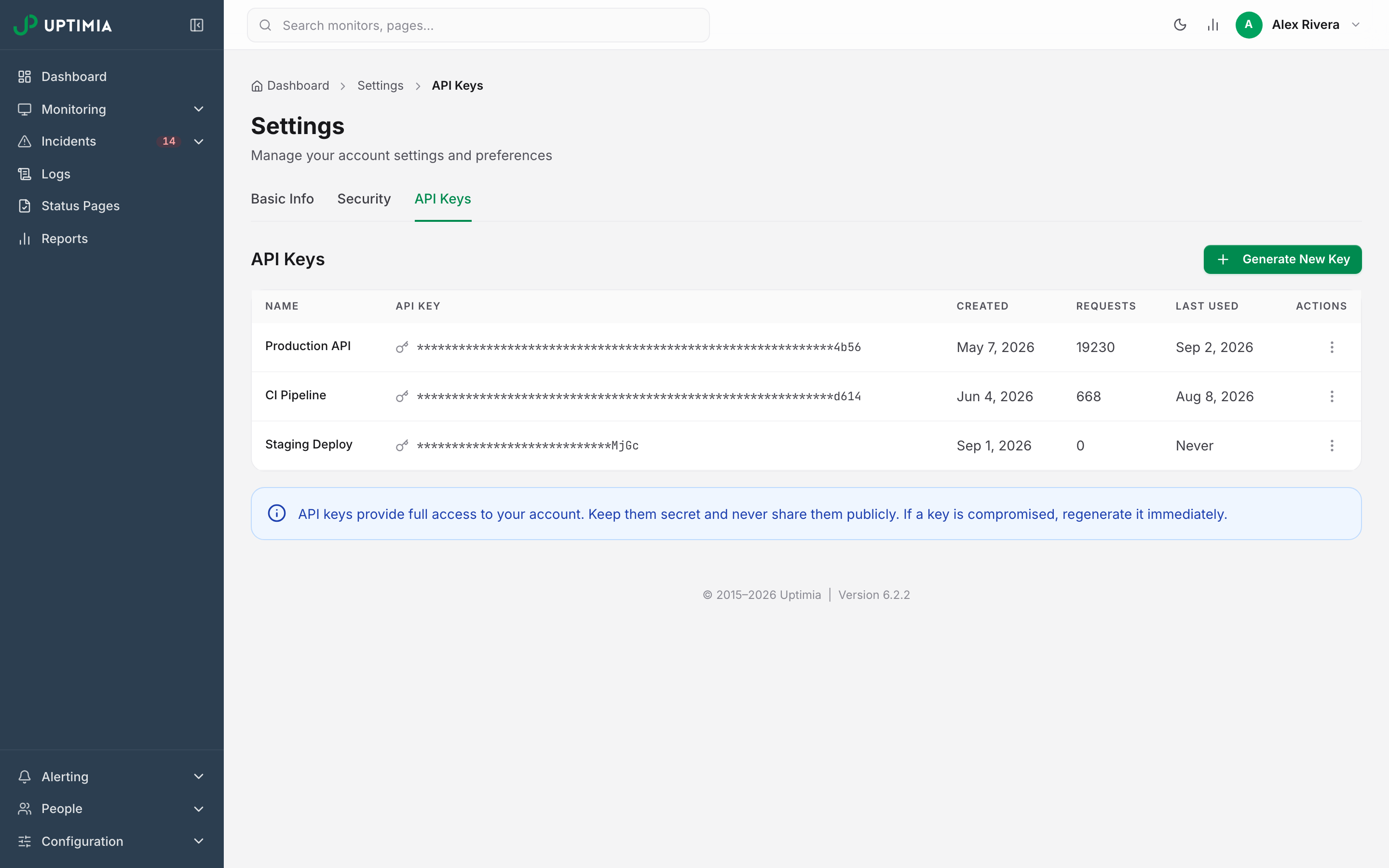
Keys do not expire. The list carries a Requests count and a Last Used timestamp per key. Use them to tell a live key from an abandoned one before deleting it; the kebab menu on each row offers Delete only, so click the row itself to rename the key. Deletion takes effect on the next request.
Warning: an API key is a credential. It carries the full authority of the identity that minted it, so do not commit it to source control, paste it into a ticket, or put it in a URL query string. Uptimia emails the account owner every time a key is created, including keys minted by POST /api/v2/auth/token.
Send Requests to the Right Host
An API key authenticates only against the host it was created on. Accounts served from different hosts keep separate databases, so a key minted on one host does not exist on the other. Sending a valid key to the wrong host returns 401 with invalid_api_key, which reads exactly like a bad key.
For a public account the base URL is https://www.uptimia.com, so requests go to https://www.uptimia.com/api/v2/; if your account is served from a different host, that host's origin is your base URL.
Open any key and read the API Documentation card. It shows an API Base URL field with the exact origin for your account, and an Example request block with a copyable curl. On an account served from its own host, the card carries a warning naming that host and stating that keys created there do not work against www.uptimia.com.
Make Your First Call
Pass the key as a Bearer token on every request:
curl "https://www.uptimia.com/api/v2/uptime" \
  -H "Authorization: Bearer YOUR_API_KEY"
There is no /api/v2/monitors collection to list or create from. Each of the 12 monitor families has its own path: /uptime, /ssl, /domain, /speed, /transaction, /rum, /virus, /server, /heartbeat, /blacklist, /dns and /api-monitor. The only routes under the /api/v2/monitors prefix are the cross-family pause, resume and copy actions, plus bulk creation. Contacts are at /contacts. The contact-type list is at /contacts/types. The methods, parameters and response shapes for each live in the endpoint map and the hosted reference.
A successful list response is a data array plus a metadata object:
{"data": [ ... ], "metadata": {"total": 14}}
The per-family log endpoints page with limit and offset. The cross-family GET /api/v2/logs pages with page and limit, and returns page and pages alongside total. metadata.total counts the rows matching the whole window, not the page size.
If the call comes back 401, check that:
- the base URL matches the host where the key was created;
- the key carries no stray whitespace or trailing newline (a value read from an environment variable often does);
- the scheme is HTTPS;
- the key still exists.
A key whose Requests column reads 0 has never authenticated.
Minting a Key from CI Without the Control Panel
POST /api/v2/auth/token exchanges an account email and password for a Bearer key, so a build agent or a native app can authenticate without anyone opening the control panel. Send no Authorization header on this call. The authentication layer rejects a stale Bearer before the handler runs.
curl -X POST "https://www.uptimia.com/api/v2/auth/token" \
  -H "Content-Type: application/json" \
  -d '{"email":"[email protected]","password":"...","device_name":"CI runner"}'
A 201 returns data.api_key, the full secret revealed once, plus user_id and operator_id. device_name is optional, capped at 100 characters, and stored as the key's name in the API Keys list. Omit it and the key is named Mobile app.
| Behavior | What happens |
|---|---|
| Two-factor accounts | The first call, sent without code, emails a 6-digit code and answers 401 with 2fa_required. Re-send the same email and password together with code. A code allows 5 verification attempts, then it is spent. A resend will not revive it. Wrong and spent codes both answer 401 invalid_2fa_code. |
| Repeat calls | Every successful call mints a new key. An app that re-authenticates on each launch accumulates one key per launch. |
| Lifetime | The key never expires and there is no refresh token. Revoke it with DELETE /api/v2/api-keys/{id}. |
| Team-member sign-in | A member signs in with their own address, and the minted key carries that seat's role and monitor-group scope. operator_id in the response tells you which you got. |
| Rate limits | 20 attempts per 15 minutes per client IP (429 too_many_attempts). A per-account lockout also follows 5 consecutive failed sign-ins, and lengthens with each further failure. Both clear on their own. |
| Blocked address | A client IP on the account-security blocklist gets 403 ip_blacklisted. Credentials are never checked, and this does not clear on its own. |
What a Key Is Allowed to Do
A key minted by the account owner carries full account authority. A key minted while signed in as a team member is stamped with that seat, and it runs with that seat's role and monitor-group scope, resolved live on every request. Demote the seat and the key narrows at once.
If a call exceeds the seat's role, Uptimia refuses it with 403 and returns a body naming the role and the missing capability:
{"status":"error","code":"forbidden",
 "message":"Your role (Read-only) doesn't allow this. Ask the account owner or an Admin to do it, or to change your role.",
 "required_capability":"monitoring.manage",
 "role":"viewer"}
If the seat is later removed from the account, the key fails closed: it returns 401 invalid_api_key rather than falling back to owner authority. A scoped seat's key also sees only monitors in its groups. An out-of-scope monitor id behaves as if it does not exist.
Handling Errors
Every endpoint error uses one envelope: status, code, message. A 401 is the exception. It arrives in two shapes, decided by the layer that rejected the request.
| Situation | HTTP | Body |
|---|---|---|
No Authorization header at all |
401 | {"status":"error","code":"unauthorized","message":"Authentication required"} |
| Key unknown, revoked, malformed, on a deleted account, or minted for a removed seat | 401 | {"error_code":"invalid_api_key","message":"API key invalid"} |
| Role or scope forbids the action | 403 | {"status":"error","code":"forbidden","message":"...","required_capability":"...","role":"..."} |
| Validation failure | 400 | {"status":"error","code":"<code>","message":"..."} |
The machine-readable key is named code in the first shape and error_code in the second. Treat any 401 as "not authenticated" and read whichever of the two is present, because a client that reads only one won't recognize the other.
On the uptime, speed and virus endpoints, a date_start earlier than your plan's readable window is silently raised to the floor. GET /api/v2/uptime/logs with no date_start returns the floor rather than everything. Omitting date_start elsewhere widens nothing. Each endpoint falls back to its own default range. The other families' history endpoints do not clamp the range themselves, so how far back they read depends on that default and on how long Uptimia keeps the rows.
The per-key Requests counter tallies usage, not a quota. There is no per-key request limit on v2 data endpoints, but several endpoints are throttled. Four routes share one limit of 10 calls a sliding minute per account, and answer 429 rate_limited: POST /api/v2/blacklist/{id}/recheck, POST /api/v2/dns/{id}/recheck and the API-monitor test runs (POST /api/v2/api-monitor/test and POST /api/v2/api-monitor/{id}/test). POST /api/v2/auth/token has its own limit of 20 attempts per 15 minutes per client IP. SMS confirmation codes are throttled per destination number. Account-security actions such as changing your password or resending the verification email answer 429 too_many_requests.
Alert Recipients Are References, Not Addresses
A monitor's contacts array does not hold addresses. Each entry is a reference, and a flag decides what the id points at:
{ "id": 41930, "is_team": 0, "is_user": 0, "is_operator": 1, "is_individual_contact": 0 }
| Flag set | id refers to |
Resolve it with | Who gets alerted |
|---|---|---|---|
is_team |
a team | GET /api/v2/teams |
the contacts of every member of that team |
is_user |
the account owner | GET /api/v2/users |
the contacts the owner owns (operator_id 0) |
is_operator |
a team-member seat | GET /api/v2/users/{id} |
every contact that seat owns |
is_individual_contact |
one contact | GET /api/v2/contacts/{id} |
that one contact |
Ids are unique per kind, not across kinds: a team and a contact can both have id 41930 and mean different things. Read the flags before resolving an id.
Only is_individual_contact names a single address. The other three name a seat or a group, which Uptimia expands when the alert fires. A monitor showing one is_operator entry may page a dozen addresses, including contacts added after the monitor was configured, so a short contacts array does not mean few recipients.
To see the addresses a monitor resolves to, call GET /api/v2/contacts/selected/{monitorId}/{type}. It returns your whole address book with an is_selected flag on each contact, already accounting for team, owner and seat expansion, and each contact carries an operator_id naming the seat that owns it. The type segment uses the API's internal keys, so a Speed monitor is fpl and an API monitor is api.
Creating a Contact
POST /api/v2/contacts requires name, type and value. For email and sms the value is the address or number. For an integration type the value is optional, and integration_id links an existing integration profile.
| Code | HTTP | Cause |
|---|---|---|
invalid_name |
400 | name missing or empty |
invalid_type |
400 | type missing |
invalid_value |
400 | value missing or empty on an email or sms contact |
invalid_phone_number |
400 | An sms value not in international format; it must start with + |
Contacts created through the API are confirmed on creation and can receive alerts immediately, with no verification step to complete and no email confirmation link anywhere in the product. SMS verification exists, but it is optional. POST /api/v2/contacts/{id}/request-confirmation sends a code, and POST /api/v2/contacts/{id}/confirm submits it. The code is charged against your SMS credit balance, and refused with insufficient_sms_credits when the balance is zero. Codes are also throttled per destination number: 1 per minute and 5 per hour (429 too_many_requests).
Two things silence a contact that looks correctly configured. If the account owner's own email address is unverified, the delivery queue drops every alert row for the account. A recipient who clicked Do not send alerts to this e-mail address in an alert email stays selected on the monitor, but never receives an alert. Who Gets Alerted covers both.
v1, v2 and the Reference
v2 is the current API. v1 remains available as legacy, so use v2 for new integrations. The two are not field-compatible. On /api/v1/contacts the address field is contact_value and a missing one returns invalid_contact_value, while on /api/v2/contacts the field is value and the code is invalid_value. Do not carry a v1 payload across.
You manage API keys themselves at /api/v2/api-keys, from a control-panel session or with an owner-authority Bearer key, but that route is not part of the published reference. There is no /api/v2/keys.
| Resource | URL |
|---|---|
| Hosted reference | https://developers.uptimia.com, also served at https://www.uptimia.com/developers |
| Machine-readable spec | https://www.uptimia.com/api/v2/openapi.json: 188 documented paths, bearerAuth security scheme, suitable for client generation |
| Request base URL | https://www.uptimia.com/api/v2/: where requests go. Opening it in a browser returns 404; it is an origin for requests, not a docs page |
Uptimia publishes no Terraform provider. To drive monitoring from infrastructure-as-code, script the API directly. Pin the base URL to the host where your key was created, store the key as a protected CI secret, and read the resource back after a write to confirm it took. Automating Maintenance from Your Pipeline covers the ordering that avoids a false alert during a deploy.