
Every custom webhook alert is one POST with a flat JSON body of eleven top-level keys. The same eleven arrive for all twelve monitor families and every status, so one receiver handles everything, and grouped incidents add one extra object beside them. Custom Webhooks Setup covers creating the integration.
The Request Uptimia Sends
| Property | Value |
|---|---|
| Method | POST |
| Content type | application/json (added for you; Content-Length is set too) |
| Body | A JSON object, never an array and never form-encoded |
| Extra headers | Only the lines you entered in Custom Headers, sent verbatim |
| Redirects | Not followed |
| TLS | Verified. Uptimia connects to the same address it looked up just before sending, so nothing can swap the address in between |
| Timeout | 10 seconds to connect, 10 seconds total for a single-monitor alert, 30 seconds total for a grouped digest |
The payload keys are a published contract. Existing keys are never renamed and never reordered. New keys can appear beside them, so parse by name and ignore what you do not recognize.
The Fields
| Field | Type | What it carries |
|---|---|---|
id |
integer | The monitor's id. Not the incident id, and not unique on its own: ids restart per family, so pair it with monitor_type |
monitor_type |
string | The family slug: uptime, transaction, fpl, rum, ssl, domain, virus, server, heartbeat, blacklist, dns, api. Speed monitors emit fpl; the interface calls them Speed |
monitor_name |
string | The monitor's name as you set it |
monitor_unique_id |
string | The optional Unique ID from the monitor's Advanced tab. Uptime monitors only; "" everywhere else and whenever it is unset |
monitor_status |
string | down, up, or test |
severity |
string | critical or trouble while down, "" on recovery, test for a test send |
incident_start_time |
string | ISO 8601 with offset, in your account's time zone: 2026-08-31T14:02:11+02:00 |
incident_end_time |
string | ISO 8601 on recovery, "" while the incident is open |
incident_duration_seconds |
integer | 0 until the incident closes; the closed incident's length on the recovery POST |
message |
string | The same one-line alert text the chat channels receive. Uptime, transaction, Real User and Speed-recovery alerts open with the *ALERT*: marker. Every other family, and Speed while down, opens with UPTIMIA ALERT (CRITICAL), (TROUBLE), (UP) or (HEALTHY). A grouped digest carries the digest's own summary line instead, as in the grouped example below. Branch on the other fields, never on this string |
monitor_notes |
string | The monitor's note, "" when there is none |
A Down Alert
{
  "id": 41827,
  "monitor_type": "uptime",
  "monitor_name": "Checkout API",
  "monitor_unique_id": "checkout-prod",
  "monitor_status": "down",
  "severity": "critical",
  "incident_start_time": "2026-08-31T14:02:11+02:00",
  "incident_end_time": "",
  "incident_duration_seconds": 0,
  "message": "*ALERT*: Project Checkout API is DOWN",
  "monitor_notes": "Runbook: wiki.example.com/checkout-oncall"
}
A Recovery Alert
{
  "id": 41827,
  "monitor_type": "uptime",
  "monitor_name": "Checkout API",
  "monitor_unique_id": "checkout-prod",
  "monitor_status": "up",
  "severity": "",
  "incident_start_time": "2026-08-31T14:02:11+02:00",
  "incident_end_time": "2026-08-31T14:19:40+02:00",
  "incident_duration_seconds": 1049,
  "message": "*ALERT*: Project Checkout API is UP after 17 minutes",
  "monitor_notes": "Runbook: wiki.example.com/checkout-oncall"
}
Field Values Across the Four Events
| Field | Down | Recovery | Test | Grouped digest |
|---|---|---|---|---|
monitor_status |
down |
up |
test |
down or up |
severity |
critical or trouble |
"" |
test |
critical, trouble or "" |
monitor_name |
The monitor's name | The monitor's name | Test monitor |
The group's anchor monitor |
monitor_unique_id |
Set or "" |
Set or "" |
Test unique ID (optional) |
Anchor's, or "" |
incident_start_time |
ISO 8601 | ISO 8601 | None |
When the group opened |
incident_end_time |
"" |
ISO 8601 | None |
When the group resolved, else "" |
incident_duration_seconds |
0 |
Seconds | None (a string) |
0 until the group resolves |
monitor_notes |
Note or "" |
Note or "" |
"" |
Note only when the digest covers one monitor |
group |
absent | absent | absent | present |
Note: The test send is the one payload that breaks the types. incident_duration_seconds arrives as the string None rather than a number, so a receiver with strict schema validation rejects the test while handling live alerts correctly. Branch on monitor_status == "test" and return early.
Severity, and Why It Is Empty on Recovery
severity describes the incident being reported. A recovery reports the end of one rather than a condition of its own. The field is then "", not omitted and not null. While a monitor is down it is one of two values:
| Value | Meaning |
|---|---|
critical |
The monitor is failing outright: unreachable, wrong status code, failed assertion |
trouble |
A degraded or warning-tier condition: a certificate or domain expiring soon, a page loading too slowly |
Do not treat trouble as informational for reporting purposes. Trouble time counts against availability exactly as critical time does; How Uptime Is Calculated covers the arithmetic.
Timestamps and Duration
incident_start_time is set on the first POST and repeated unchanged on the recovery POST, which makes it the half of a duplicate-check key that never changes. Both timestamps are DATE_ATOM strings, ISO 8601 with a numeric UTC offset. They are rendered in your account's time zone, so the offset moves with daylight saving. Parse the offset; never assume UTC.
While an incident is open, incident_end_time is "" and incident_duration_seconds is 0. Both are filled on the recovery POST, for every monitor family. The duration is the closed incident's full length in seconds, not the time since the last alert.
Monitor Notes
monitor_notes carries the monitor's free-text note, up to 500 characters, set in the monitor editor's Advanced tab. An on-call script uses it to print a runbook link or an escalation phone number beside the alert. It is "" when no note is set and on every test payload. Monitor Notes covers where else the note appears.
Grouped Incidents: The group Object
When several monitors fail inside the join window, Uptimia sends one digest instead of one alert per monitor. The digest keeps all eleven fields, which describe the anchor monitor (the first monitor that failed in the group) plus the group's own start, end and duration. It adds a group object beside them. Alert Groups covers when grouping applies.
| Key | Type | What it carries |
|---|---|---|
id |
integer | The alert group's id |
size |
integer | Member incidents in the group |
distinct_monitors |
integer | Distinct monitors among those members; lower than size when one monitor failed, recovered and failed again |
down_count |
integer | Distinct monitors still down at send time |
members |
array | One object per member incident: type, id, name, status (down, or up once that member recovered) |
acknowledged |
boolean | Whether someone has acknowledged the group |
acknowledged_by |
string | Label of the person who acknowledged, "" when nobody has |
acknowledged_at |
integer | Unix epoch seconds, 0 when not acknowledged (the one timestamp in the payload that is not ISO 8601) |
{
  "id": 41827,
  "monitor_type": "uptime",
  "monitor_name": "Checkout API",
  "monitor_unique_id": "",
  "monitor_status": "down",
  "severity": "critical",
  "incident_start_time": "2026-08-31T14:02:11+02:00",
  "incident_end_time": "",
  "incident_duration_seconds": 0,
  "message": "DOWN | 3 monitors are DOWN — Checkout API and 2 more",
  "monitor_notes": "",
  "group": {
    "id": 902,
    "size": 3,
    "distinct_monitors": 3,
    "down_count": 3,
    "members": [
      { "type": "uptime", "id": 41827, "name": "Checkout API", "status": "down" },
      { "type": "uptime", "id": 41830, "name": "Cart service", "status": "down" },
      { "type": "api",    "id": 118,   "name": "Payments chain", "status": "down" }
    ],
    "acknowledged": false,
    "acknowledged_by": "",
    "acknowledged_at": 0
  }
}
On a grouped payload, monitor_notes is populated only when the digest is about one monitor: exactly one still down on a down payload, or a single-monitor group on the recovery. With two or more monitors in the digest there is no one note to carry. The key is then present and empty rather than absent.
Why a Webhook Gets Acknowledgment Facts but No Acknowledge Link
Human channels (email, SMS, Slack, Telegram, Discord, Mattermost, Microsoft Teams and Twilio) can carry a signed link that acknowledges the group in one click. Webhooks and PagerDuty do not. They are machine and log pipelines, and anything that reads the feed could replay a signed acknowledgment token. They receive the facts (acknowledged, acknowledged_by, acknowledged_at) but cannot silence a live escalation. Acknowledging Incidents and MTTA covers the workflow.
Responding Correctly
Answer with any 2xx and Uptimia treats the alert as delivered: 200, 201, 202 and 204 all count. A 3xx does not count. Redirects are never followed, so a receiver that redirects to a canonical path fails on every attempt. Any other status, a TLS error or a timeout is a failure.
Return the 2xx before you do slow work. Uptimia gives the whole request 10 seconds. An endpoint that opens a ticket synchronously and then answers will time out, and Uptimia records the send as failed and retries it, leaving you with duplicate tickets.
Delivery Guarantees and Deduplication
A failed delivery goes back on the queue, is retried up to 5 times over the next 15 minutes, and is then dropped. Integrations Overview has the schedule. Delivery is at-least-once, so an endpoint slow enough to time out and then succeed on a retry receives the same event twice.
Deduplicate on monitor_type + id + incident_start_time + monitor_status. That tuple is identical across every retry of one event. It differs for the down and the recovery of the same incident.
Grouped digests are the exception. One group sends several down payloads: the opening digest, an update each time more monitors join, and one per escalation step and repeat round. Every one of them carries the anchor's id, the group's incident_start_time and monitor_status: "down", so that tuple cannot tell them apart. When a group object is present, add message to the key. The digest, the join update, each escalation step and each repeat round read differently, while a retry of one send repeats the same line.
Authenticating the Request
There is no HMAC and no signature header. Anyone who knows the URL can post to it, so protect the URL itself:
- Use HTTPS and a long, unguessable path segment: a random 32-character token, not
/uptimia. - Add a secret header in Custom Headers, one per line in
Name: valueformat, and reject any request that does not carry it. - Rotate both by editing the integration; the change applies to the next alert with no re-attach on the monitors.
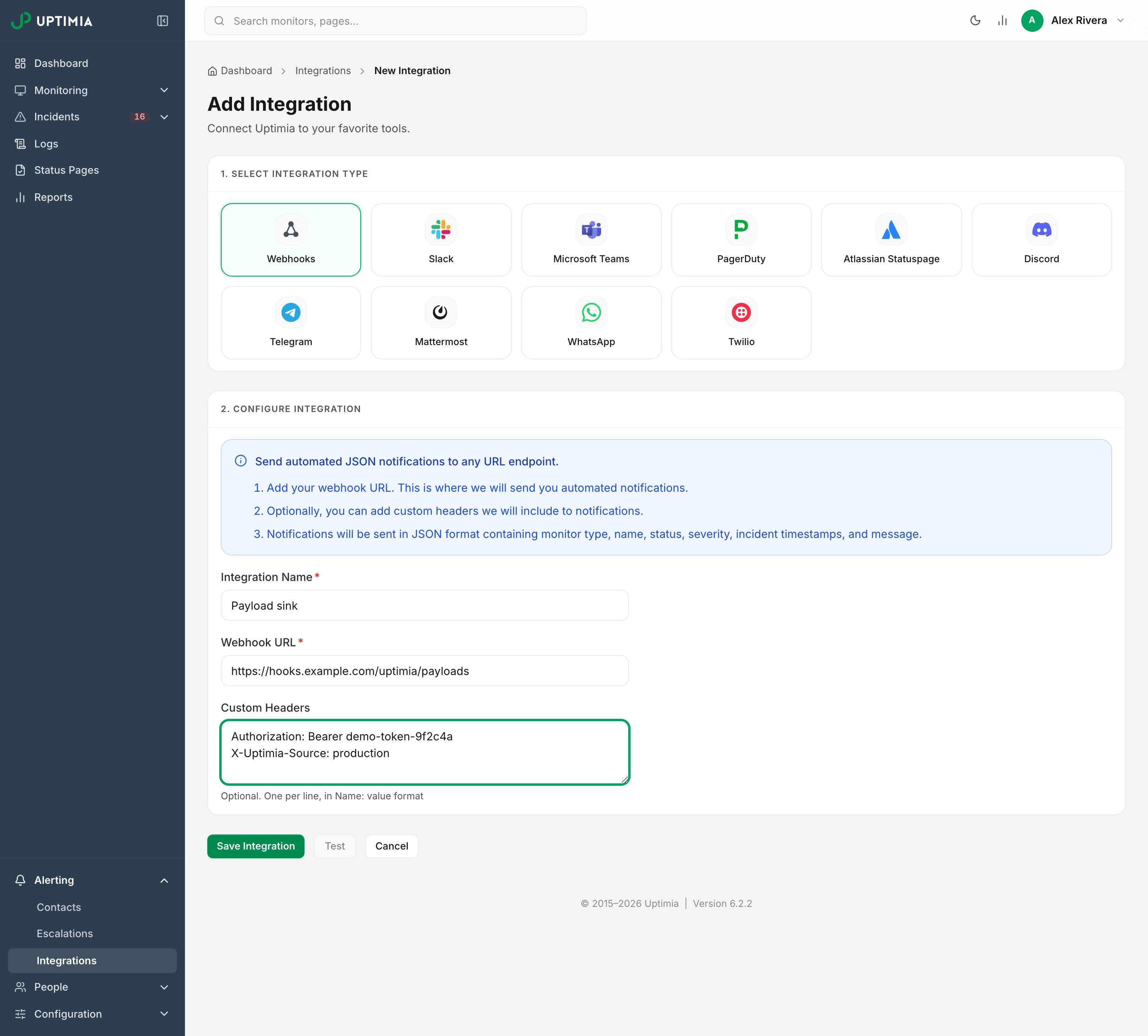
Uptimia checks the URL when you save it, and again before every send, so you cannot use an endpoint on a private or reserved address, such as anything on your own internal network. Integrations Overview lists the rules, and Custom Webhooks Setup has the address ranges.
A Worked Receiver
This Flask endpoint checks the secret header, skips test sends, deduplicates, and answers 204, an empty success response.
from flask import Flask, request, abort

app = Flask(__name__)
SECRET = "abc123"
seen = set()

@app.post("/uptimia-9f3c1a7e4b2d")
def uptimia():
    if request.headers.get("Authorization") != f"Bearer {SECRET}":
        abort(401)

    e = request.get_json(force=True)

    if e["monitor_status"] == "test":
        return "", 204

    key = (e["monitor_type"], e["id"], e["incident_start_time"], e["monitor_status"])
    if e.get("group"):
        key += (e["message"],)
    if key in seen:
        return "", 204
    seen.add(key)

    group = e.get("group")
    if group:
        print(f'group {group["id"]}: {group["down_count"]} monitors down — {e["message"]}')
    else:
        print(f'{e["monitor_name"]} is {e["monitor_status"]} — {e["message"]}')
        if e["monitor_notes"]:
            print("note:", e["monitor_notes"])

    return "", 204
Replay a real body against it while you develop, instead of waiting on an outage:
curl -i -X POST https://hooks.example.com/uptimia-9f3c1a7e4b2d \
  -H 'Content-Type: application/json' \
  -H 'Authorization: Bearer abc123' \
  -d '{"id":41827,"monitor_type":"uptime","monitor_name":"Checkout API","monitor_unique_id":"checkout-prod","monitor_status":"down","severity":"critical","incident_start_time":"2026-08-31T14:02:11+02:00","incident_end_time":"","incident_duration_seconds":0,"message":"*ALERT*: Project Checkout API is DOWN","monitor_notes":""}'