
A DNS monitor records what your authoritative nameservers answer on its first sweep, then compares every later sweep against that recording. When an answer stops matching, Uptimia opens a change episode on that record and, depending on the record group, pages you. Setup and nameserver health belong to DNS Monitoring.
Before You Start
- You need a DNS monitor that has completed at least one sweep. Until then the Watched records table reads "The baseline sweep records the watched records within a minute."
- Acknowledge and Mark dynamic need an Owner, Admin or Editor seat.
- DNS monitors sweep every 5 minutes. The cadence is fixed: there is no frequency control on the editor.
How the First Sweep Sets Your Baseline
The first sweep is a baseline sweep: it records an answer for every watched record and opens nothing.
- Only authoritative answers count. A reply is used only if the server was reachable, the probe was trustworthy, and the answer carried the AA (authoritative answer) bit. Some servers are reachable but answer without AA: a lame secondary, or a resolver mistaken for a nameserver. Such a reply cannot seed the baseline, open a change or block a restore. It surfaces as a Not answering authoritatively health finding instead.
- Values are compared as sorted sets. Round-robin order is normalized away, so four A records returned in a different order every sweep are not a change.
- The baseline is per record. Each watched name and type (
wwwA,@MX,_dmarcTXT) carries its own values, TTL and the time it was set.
A record added later gets its baseline on the first sweep that answers it, with no episode. Removing a watched name deletes its baseline keys, so re-adding it starts clean. Changing the zone resets the baseline entirely.
What Counts as a Change
An episode opens when any reachable, authoritative nameserver serves a value set that does not equal the baseline. One disagreeing server opens it; every reachable authoritative server must agree again before it closes.
Severity comes from the record's group, set on the Watched records card in the editor.
| Group (editor label) | Records compared | Default severity |
|---|---|---|
| Apex & host addresses | A, AAAA and CNAME for every watched name | Critical |
| MX | MX at the zone apex | Critical |
| NS | NS at the zone apex | Critical |
| Policy records | TXT at the apex, TXT at _dmarc, CAA at the apex |
Trouble |
On a sending domain, watch the MX and Policy records groups. For how they sit alongside blacklist and uptime checks, see Monitoring Your Email Infrastructure.
Each group's select offers Critical, Trouble and Info only. Critical and Trouble page you. Info only records the episode without opening an incident, and turning a group's toggle off does the same thing: the change is still recorded at info severity, so the history stays complete.
Three things are recorded and never page, whatever the group is set to:
- A TTL-only change. If the values match and only the TTL moved, the episode is info. It never blocks a restore either: a record whose values are back but whose TTL still differs still closes.
- A record that could not be read this sweep. A SERVFAIL, REFUSED or timeout is a check error. That record's state is frozen rather than judged, and the sweep row carries a "· N check errors" suffix.
- A value change on a record marked dynamic, unless the answer set empties out.
An empty answer set is a legitimate value in both directions. A record that disappears shows as NOERROR, 0 answers — rrset deleted, a name that had nothing shows (no record) on the "was" side, and a CNAME'd name with an empty A rrset seeds a normal baseline rather than an error.
Reading a Change on the Watched Records Table
Watched records is the first card on the monitor page. Its header names the sweep it reflects, then one of "as of the 14:20 sweep · all servers agree" ("both servers agree" on a two-nameserver zone), "changed from baseline" or "servers disagree". The roll-up on the right reads "1 changed · 10 at baseline".
Records sit in five groups: Apex addresses, Hosts, Mail routing, Policy records and Infrastructure. A group whose records are all at baseline collapses to its header row; one holding a changed, acknowledged or restored record starts expanded. Clicking a header overrides either way.
The columns are Record, Answer, TTL and Last changed. Answer shows what the nameservers serve now, with a struck-through was … sub-line underneath during and after an episode. Last changed carries the state:
| Last changed reads | State | What it means |
|---|---|---|
Aug 12 — baseline |
At baseline | The answer has matched since the baseline was set |
changed 09:41 |
Active episode | A server is serving something else. Acknowledge and Mark dynamic appear under it |
Aug 12 · acknowledged ✓ |
Closed by you | Someone accepted the new answer as the baseline |
Aug 12 · restored 10:15 ✓ |
Closed by sweeps | The values came back and the restore was verified |
A restored row's was … line carries the window the wrong answer was live for, as in was 203.0.113.9 09:41–10:05. You can read the exposure straight off the table.
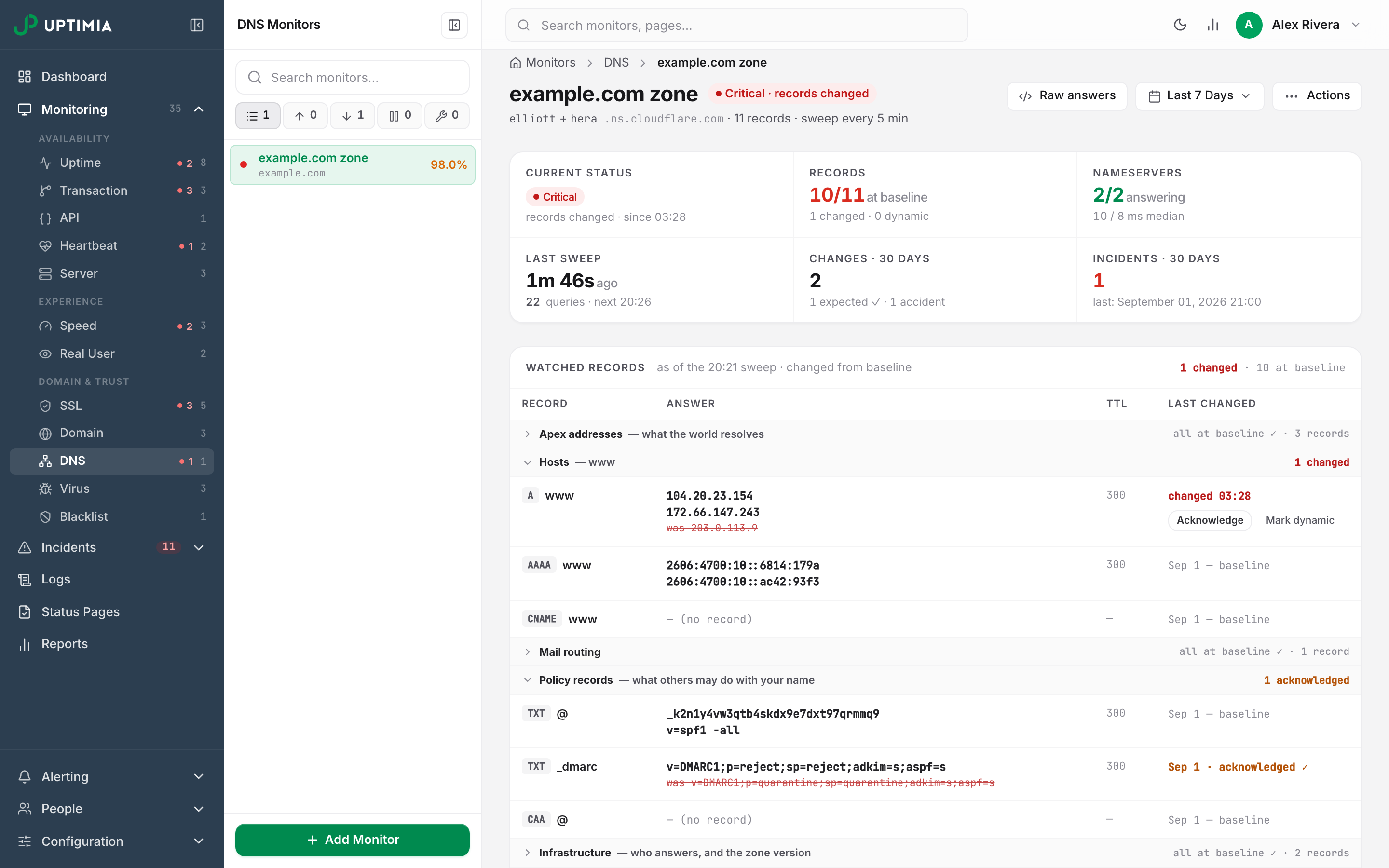
Acknowledge: Making the New Answer the Baseline
Use Acknowledge for a change you meant to make and intend to keep: a migration, a new mail provider, a corrected SPF record.
- On the changed row, click Acknowledge. The Acknowledge this change modal opens with the full diff at the top.
- Type a note if you want one. Notes are optional and capped at 500 characters.
- Click Acknowledge — new baseline.
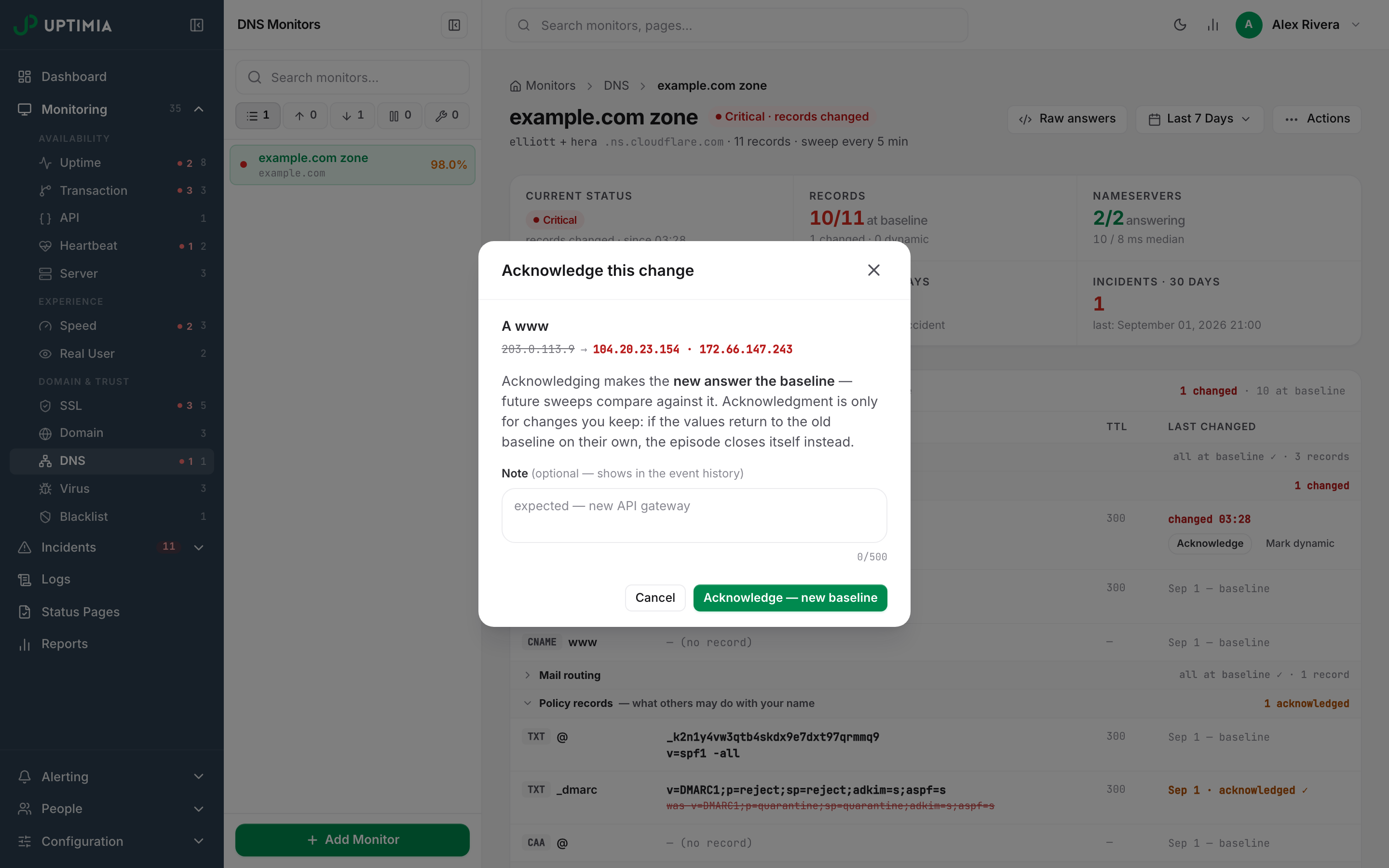
Acknowledging is permanent:
- The episode's new values become that record's baseline. Every later sweep is compared against them.
- The episode closes as acknowledged, stamped with your email address and your note.
- If nothing else alertable remains open, the incident closes silently: no recovery alert on any channel, because an acknowledgment records a decision rather than a recovery.
- Any DOWN alert still queued behind a recipient's alerting hours is dropped, never delivered late.
Note: Because the close is silent, team members who received the original DOWN alert get no follow-up. Post an incident note or a status update first if your team needs to see the resolution.
Acknowledging works only on an open record change. The button does nothing on a health finding, or on an episode that has already restored or been acknowledged.
In the root-cause block of the alert email, an acknowledged close prints Restore verification: Closed by operator acknowledgement — the new answer is now the baseline, never "restored after N matching sweeps".
Mark Dynamic: CDN Pools, GeoDNS and Round-Robin Answers
Use Mark dynamic when the values are supposed to rotate: a CDN edge pool, a GeoDNS answer, a load-balanced address set. Acknowledging such a record only re-arms the same alert on the next rotation.
Clicking Mark dynamic opens the Mark this record dynamic modal. Confirming adds the record to the monitor's dynamic list and acknowledges the open episode at the same time, with the fixed note marked dynamic — values are allowed to rotate.
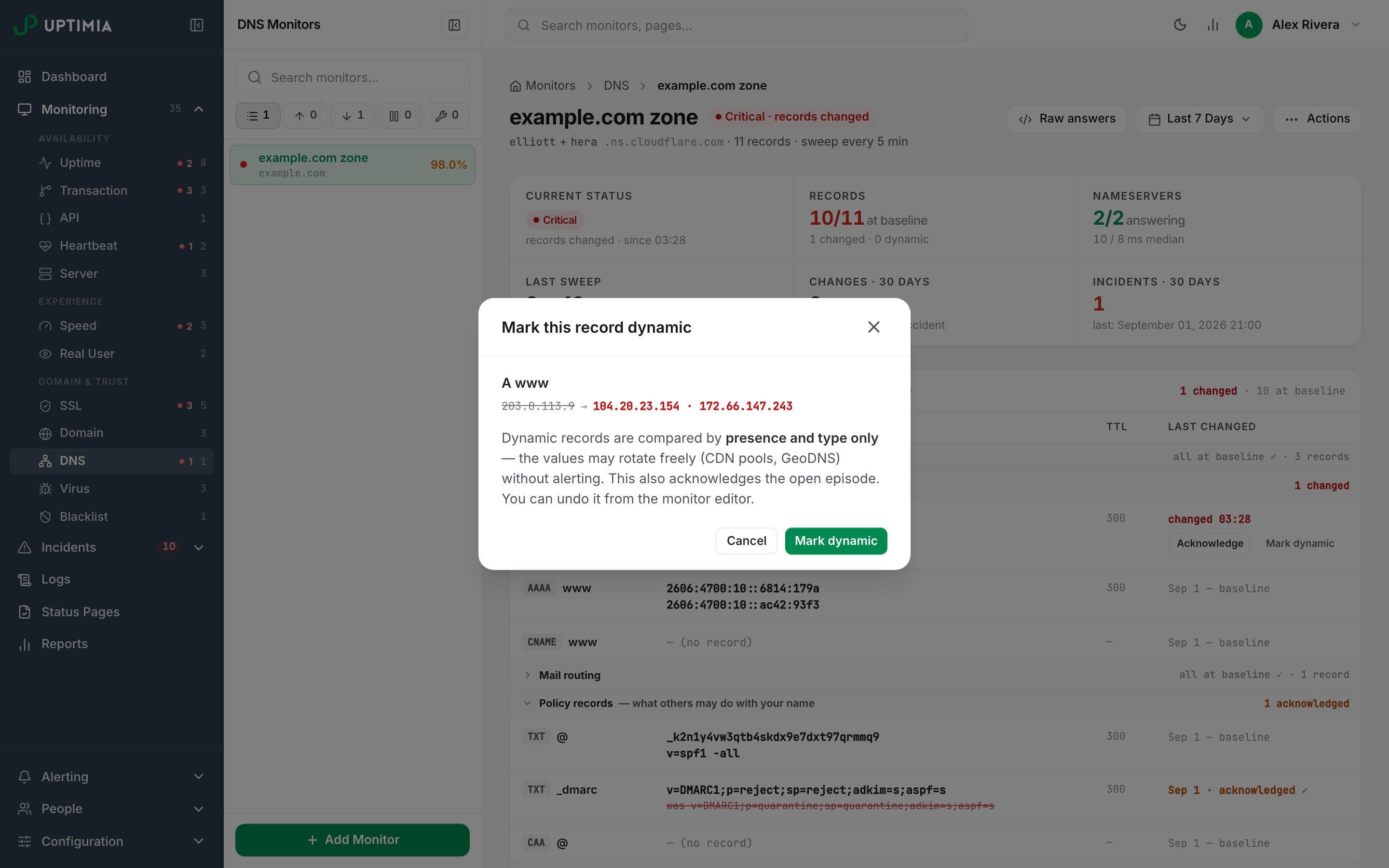
From then on the record is compared by presence and type only. It opens an episode in two cases only: when its answer set becomes empty (the record disappears), and when it comes back after being empty. Value and TTL differences are ignored. The row picks up a dynamic — presence only, values rotate freely badge, and the Records stat cell counts it in its "N changed · M dynamic" sub-line.
Warning: the modal's closing line is stale copy. It promises You can undo it from the monitor editor, but the editor has no dynamic-records control, the control panel has no button to un-mark a record, and re-saving the monitor preserves the list. Removing a watched name drops the dynamic markings for that name's address records, but the five zone-level records (@ MX, @ NS, @ TXT, _dmarc TXT, @ CAA) are always watched. Clearing a marking on one of those can only be done from a script (see Getting Started with the Uptimia API).
Verified Restores: Why a Change Takes Several Sweeps to Clear
A change episode closes itself when the values come back. By default it does not close on the first matching sweep, because a half-propagated zone or one stale secondary would close it early.
On each sweep where every reachable authoritative nameserver answers the baseline value for that record, the clean streak advances by one. When the streak reaches the monitor's setting, the episode is marked restored and verified. A sweep that still differs resets the streak to zero; a sweep that could not read the record neither advances nor resets it.
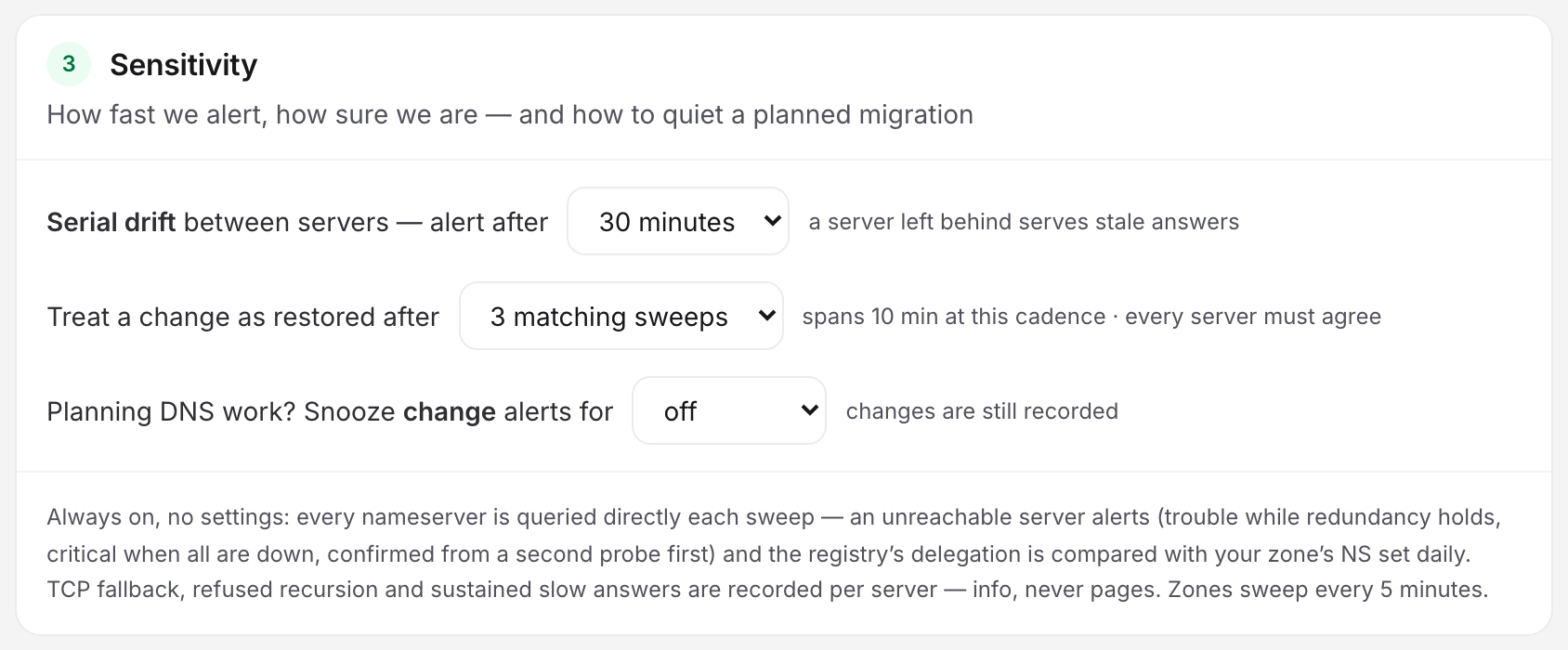
Set the depth on the Sensitivity card in the editor (Actions → Edit from the monitor page).
| Setting | Values | Default | Unit text beside it |
|---|---|---|---|
| Treat a change as restored after | 1, 3 or 5 matching sweeps | 3 matching sweeps | spans 10 min at this cadence · every server must agree; at 1, restored at the first matching sweep |
At the fixed 5-minute cadence, 3 matching sweeps span 10 minutes of agreement and 5 span 20. The row records both moments: when the values came back, and when verification completed.
The incident closes once every alertable episode has restored or been acknowledged. A verified restore sends the recovery alert if Alert when records are restored and verified is on in the monitor's Alerting card, and on chat and webhook channels it reads UPTIMIA ALERT (UP): DNS monitor "<name>" restored — records back at baseline (verified) after <duration>. SMS is compressed to UPTIMIA ALERT (UP): DNS restored - verified: <zone> since <date>.
The GeoDNS Trap: Rotation Makes Regional Answers Look Like Changes
Each sweep queries your nameservers from one probe location, rotating through the monitor's selected locations. Because authoritative answers are normally identical everywhere, one probe per sweep is enough, and the rotation adds geographic coverage without multiplying query volume against your servers.
A zone that answers by client region breaks that. The sweep from Amsterdam sees the European address, the next from Singapore sees the Asian one, and the single baseline flips between changed and restored. The symptom is a monitor that alerts and self-restores repeatedly, with a Changes · 30 days count in the double digits.
Best fix first:
- Mark the regional records dynamic. Presence-and-type comparison still catches the case that matters (the record disappearing) and ignores which pool member you were handed.
- Narrow the locations to one region. On the Locations tab, switch to Custom selection and pick probes in a single region. A DNS monitor needs at least 6 DNS-capable probes, and a smaller selection is refused. Uptimia intersects a saved profile built for the general fleet with the DNS-capable fleet first. The editor then says what it dropped: N of M probes in this profile are DNS-capable — applied those. If that intersection is empty, or leaves fewer than 6, the save is refused rather than silently widened. Check what the profile resolves to first (see Location Profiles).
Snoozing Change Alerts During Planned Work
Before a migration, snooze the change alerts rather than pausing the monitor. Pausing stops the sweeps, so you lose the record of what happened, while snoozing keeps sweeping and keeps recording. For the other knobs that quiet a noisy account, see Getting Fewer, Better Alerts.
On the Sensitivity card, set Planning DNS work? Snooze change alerts for to 4 hours, 24 hours or 7 days. The default is off. While it runs:
- Changes are still detected, recorded as episodes, shown on the Watched records table with their diffs, and counted in the sweep log. Only the paging is held.
- Health alerts are unaffected. An unreachable nameserver, serial drift or a delegation mismatch still pages at full severity.
- An incident already open before you snoozed stays open. The snooze stops new change episodes from paging; it closes nothing.
Editing a monitor mid-snooze shows a disabled on — 3 h 20 min left entry in the select. Choosing off ends the snooze on save; choosing a window restarts it from now.
Where DNS Changes Show Up
| Surface | What you see |
|---|---|
| Watched records card | The live diff, the state per record, and the row actions |
| Sweep log card | The last 10 sweeps: time, result badge (at baseline, N records differ, health issue, partial), probe location, servers answered and queries. A row opens the full per-nameserver transcript, and Raw answers in the page header shows the last sweep in full |
| Logs in the sidebar | The account-wide Monitoring Logs page carries DNS sweeps as their own type. See Monitoring Logs |
| Incident detail page | The sweep's reason sentence as the headline error, the status, Type, Started, Ended, Duration, the Detecting checkpoints list and the alerts that were sent |
| Alert email (root-cause block) | The zone, the discovered nameservers, the sweep interval, Detected ("Between two sweeps (window ≤ 5 minutes)"), the active change and health counts, and Restore verification |
| Exports | The incident's Export menu: Download PDF, Download HTML, and (for Owner, Admin and Editor seats) Create public link |
Only critical and trouble episodes reach the incident record. An info episode, such as a TTL-only delta, a group set to Info only or a change on a disabled group, lives on the Watched records table and never appears in Incidents.
Who Can Acknowledge or Mark Dynamic
| Role | Sees the change and the diff | Can Acknowledge / Mark dynamic |
|---|---|---|
| Owner | ✓ | ✓ |
| Admin | ✓ | ✓ |
| Editor | ✓ | ✓ |
| Read-only | ✓ | — |
| Accounting / Billing | — | — |
The buttons are hidden from Read-only and Accounting / Billing seats, and the same rule applies to a script: an API key created by a team member carries that member's role, so a Read-only member's key cannot acknowledge either. Only an owner-authority key skips the role check.