
A DNS monitor queries the nameservers that are authoritative for one zone, directly, with no recursive cache in between. Every 5 minutes it asks those servers for the records you chose, compares the answers against a recorded baseline, and checks the health of each server as it goes. That is one sweep. DNS Change Detection covers living with change alerts: baselines, Acknowledge, Mark dynamic and the restore streak.
Before You Start
- DNS monitors are unavailable on Free. Basic includes 1 zone, Professional 10 and Enterprise 100; the trial includes 50. See Plan Limits and Quotas.
- Creating and editing monitors requires the Owner, Admin or Editor role.
- One monitor watches one zone, given as a naked domain (
acmestore.com). An IP address is refused.
What "DNS" Refers To in Uptimia
Two features carry the DNS name, and they are separate products that answer different questions.
| Product | What it queries | The question it answers |
|---|---|---|
| DNS monitor (this article) | Your zone's own authoritative nameservers, directly, with recursion disabled | Are my records still what I set them to, and are my nameservers healthy? |
| Uptime monitor → Network → DNS | One host you name, as a reachability check with an optional Expected Response | Is this one DNS server answering, and does it return the value I expect? |
Only the DNS monitor keeps a baseline and alerts you when an answer changes. The Network check is a sub-type of an uptime monitor. Uptime Monitoring covers it.
What a DNS Monitor Watches
Each sweep does two jobs from the same set of queries.
Record change detection. Uptimia queries every watched record at every authoritative nameserver, then compares the answer set with the baseline recorded on the first sweep. Answers are compared as sorted sets, so round-robin ordering never raises an alert. A record appearing where there was none is a change too: an empty answer set is a legitimate baseline value.
Nameserver health. The same sweep records, for each server:
- whether it answered, and how fast
- whether it set the authoritative (AA) flag
- whether its SOA serial agrees with its siblings
- whether it answers over TCP
- whether it offers recursion
Queries go out with recursion disabled and the AA flag verified, so neither a cache nor a TTL sits between you and the answer. A change shows up within one sweep instead of whenever caches expire.
The two halves are independent: every health check can be green while the zone serves the wrong answers, and every record can match while a server is down. The header pill reflects both, and never shows a bare Up or Down.
Creating a DNS Monitor
- Go to Monitoring → DNS.
- Click Create DNS Monitor → on the explainer, or Add Monitor in the monitors panel if you already have DNS monitors.
- Enter a Monitor Name.
- In Zone / domain, enter the naked domain. Uptimia strips a pasted URL, a
www.prefix, a port or a trailing dot for you. It stores a name with non-English letters in its punycode form, the plain-ASCII spelling DNS uses. - In the Watched records card, set the severity of each record group and add any names you want watched.
- In the Sensitivity card, set the serial-drift tolerance and the restore depth.
- In the Alerting section, select the contacts to page. At least one recipient is required; Uptimia rejects the save without one.
- Click Save Monitor.
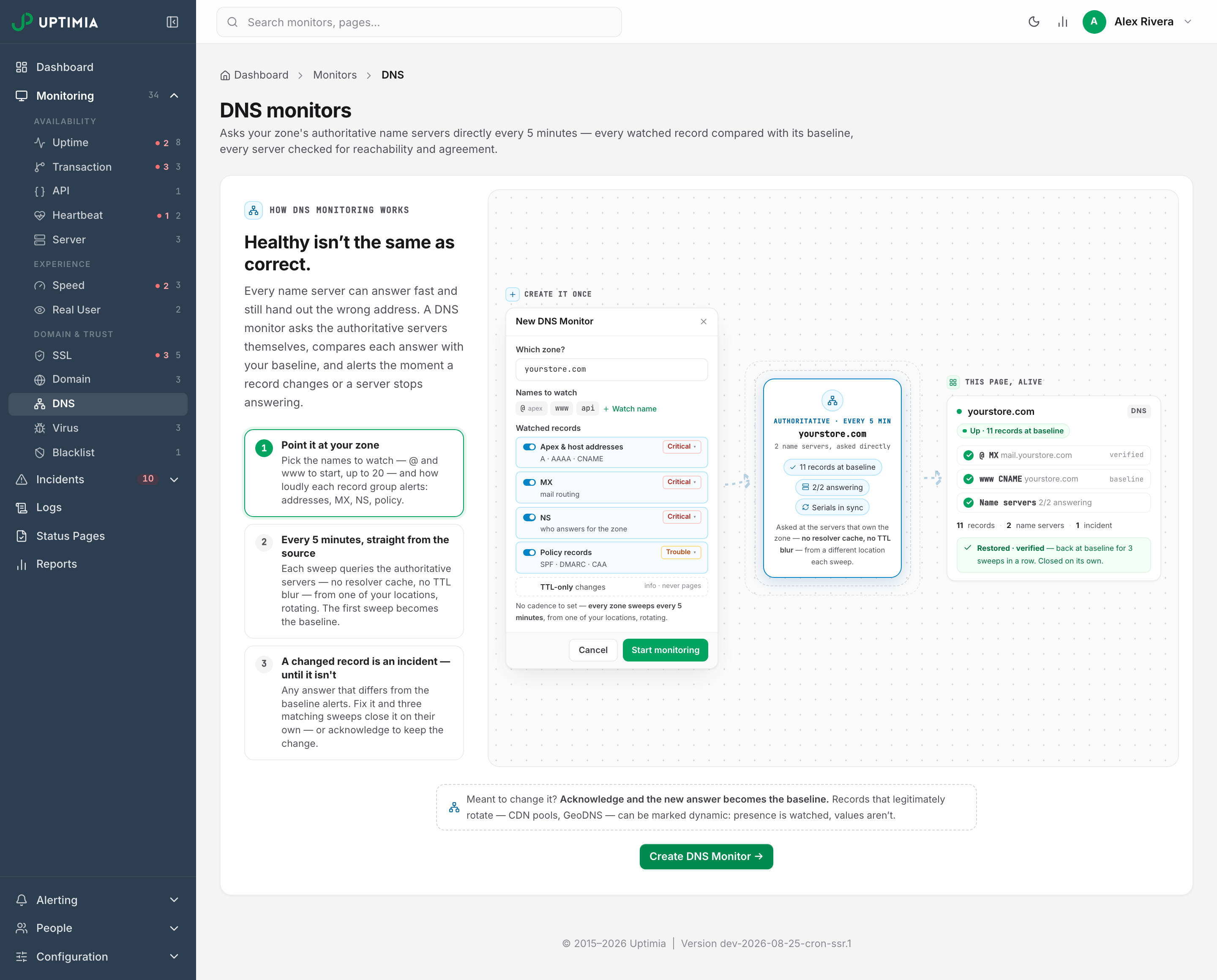
The editor tabs are Main, Advanced, Groups and Locations. Creating the monitor lands you on the detail page with a Waiting for the baseline sweep… banner, and the first sweep runs within a minute, recording every watched answer as the baseline. Nothing can alert before that, because there is nothing yet to compare against.
The Watched Records Card
The card sets what is compared and how loudly a difference is reported.
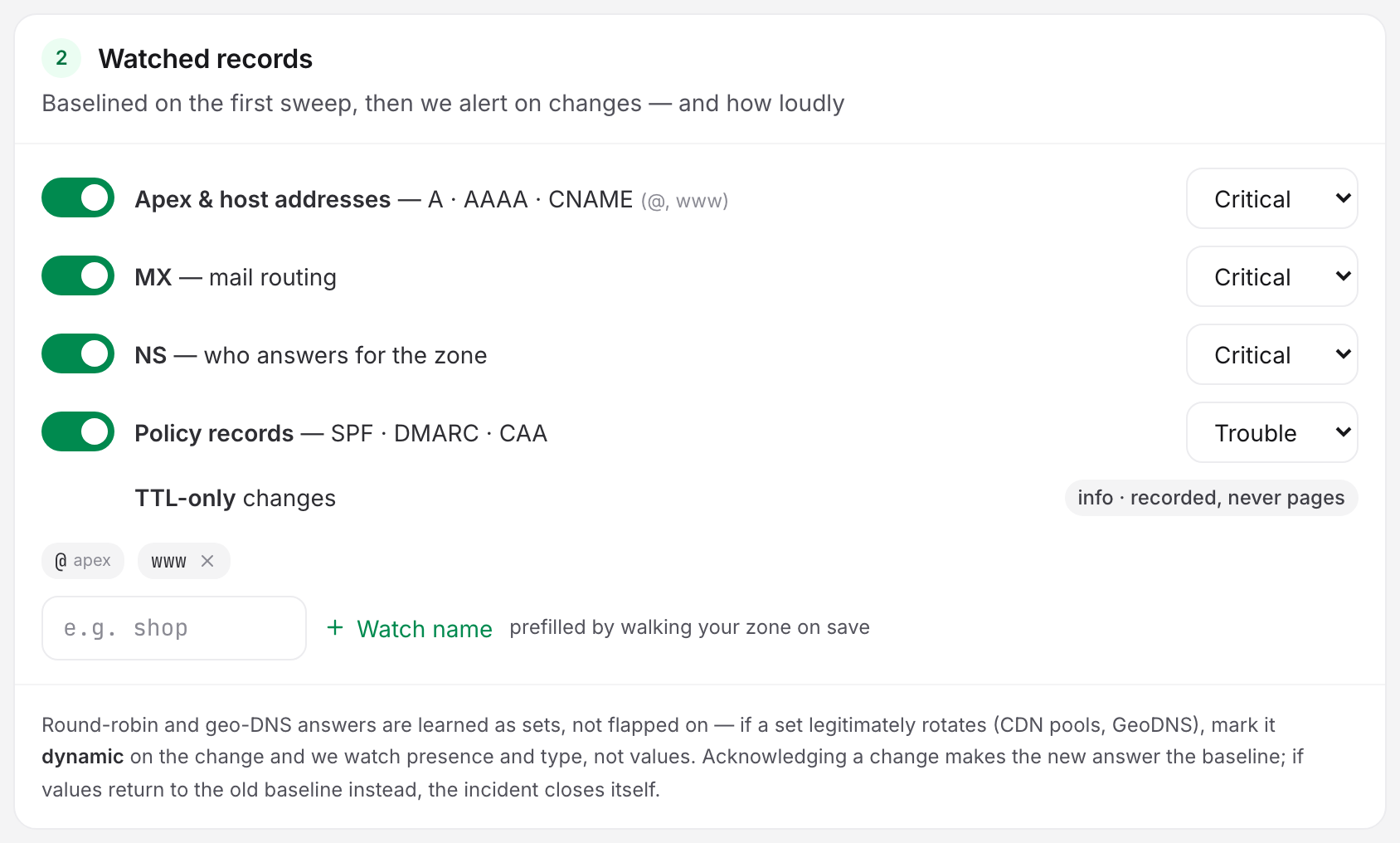
Record Groups
| Group | Records compared | Default severity |
|---|---|---|
| Apex & host addresses | A, AAAA and CNAME for every watched name | Critical |
| MX | The MX set at the apex | Critical |
| NS | The NS set at the apex | Critical |
| Policy records | The TXT set at the apex, TXT at _dmarc, and CAA at the apex |
Trouble |
Each group has a toggle and a severity select offering Critical, Trouble and Info only. Critical and Trouble changes open an incident and page your contacts; Info only is recorded and never pages.
A group you turn off is still watched. Its changes are recorded at info severity, and the row says so: info · still recorded, never pages.
TTL-only changes are a fixed row with no control. A change where only the TTL moved is always info. A record whose values return to baseline counts as restored even if its TTL still differs.
The Watched Names
The apex @ is always watched and cannot be removed. A new monitor also watches www. Add more with the input and the Watch name link: shop, api, mail.eu. Names are relative to the zone, and Uptimia lowercases each one and strips a trailing dot.
- Up to 20 watched names per zone, including
@. - Each watched name is queried for A, AAAA and CNAME on every sweep.
- Wildcards are not supported. The editor refuses them with "Wildcards aren't supported — we watch the records you choose, by name." There is no watch-the-whole-zone option and Uptimia never attempts a zone transfer.
Uptimia sweeps 5 zone-level keys regardless of the names you list: MX, NS, TXT and CAA at the apex, plus TXT at _dmarc. A monitor watches the number of names × 3, plus those 5 zone-level records. That is the figure the detail page prints in the line under the monitor name.
Sensitivity: Drift, Restore and Snooze
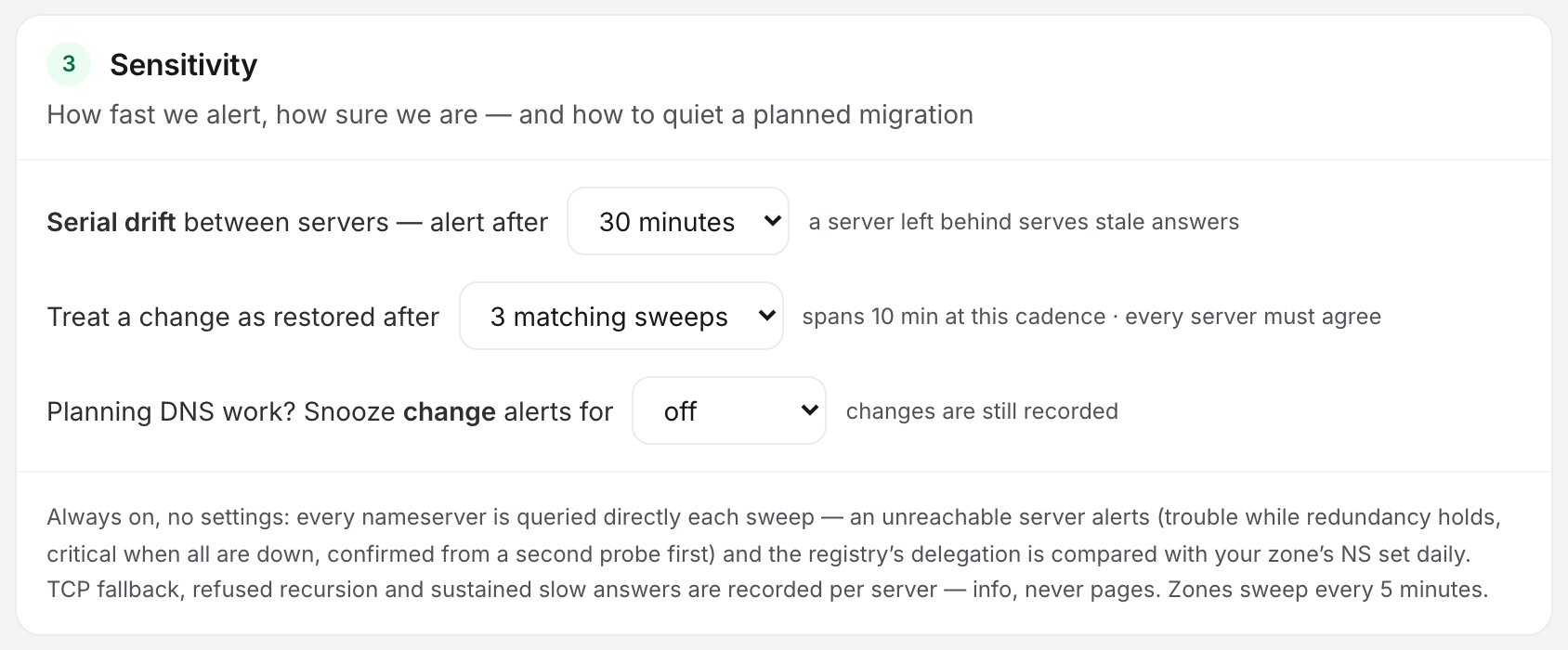
| Setting | What it does | Default | Options |
|---|---|---|---|
| Serial drift between servers — alert after | How long your nameservers may serve different SOA serials before a Trouble episode opens. A server left behind serves stale answers. | 30 minutes | 30 minutes, 2 hours, 6 hours |
| Treat a change as restored after | How many consecutive sweeps must show the baseline values again, with every reachable server agreeing, before the change counts as restored. The incident then closes itself. | 3 matching sweeps | 1, 3 or 5 matching sweeps |
| Snooze change alerts for | Holds change alerts while you do planned DNS work. Changes are still recorded, and nameserver health alerts are unaffected. | off | off, 4 hours, 24 hours, 7 days |
The restore select prints its own wall-clock span as you change it. 3 matching sweeps reads spans 10 min at this cadence, because the streak covers the gaps between sweeps, not the sweeps themselves.
The snooze window starts running the moment you save it. Edit a monitor whose snooze is still going and the select shows the time remaining; pick off to end it now, or another window to restart it from now.
Nameserver Health, Checked on Every Sweep
These checks use the same queries, and the serial-drift tolerance is the only setting you can change.
| Check | What it means | Severity |
|---|---|---|
| Nameserver unreachable | The server answered nothing this sweep. Some servers down is Trouble: your redundancy is gone. All servers down is Critical. | Trouble or Critical |
| Not answering authoritatively | The server is listed as authoritative but answers without the AA flag. | Trouble |
| Serial drift between servers | Reachable servers disagree on the SOA serial for longer than your tolerance. | Trouble |
| Parent vs child delegation mismatch | The registry's delegation does not match the zone's own NS set. | Trouble |
| Recursion offered | The server offers to look up other domains for anyone who asks (the RA flag). That is a misconfiguration: attackers can use such a server to amplify traffic floods. | Info: recorded, never pages |
| TCP fallback failing | The per-sweep SOA query over TCP did not answer. Large answers need TCP. | Info: recorded, never pages |
| Sustained slow answers | The rolling 24-hour median for that server is above 200 ms. | Info: recorded, never pages |
Uptimia never pages on an unreachable nameserver from a single observation: before a health incident opens, it re-checks the failing servers from another location in the monitor's rotation. Recovery works the other way round. The outage was confirmed twice already, so a server that answers again closes its episode immediately, with no verification streak.
A nameserver that only has an IPv6 address, checked from a location with no IPv6, does not count as down. Uptimia records it as not reachable from that location for that sweep, and leaves it out of the down count, the change comparison and the restore agreement.
Delegation and Lame Servers
Once a day, the sweep adds a parent-versus-child check. It asks the parent zone's servers for the delegation NS set, compares that with the NS set your own servers answer with, and probes each delegated server for an authoritative SOA answer. A server that is delegated to but does not answer authoritatively is lame. The domain points at it. The server does not know the zone.
A mismatch or a lame server opens a Trouble episode; a later daily check that matches again closes it.
Uptimia records DNSSEC state without judging it. The card reports DS present at parent, unsigned — recorded, not a failure, or not recorded, and Uptimia does not validate the chain of trust. Signing an unsigned zone shows up as a record change, not a failure.
Locations Are a Rotation, Not Parallel Sweeps
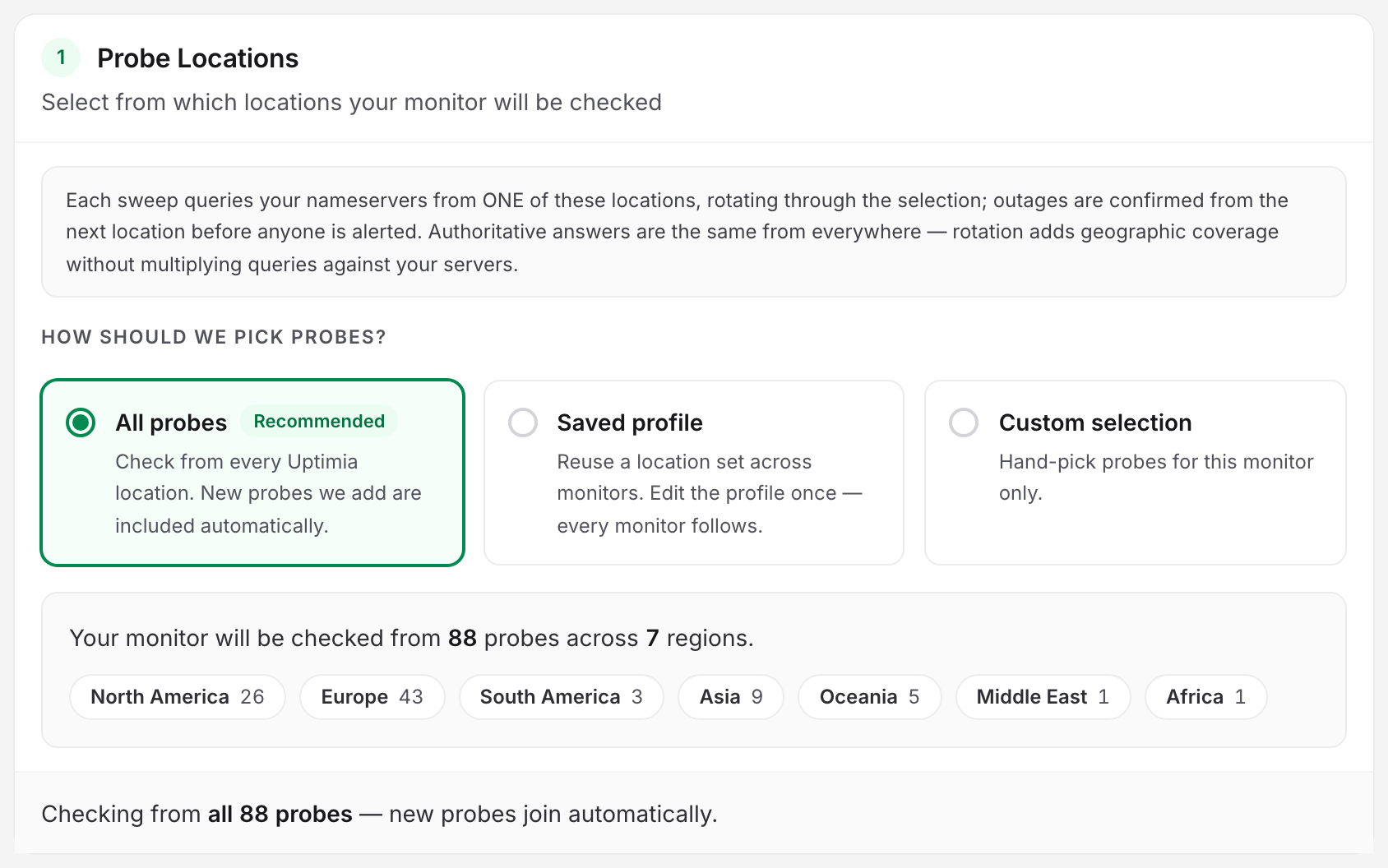
An authoritative answer is the same everywhere, so one location per sweep is enough. The Locations tab does not fan a sweep out; it sets which locations take turns running one.
- Each sweep queries your nameservers from one of the selected locations, rotating through the selection.
- A nameserver outage is confirmed from the next location in the pool before anyone is paged.
- The catalog on this tab is the DNS-capable probe fleet, which is smaller than the full probe list. All probes, Saved profile and Custom selection work as they do for other families. See Location Profiles.
- A custom selection needs at least 6 DNS-capable locations. Below that Uptimia refuses the save: "Too few sweep locations — add more DNS-capable probes, or use all of them." Uptimia intersects a saved profile with the DNS fleet first, so non-DNS probes cannot count toward the 6.
- EU accounts get European probes by default on uptime monitors, but not on DNS monitors.
Answer-time medians mix samples from different locations, so a distant one inflates the millisecond figure, and the sweep log attributes each sweep to the location that ran it. If a GeoDNS zone answers differently per region, Uptimia reports those regional answers as changes when the rotation reaches those locations. That is the comparison working. Mark such records dynamic so only presence and type are compared.
There Is No Check-Frequency Control
DNS sweeps run every 5 minutes, fixed. The editor shows no frequency slider and no alert-delay control for this family. A configuration change takes effect from the next sweep, at most 5 minutes away.
The recovery toggle is on by default: Alert when records are restored and verified.
The Advanced tab carries an Outage confirmation control, stored per monitor. The options are 3 other vantages (recommended), 2 other vantages and 1 sweep — the first vantage alerts on its own. A vantage is one location in the rotation: Uptimia re-checks a nameserver that stops answering from that many other locations before it opens an incident.
Reading the Detail Page
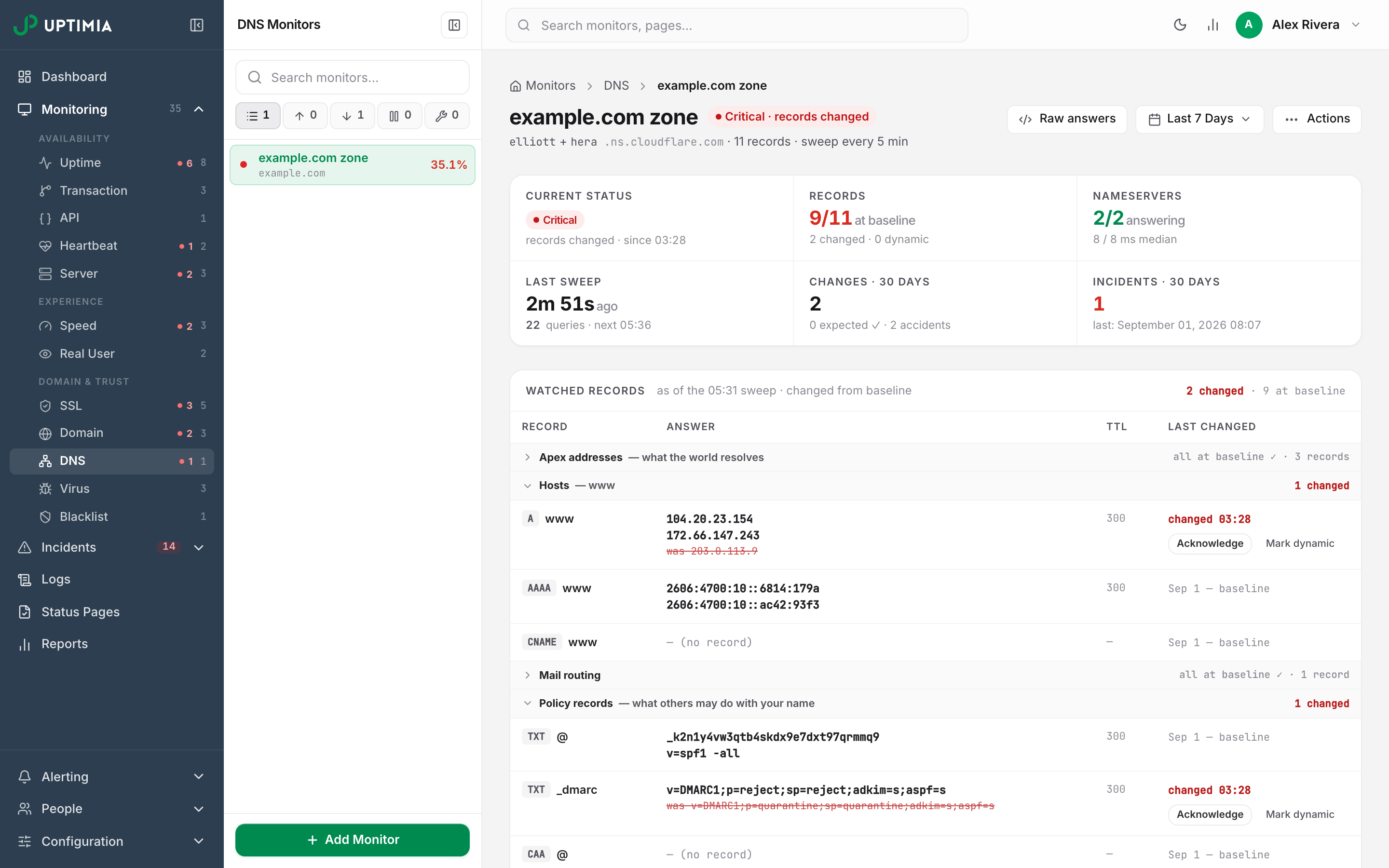
The header pill states the monitor's state first and its driver second, never a bare Up or Down.
| Pill | What it means |
|---|---|
| Waiting for first sweep… | Created, no baseline yet. The first sweep runs within a minute |
| Up · N records at baseline | Every watched record matches its baseline and no health episode is open |
| Trouble · | A non-critical episode is open: serial drift, a delegation mismatch, one unreachable server |
| Critical · records changed | A critical episode is open: a critical-severity record changed, or every nameserver is down |
| Paused / Maintenance | No sweeps are running |
Under it sits a 6-cell strip:
- current status
- records at baseline, out of the total
- nameservers answering, with their median answer time
- last sweep and next
- changes in 30 days
- incidents in 30 days
Watched records comes first, one row per watched record, carrying its type chip, name, current answer, TTL and when it last changed; a changed row shows the previous answer struck through beneath the current one. Groups collapse to a header row while everything in them is at baseline. They open themselves when something is not. Each changed row carries inline Acknowledge and Mark dynamic actions. Below it sit a Timeline strip and the Incidents card, both driven by the header's date-range picker.
Two banners mean detection has stopped. Sweeps are not landing. appears when the last sweep could not run, or when nothing has landed for more than two cadences, and change detection and health judgments stay frozen until sweeps resume. N of M queries failed this sweep means the affected records are frozen rather than judged. That banner ends "Our infrastructure failed, not yours."
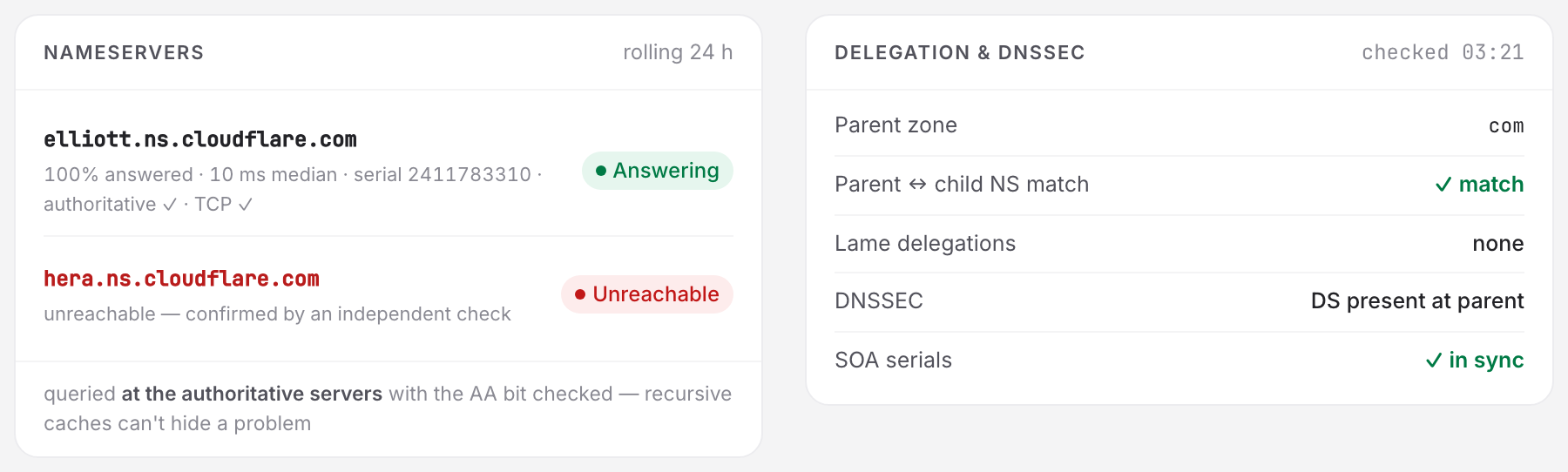
The two cards at the bottom carry the health detail. Nameservers lists one row per authoritative server, each with an Answering or Unreachable pill, followed by a rolling-24-hour meta line: percentage answered, median answer time, SOA serial, authoritative ✓, TCP ✓, and recursion offered when it applies. Delegation & DNSSEC lists the parent zone, the parent-to-child NS match, lame delegations, DNSSEC and whether SOA serials are in sync.
The Sweep Log and Raw Answers
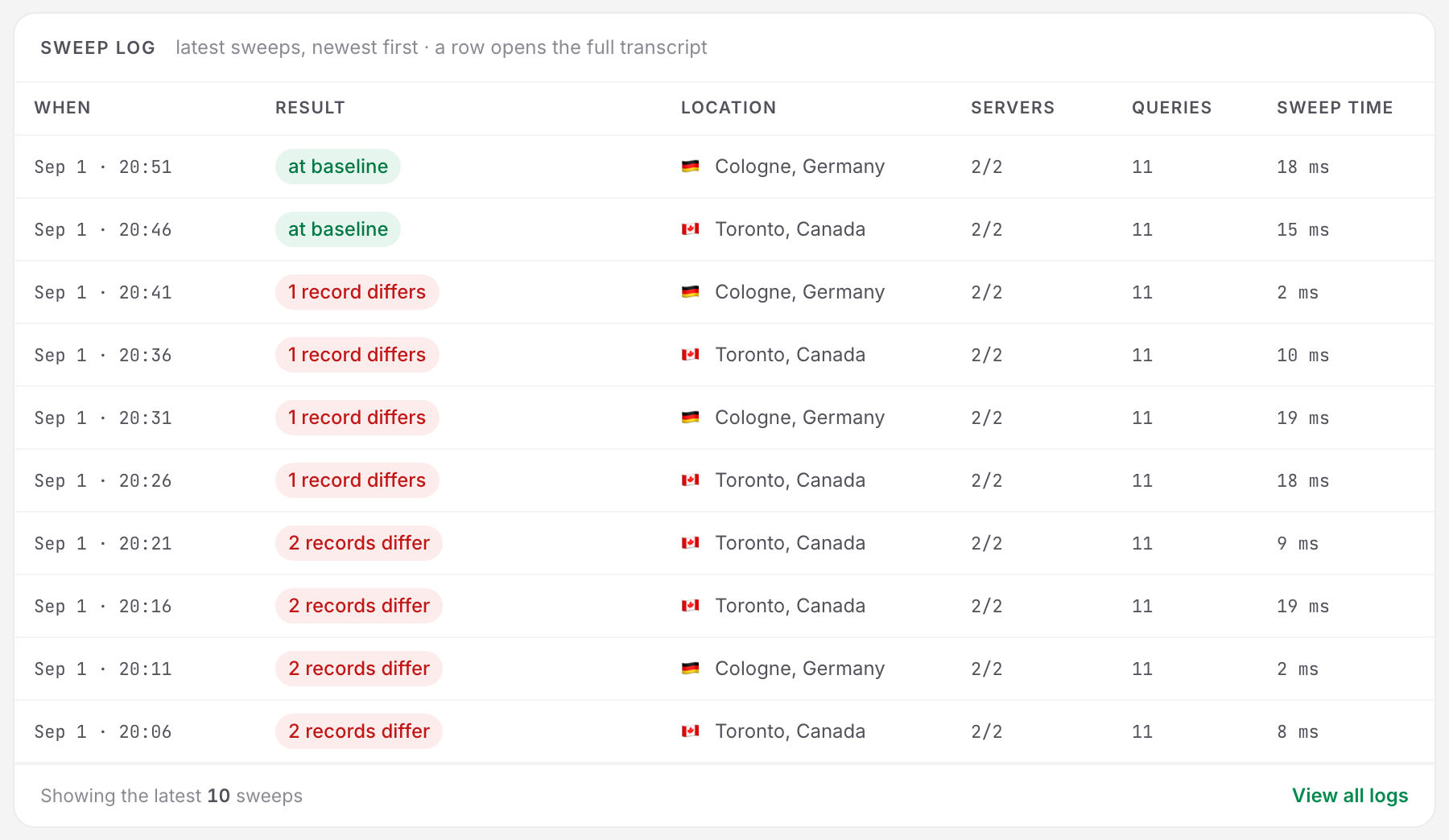
The Sweep log card holds the latest 10 sweeps, newest first: When, Result, Location, Servers, Queries and Sweep time. The Location column carries the flag and city of the probe that ran that sweep. Use it to tell a location-specific problem from a zone-wide one.
| Result badge | What the sweep found |
|---|---|
| at baseline | Every server answered and every record matched |
| N records differ | At least one watched record is off its baseline |
| health issue | Every server answered, but a health episode is open |
| partial | The sweep did not complete: a query error, or a nameserver that did not answer |
The badge gains a · N check errors suffix when queries failed. Click a row to open the check drawer, which holds the counter strip and one card per nameserver, listing every watched record as that server answered it. View all logs opens the account-wide log, filtered to this monitor. See Monitoring Logs.
Raw answers in the header opens the last sweep's full transcript. Uptimia lists every query per authoritative server, with its response code (rcode), TTL, values and timing. A footer names the probe that ran it.
Sweeping on Demand
Actions → Sweep now pulls the next sweep forward. It runs within a minute, and the page polls faster until the result lands. Uptimia drops any result already in flight rather than judging it, so a sweep queued after a configuration change cannot write a stale baseline.
Rechecks are limited to 10 per minute per account. Over that, Uptimia refuses the request with "Too many recheck requests — please wait a moment and try again." Sweep now is also refused while the monitor is paused, in a maintenance window, or suspended over your plan's pool.
Limits and What DNS Monitors Cannot Do
Your plan's DNS pool is a count of zones: 1 on Basic, 10 on Professional, 100 on Enterprise, 50 during the trial, and none on Free. Once it is full, Uptimia refuses to create another with "You have reached the maximum number of DNS monitors for your plan." A downgrade deletes nothing. Uptimia suspends monitors over the new pool, and they stop sweeping until you are back within the pool.
What the family does not do today:
- No status pages and no scheduled reports. DNS monitors cannot be added to either. Maintenance windows do cover them, by type. See Monitor Type Coverage.
- No bulk creation. One zone per monitor, created individually.
- No wildcard or whole-zone watching, and no zone transfers. You watch the names you list.
- No DNSSEC validation. Signing state is recorded, never judged.
- No per-monitor cadence. Every zone sweeps every 5 minutes.
Everything downstream of detection is shared: contacts, escalation policies, alert grouping, acknowledgment links and every alert channel behave as they do for any other family.