
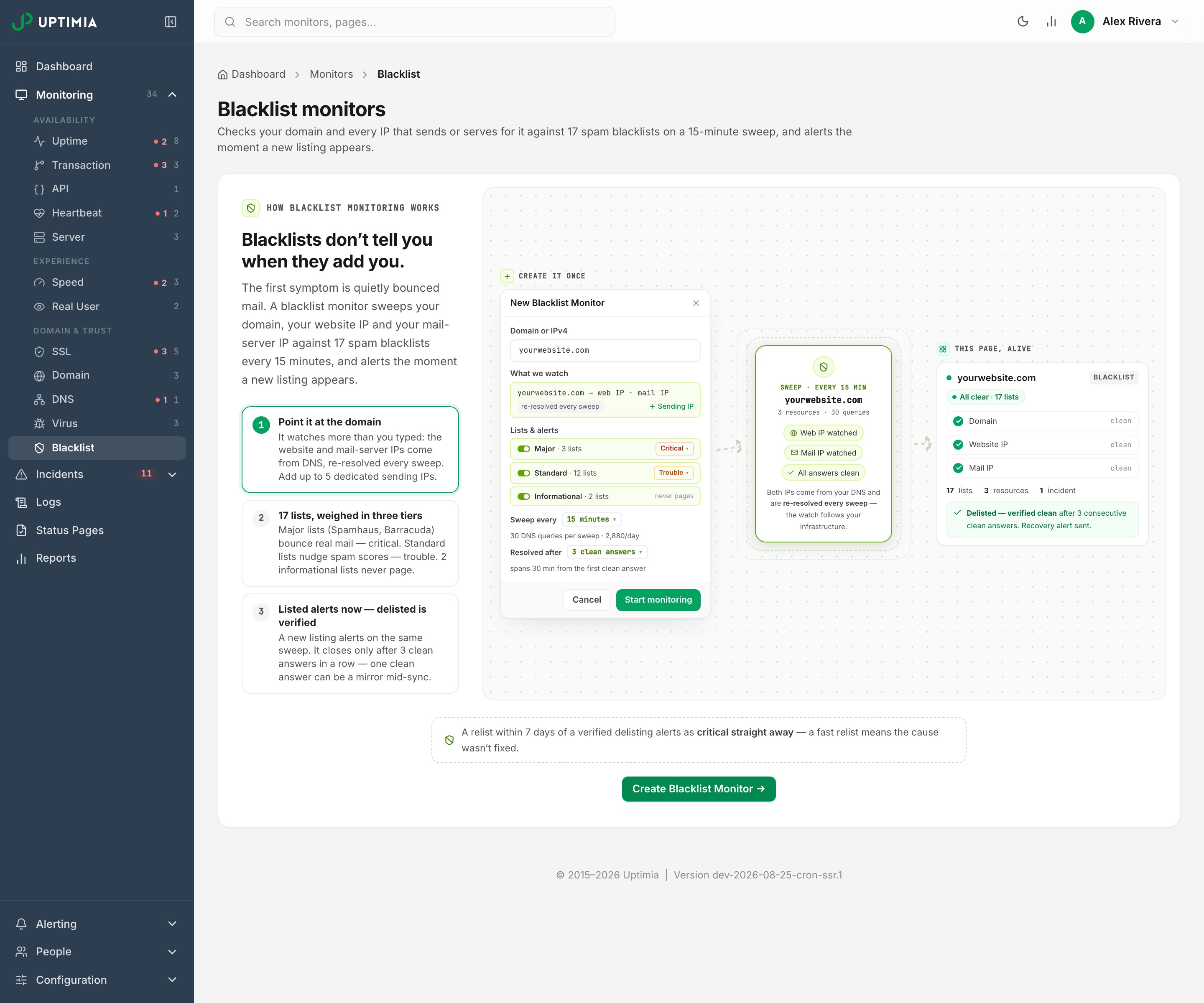
A blacklist monitor sweeps your domain and every IP that sends or serves for it against 17 spam blacklists. A new listing opens an incident. Beyond the target you type in, it watches the web IP from your A record, the mail server IP from your MX, and up to 5 dedicated sending IPs you add yourself. The listing lifecycle after a hit is in Blacklist Listings and Delisting.
Before You Start
- Blacklist monitors are not included on the Free plan. The pool is Basic 1, Professional 10, Enterprise 100, and the Trial 50. See Plan Limits and Quotas.
- Creating or editing a monitor needs the Owner, Admin or Editor role. A Read-only seat can view the detail page but not the editor.
What "Blacklist" Refers To
Only the first of the three is this article.
| Where you see it | What it means |
|---|---|
| A Blacklist monitor | Your domain or a sending IP is on a DNSBL, a spam blocklist that mail servers query before accepting your mail |
| "blacklisted by browsers and search engines" | Google Web Risk has flagged your site for malware or social engineering. See Virus and Malware Monitoring |
| "The URL is blacklisted or invalid" | You see this on monitor create and on bulk import. Uptimia refuses to create a monitor for that URL, because the URL is on an internal list of hosts Uptimia does not monitor |
A blacklist monitor tells you your mail is bouncing. A virus monitor tells you Chrome is showing an interstitial to your visitors.
What a Blacklist Monitor Watches
One monitor covers one target and every address that target resolves to. The wall on the detail page renders one column per resource.
| Resource | Where it comes from | Which lists ask about it |
|---|---|---|
| domain | The target you typed, normalized to its naked form | The 4 domain-kind lists |
| web IP | The A record of the target, re-resolved every sweep | The 13 IP-kind lists |
| mail IP | The lowest-priority MX host, resolved to an A record, re-resolved every sweep | The 13 IP-kind lists |
| dedicated IP | Each address you add by hand, up to 5 | The 13 IP-kind lists |
Each sweep re-discovers the addresses, so the watch follows infrastructure moves: change your A record and the next sweep queries the new address.
- When the A record and the MX host resolve to the same IPv4, the mail slot folds into the web slot. You get one column.
- When a slot resolves to several public IPv4 addresses, the sweep watches the lowest one and the column carries a
+N more … (not watched)chip. Add the others as dedicated sending IPs if you want them covered. - A slot with no value has no column. A domain with no MX has no mail column, rather than a permanent error.
A blacklist monitor covers reputation only. The delivery side (the MX host answering, the SMTP port, the certificate) is in Monitoring Your Email Infrastructure.
The 17 Lists and Their Three Tiers
The registry is fixed. You choose which tiers are swept and how loudly each one alerts. Individual zones are not selectable.
| Tier | Lists | What a listing costs you | Default severity |
|---|---|---|---|
| Major | 3 | Consulted directly by large providers and appliances: a listing bounces real mail | Critical |
| Standard | 12 | Scoring signals for SpamAssassin-class filters: one nudges spam scores, several compound | Trouble |
| Informational | 2 | Lists whole provider networks and charges for immediate removal | Recorded, never pages |
| Tier | List | Zone | Asked about |
|---|---|---|---|
| Major | Spamhaus ZEN | zen.spamhaus.org |
Every watched IPv4 |
| Major | Spamhaus DBL | dbl.spamhaus.org |
The domain |
| Major | Barracuda | b.barracudacentral.org |
Every watched IPv4 |
| Standard | SpamCop | bl.spamcop.net |
Every watched IPv4 |
| Standard | SURBL | multi.surbl.org |
The domain |
| Standard | URIBL | multi.uribl.com |
The domain |
| Standard | Nordspam DBL | dbl.nordspam.com |
The domain |
| Standard | PSBL | psbl.surriel.com |
Every watched IPv4 |
| Standard | DroneBL | dnsbl.dronebl.org |
Every watched IPv4 |
| Standard | SpamRats | all.spamrats.com |
Every watched IPv4 |
| Standard | Mailspike | bl.mailspike.net |
Every watched IPv4 |
| Standard | Hostkarma | hostkarma.junkemailfilter.com |
Every watched IPv4 |
| Standard | Backscatterer | ips.backscatterer.org |
Every watched IPv4 |
| Standard | s5h.net | all.s5h.net |
Every watched IPv4 |
| Standard | Truncate | truncate.gbudb.net |
Every watched IPv4 |
| Informational | UCEPROTECT L1 | dnsbl-1.uceprotect.net |
Every watched IPv4 |
| Informational | UCEPROTECT L3 | dnsbl-3.uceprotect.net |
Every watched IPv4 |
Two answers are read by fixed rules your tier settings cannot change. Spamhaus PBL answers (127.0.0.10 and 127.0.0.11) are recorded as informational, whatever severity the Major tier carries, because PBL says an address is not meant to send mail directly, which is policy rather than an accusation. The second is a good-reputation answer. When Hostkarma or Mailspike returns one, Uptimia records it as whitelisted, never as a listing.
Creating a Blacklist Monitor
With no blacklist monitor on the account, Monitoring → Blacklist shows an explainer with a Create Blacklist Monitor button in place of the monitor list.
- Go to Monitoring → Blacklist.
- Click Create Blacklist Monitor on that page, or, once the account already has one, Add Monitor at the foot of the monitor panel.
- Enter a name.
- In Domain or IPv4, enter the naked domain or the bare public IPv4 address you want watched.
- Add any dedicated sending IPs in the What we watch card.
- Adjust the tiers, sweep cadence and verification depth in the Lists & alerts card, or keep the defaults.
- Pick the contacts that should be alerted, then save.
The monitor lands on its detail page in a Pending · first sweep state. The first sweep runs within a minute.
What the Target Field Accepts
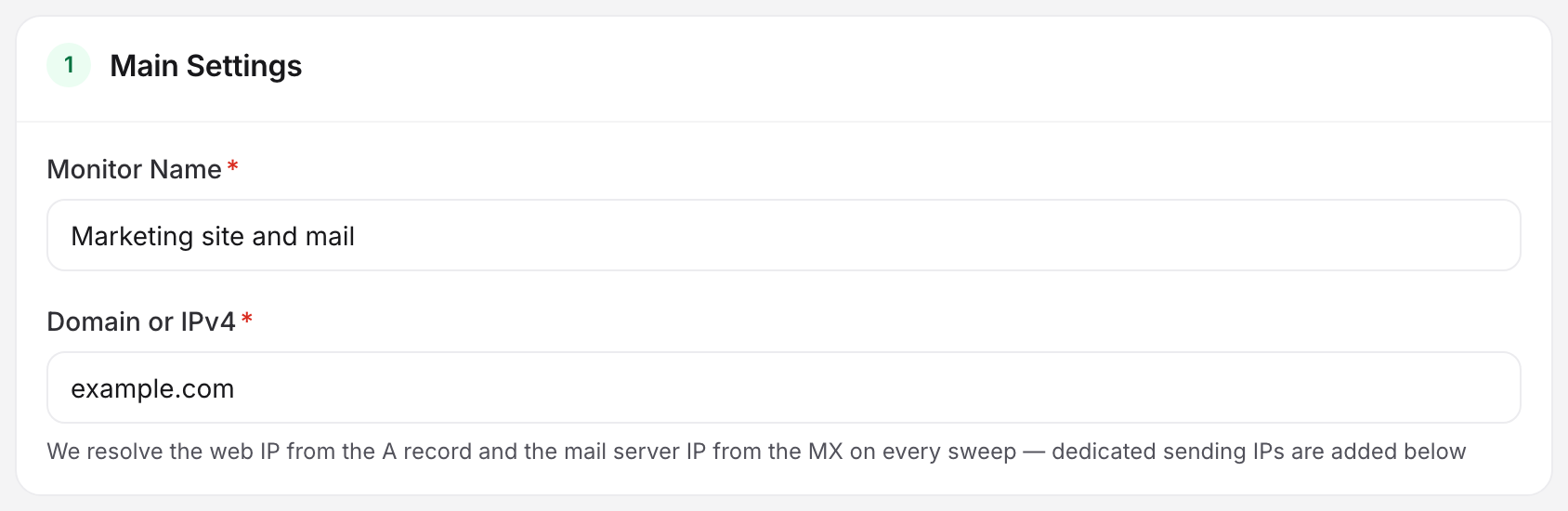
The field is labeled Domain or IPv4. Its hint reads: "We resolve the web IP from the A record and the mail server IP from the MX on every sweep — dedicated sending IPs are added below."
The field takes a naked domain or a bare public IPv4 and nothing else. A pasted URL, a port or a trailing root dot is refused inline rather than cleaned up. Uptimia strips a leading www. and converts an internationalized domain to punycode, so www.example.com and example.com are the same target.
Rejected inline with "Enter a domain (acme.com) or a public IPv4". The same message appears in the "Before you can save" rail, and the save is refused until you fix it:
- Any IPv6 address. A blacklist is asked about an IPv4 address written backwards, and no list in the registry answers about IPv6.
- A domain with no alphabetic top-level domain, such as
store.123. - A host longer than 253 characters.
- Any private or reserved IPv4: RFC 1918 private space, loopback, link-local,
100.64.0.0/10carrier-grade NAT,192.0.0.0/24, the three RFC 5737 documentation ranges (192.0.2.0/24,198.51.100.0/24,203.0.113.0/24),198.18.0.0/15benchmarking, and multicast. No public list holds an opinion on any of them, so watching one only buys a permanently green column and wasted queries.
A domain whose top-level domain is itself internationalized (.рф, .中国) gets its own message: "IDN top-level domains aren’t supported — use a domain with a standard TLD (.com, .de) or a public IPv4".
A bare-IPv4 target has no domain to check, so the 4 domain lists do not apply and the card says so.
Adding Dedicated Sending IPs
Under Dedicated sending IPs · optional, up to 5 — e.g. a dedicated ESP or newsletter IP, click Add a dedicated sending IP and type the address. Each row is recorded as you type, so a typed value survives the save. Click away and a blank row disappears. An invalid row stays visible with its reason and the sentence "It is not being watched until you fix it."
The row-level refusals are the same reserved-range rules, plus two of their own: "That IP is already being watched." for a duplicate, and "That is the monitor's own target — it is already watched. Add a different sending IP."
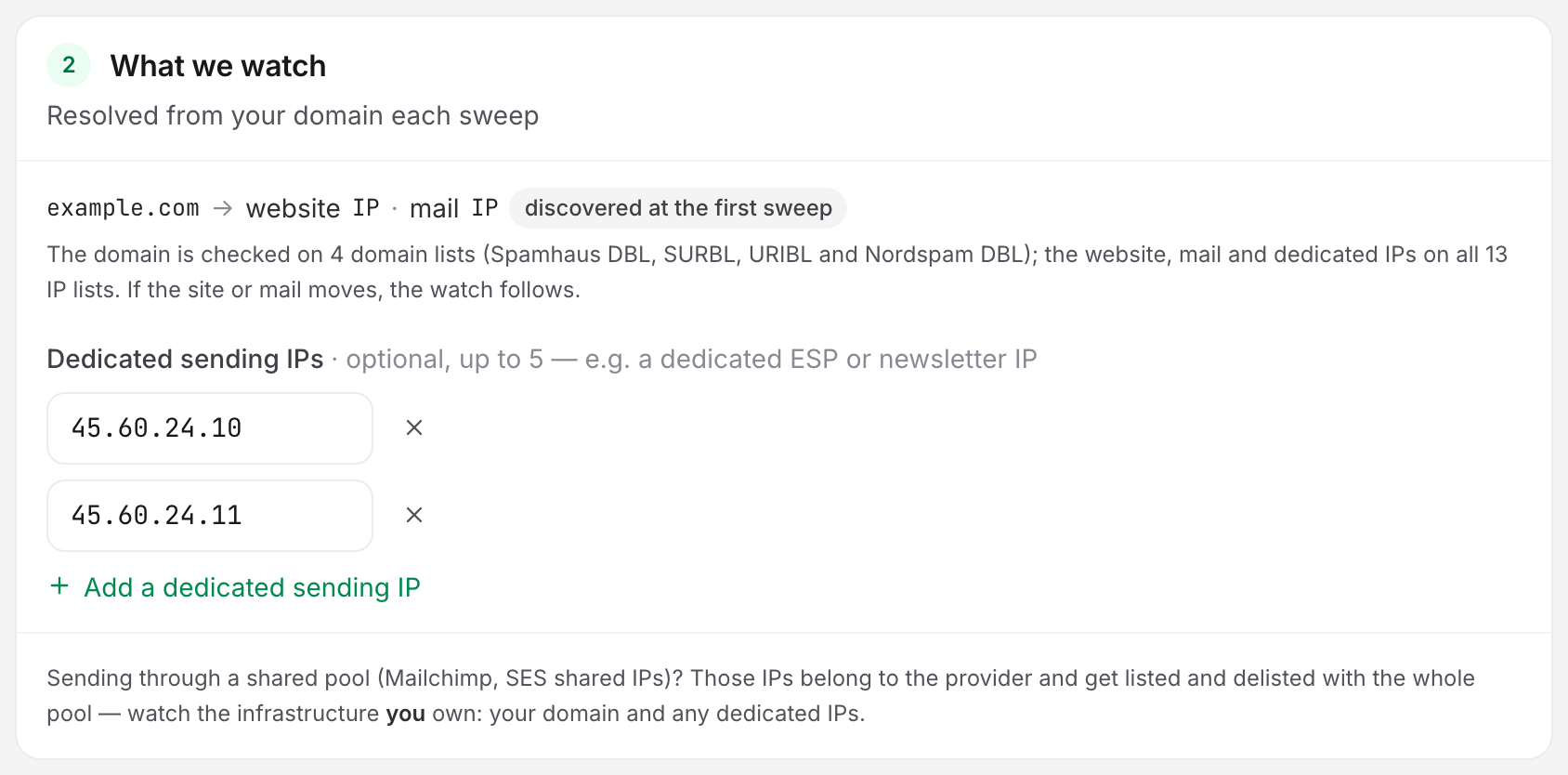
If you send through a shared pool such as Mailchimp or shared SES addresses, those IPs belong to the provider. They get listed and delisted with the whole pool. Watch what you own: your domain and your dedicated IPs.
Sweep Cadence, Verification Depth and Tier Severity
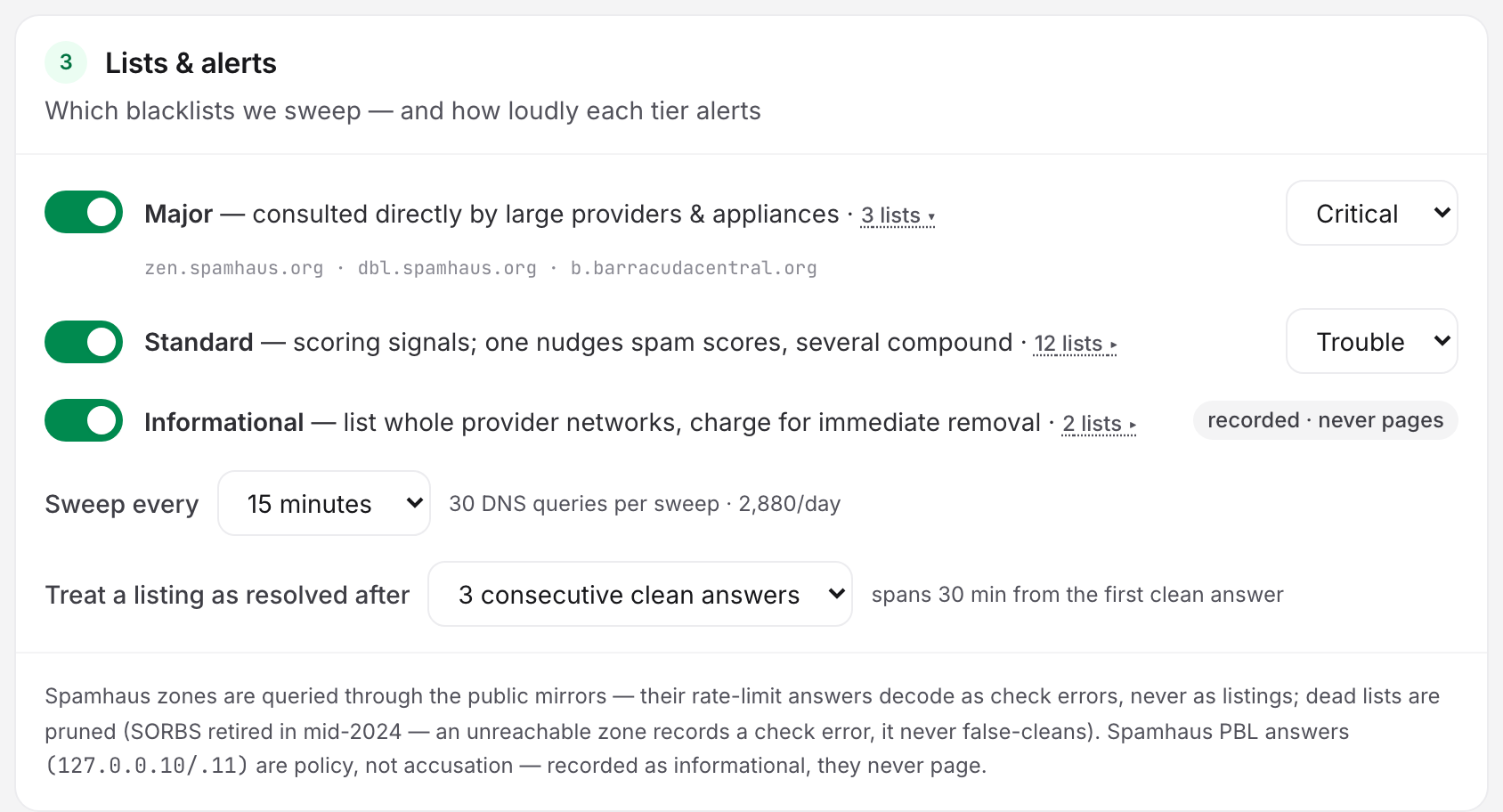
All three live on the Lists & alerts card. Blacklist monitors have no check-frequency slider and no alert delay. The cadence select replaces the slider, and an alert fires as soon as the incident opens.
| Setting | What it does | Default | Options |
|---|---|---|---|
| Tier toggle | Whether the tier's zones are queried at all | All three on | On / off per tier |
| Tier severity | The severity a listing on that tier opens the incident at | Major Critical, Standard Trouble | Critical, Trouble |
| Informational tier | Recorded on the wall and counted, never pages | On | On / off, no severity |
| Sweep every | How often every enabled list is queried | 15 minutes | 15 minutes, 30 minutes, 1 hour |
| Treat a listing as resolved after | Consecutive clean answers required before a listing is called resolved | 3 consecutive clean answers | 1, 3, or 5 |
Turning off all three tiers is refused: "Enable at least one list tier — with all three off there is nothing to sweep."
The card prints the DNS cost live. With all tiers on and no dedicated IPs, a domain target costs 30 queries per sweep: 4 domain lists for the domain, plus 13 IP lists for the web IP and 13 for the mail IP. At the 15-minute cadence that is 2,880 queries a day. Each dedicated IP adds 13 queries per sweep.
The card shows the wall-clock span next to the verification select. A setting of 3 clean answers at a 15-minute cadence spans 30 min from the first clean answer, because a streak of N answers covers N−1 intervals. Set it to 1 and a listing resolves at the first clean answer. That is faster and less certain. A mirror mid-sync can answer clean once while the listing is live everywhere else.
Note: Saving recomputes severity from the tier settings, but severity can only move up. Lowering the Major tier to Trouble applies to listings opened after the save. A listing already open at Critical keeps its Critical severity until it resolves.
Reading the Detail Page
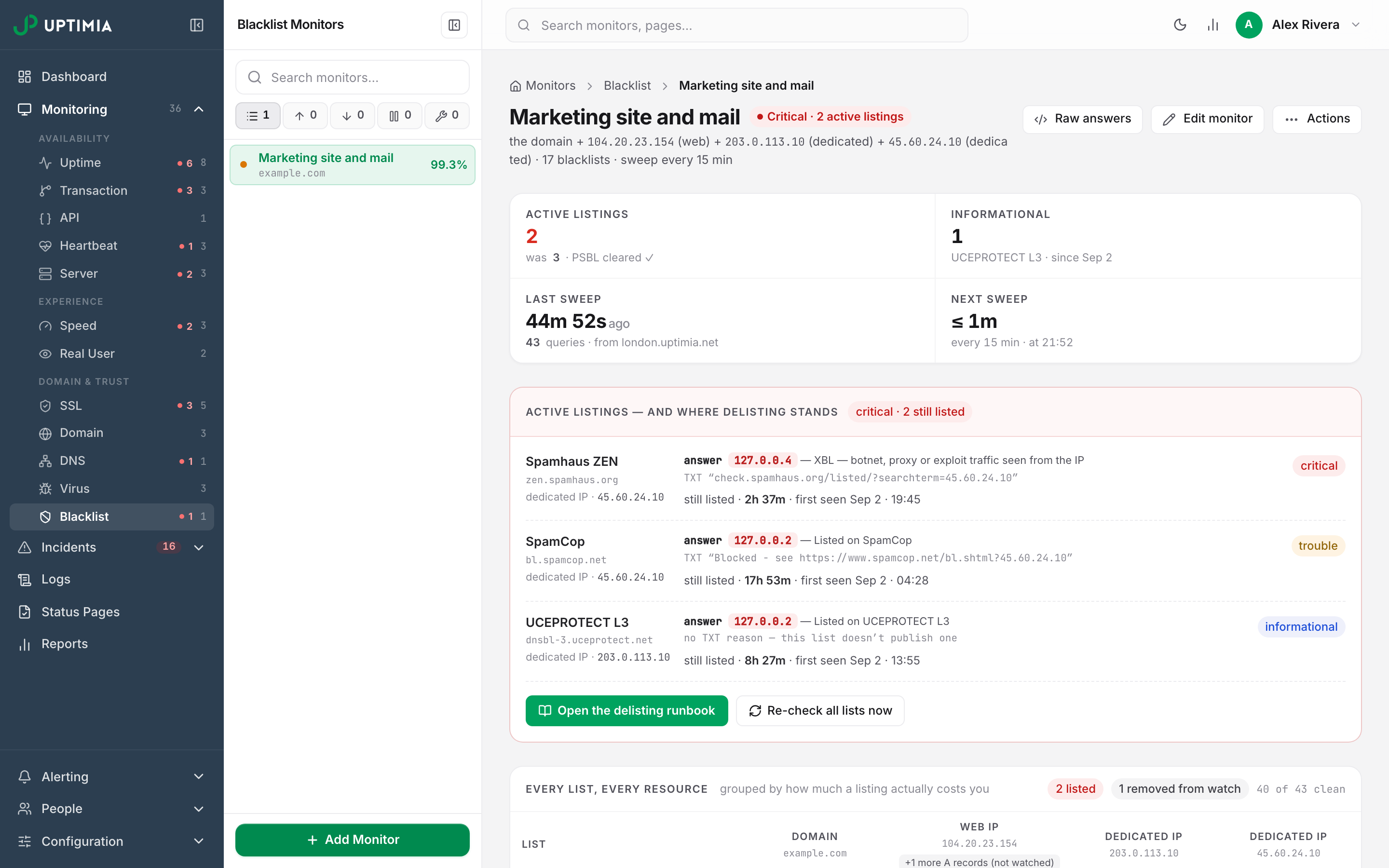
The status pill never says Up or Down. It names the worst thing the last sweep found:
| Pill | What it means |
|---|---|
| Pending · first sweep | No sweep has landed yet. The wall shows gray unknown cells, not green ones |
| All clear · N lists | Every enabled list answered clean for every watched resource |
| Clean · N informational | No alertable listing; N informational listings are open |
| Trouble · N active listings | N listings open, none of them critical |
| Critical · N active listings | At least one critical listing is open |
| Partial · N unreadable | No listing is open, but N zones could not be read in the last sweep. The page will not claim a green all-clear over coverage it never got |
| Paused / Maintenance / Suspended | The monitor's own state, which takes precedence over every listing pill above |
Under the name, the subline names the resources being watched, the list count and the cadence. Below it sits a 4-cell strip. It shows Active listings, Informational, Last sweep and Next sweep. The Last-sweep cell names how many queries the sweep made and which probe answered; the Next-sweep cell shows the cadence and the clock time of the next sweep, or monitor paused.
The Lists × Resources Wall
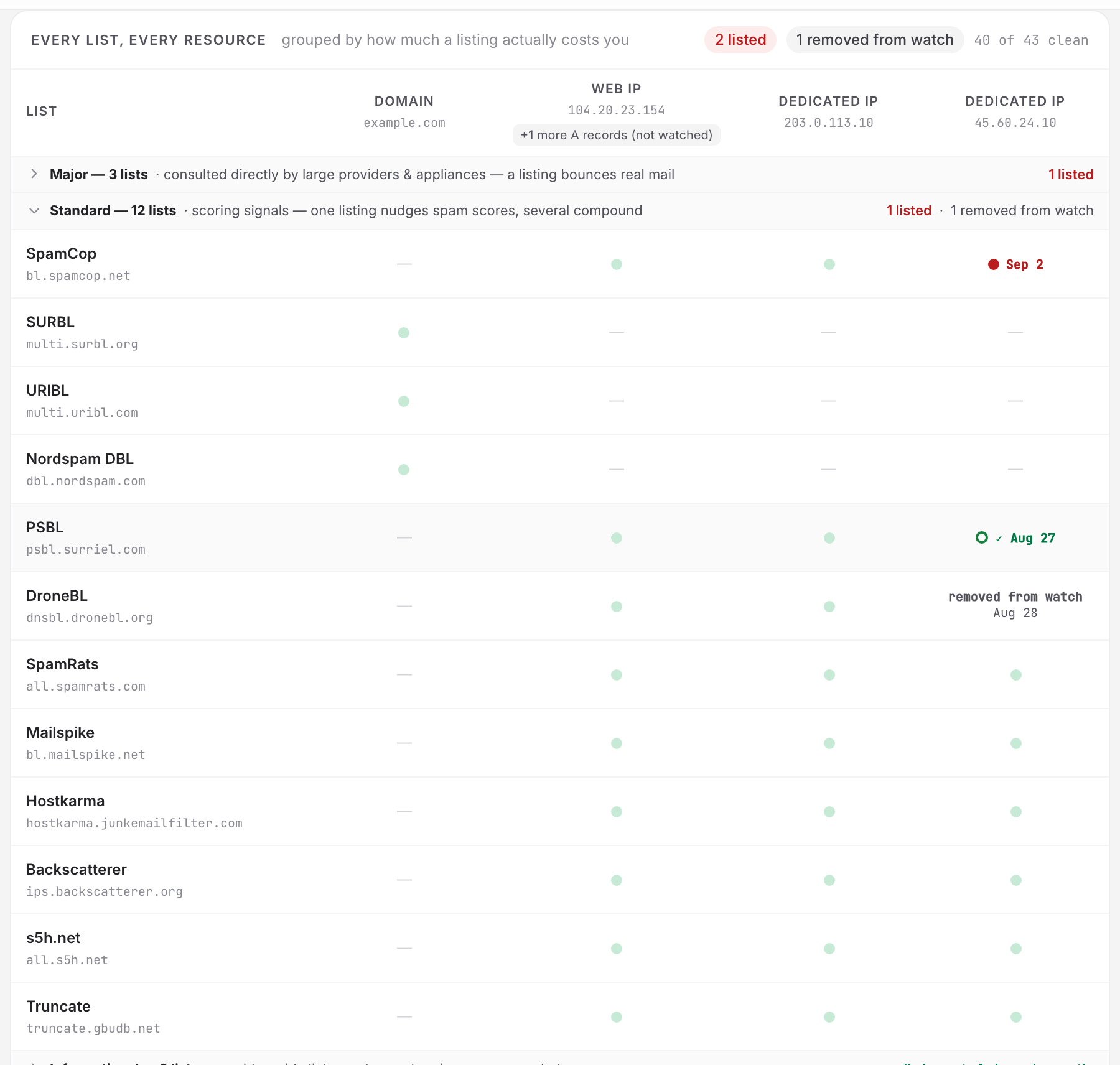
The Every list, every resource card is a matrix: one row per enabled list, one column per watched resource, grouped by tier.
| Cell | Meaning |
|---|---|
| clean | The zone has no record for that resource |
| listed | A listing, with its first-seen date |
| informational | An informational-tier listing or a PBL answer |
| ✓ date | A listing on that resource was verified clean recently: a confirmed delisting, not just a quiet cell. It also adds · N cleared recently to the tier's summary line |
| check error | The zone could not be read in the last sweep. This is not "clean" |
| not checked (IPv6) | The slot publishes only an AAAA record. DNSBLs answer about IPv4, so the zone is not queried for it |
| n/a | A domain-kind list against an IP slot: it was never going to be asked |
| removed from watch | The listing's address left the watch. Not a verified delisting |
A tier whose cells are all clean collapses to its header row, summarized as all clean ✓, while a tier holding a listing, an informational hit, a check error or a pending cell expands itself. Clicking a tier header overrides either way. The card header carries the running count, N of M clean, or awaiting first sweep before the first result lands.
Raw Answers
Raw answers in the page header opens the last sweep grouped by verdict rather than by resource. Findings come first. They are listings, informational listings, check errors and whitelist entries. Each is a card with one plain-English sentence over a Raw answer expander holding the query, the answer code, the TXT record and the probe host. The clean majority collapses to one line per resource, N lists answered clean. It reads N of M lists answered clean when some of that resource's answers were not clean.
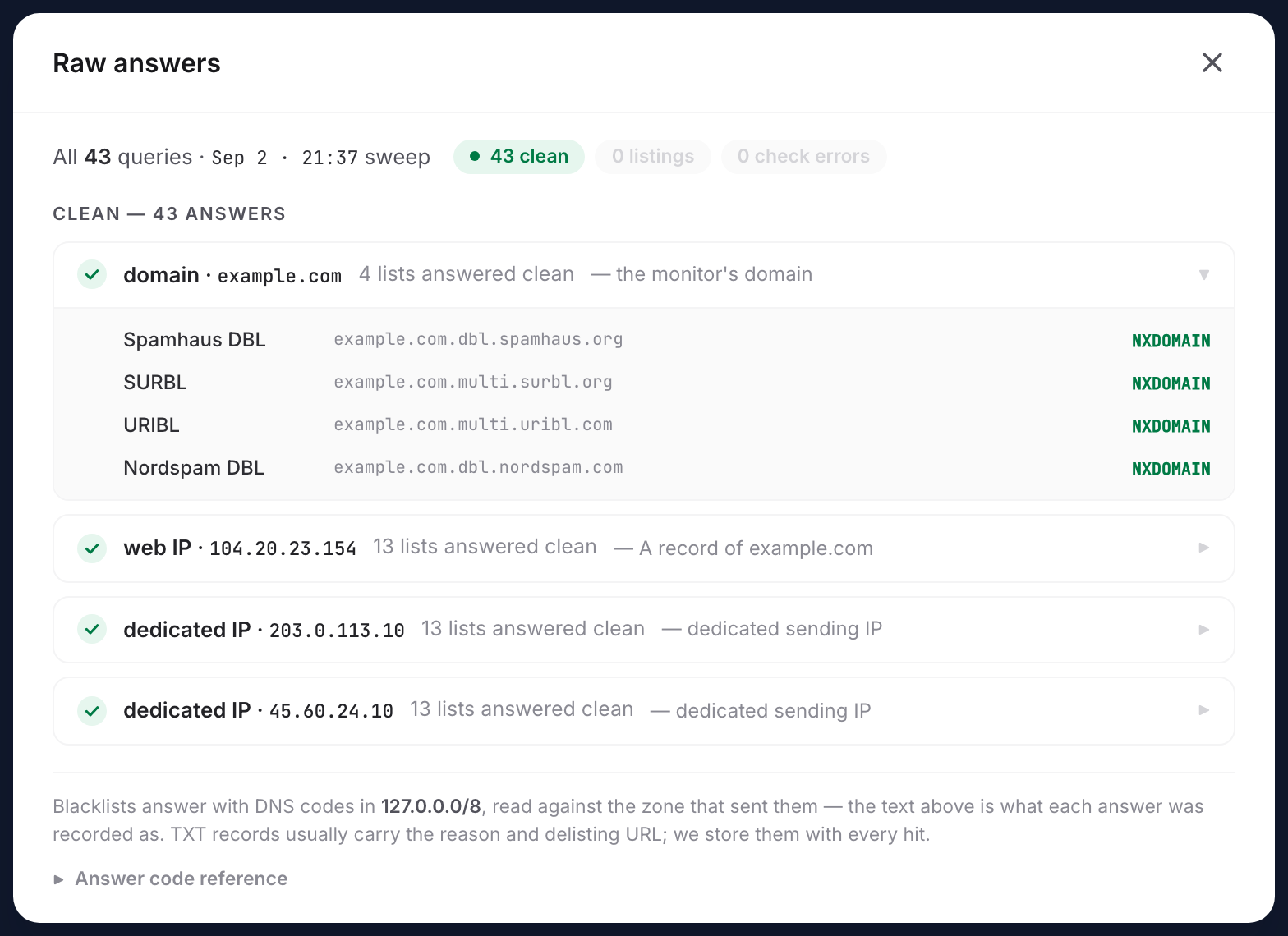
A collapsed Answer code reference at the bottom decodes the codes:
| Answer | Meaning |
|---|---|
| NXDOMAIN / no answer | Clean: the zone has no record for you |
127.0.0.2 – .9 (Spamhaus ZEN) |
SBL / CSS / XBL: curated spam source, compromised host, or botnet traffic |
127.0.0.10, .11 (Spamhaus ZEN) |
PBL: policy, not accusation. Informational |
127.0.1.2 – .106 (Spamhaus DBL) |
Domain listed: spam, phishing, malware, or an abused legitimate domain |
127.0.0.2 (all other lists) |
Listed: the standard "yes" answer |
127.0.0.1, .5 (Hostkarma), .17 – .20 (Mailspike) |
Whitelisted: good-sender records, never a listing |
127.0.0.255, 127.0.1.255, 127.255.255.x |
Check error: the zone refusing the query. Never a listing |
| SERVFAIL / timeout | Check error: zone unreachable; excluded from counts, never shown as clean |
The reference exists because "any answer in 127.0.0.0/8 means listed" is wrong: that assumption pages you for a whitelist hit or a rate-limit refusal.
Re-checking Every List On Demand
Click Re-check all lists now on the active-listings card, or Re-check all lists in the page's action menu. Uptimia pulls the monitor's next sweep forward and confirms with "Sweep queued — runs within a minute". The results do not update immediately. The wall changes when that sweep runs.
The request is refused outright when the sweep would skip the monitor anyway:
- "This monitor is suspended by your plan and is not being swept"
- "This monitor is paused — resume it to sweep"
- "This monitor is in maintenance — no sweeps run until it ends"
Re-checks are capped at 10 per minute per account. Each one fans a full registry sweep across the probe fleet.
When a Sweep Cannot Get an Answer
An unreadable zone is recorded as a check error, never as clean. Check errors are excluded from the clean counts and never close a listing. They freeze that cell's listing state: the clean streak neither advances nor resets.
After 4 consecutive degraded or frozen sweeps a banner appears above the wall: "Checks have been unreadable since <date>". The reason follows, then either "results below are frozen at the last good sweep" or, when most zones errored, "the wall below is the latest sweep, with most zones unreadable."
| Reason shown | What happened |
|---|---|
| your target did not resolve | The target has no A, AAAA or MX-derived IPv4 address. The whole sweep freezes, including the domain-only lists |
| resolving your target timed out | The resolve stage exceeded its budget |
| most blacklist zones answered with an error | The zones themselves refused or failed |
| our probe network could not be reached | No probe answered usably |
| your target resolves to a private address | The stored target now resolves into reserved space, which no public list can hold an opinion on |
| your target is not a valid monitor target | The stored target no longer parses |
| the sweep failed with an internal error | The sweep itself errored before it could record answers |
The monitor list appends a muted · retry failed to the last-check column when the most recent attempt is newer than the most recent successful check. A failing monitor then does not read as a fresh clean one. A check error never opens an incident on its own. Only a listing does.
Reports, Maintenance and Status Pages
- Scheduled reports. A report that covers all monitors includes blacklist monitors. They cannot be picked individually. The report editor says so on the Monitors to include card. The blacklist block reports listings opened in the period, listings resolved, total time listed and the zones involved, plus a tri-state current status where an informational-only listing is amber, never green. The CSV attachment skips blacklist monitors: its columns are response time, uptime, downtime and incident count, and a blacklist monitor reports on none of them.
- Maintenance windows. Blacklist is a selectable type in the maintenance modal. No sweeps run inside a window, and a listing closed by a window is never claimed as a verified delisting.
- Status pages. Blacklist monitors cannot be added to a status page.
Limits and What Is Not Built Yet
| Blacklist monitors | Free | Basic | Professional | Enterprise |
|---|---|---|---|---|
| Included | 0 | 1 | 10 | 100 |
A 0 means the type cannot be created on that plan. The Trial includes 50. A downgrade does not delete monitors over the new limit: the excess is suspended and stops being swept until you upgrade or delete enough of them to fit. Full pool details are in Plan Limits and Quotas.
Not available today:
- No Locations tab and no location profiles. A DNSBL answers the same from every probe, so there is nothing to choose.
- No bulk create. Blacklist monitors are made one at a time.
- No IPv6. Targets, discovered addresses and dedicated IPs are IPv4 only. An AAAA-only slot is recorded as an explicit "not checked (IPv6)" cell rather than counted as clean.
- An exported sweep cannot name the clean zones. The check log stores counters plus the informative answers, so an exported historical sweep reports the clean answers as a count.
- No built-in "remind me daily while listed" toggle and no weekly all-clear digest. Repeat-while-open alerting is an escalation policy setting, on Professional and above.
Warning: deleting a blacklist monitor deletes its listing history with it, and cannot be undone. Pause the monitor instead if you only want the sweeps to stop.