
A listing is one blacklist zone answering "yes" about one address you watch. Uptimia records each listing as its own episode and keeps sweeping while it stands, and the episode closes only once the zone has answered clean the number of times you asked for.
Blacklist Monitoring covers setting the monitor up: target, sending IPs, tiers and cadence.
What Opens a Listing, and What Sets Its Severity
Every sweep asks each enabled zone about the resources it can answer for:
- The four domain zones answer about your domain.
- Every IP zone answers about the website IP from your A record, the mail-server IP from your lowest-priority MX record, and any dedicated sending IPs.
When a list that was clean starts answering "listed" about one of your watched addresses, a new episode opens. Its severity comes from the tier the list sits in:
| Tier | Default severity | What it does |
|---|---|---|
| Major (3 lists) | Critical | Opens an incident and pages your recipients |
| Standard (12 lists) | Trouble | Opens an incident and pages your recipients |
| Informational (2 lists) | Informational, fixed | Recorded on the page and in reports. Never opens an incident, never alerts |
Which lists sit in which tier, and how to change a tier's severity, is in Blacklist Monitoring.
Two rules override the tier setting. A Spamhaus PBL answer (127.0.0.10 or 127.0.0.11) is always informational. A listing that reappears within 7 days of a verified delisting, on the same list and the same address, is always critical.
One monitor carries one incident, whatever the mix of lists. The first alertable listing opens it at the severity of the worst active listing, and a new list joining at that same severity updates the incident's reason without re-alerting. When a critical listing joins a trouble one, the trouble incident closes silently, and a critical incident opens and alerts. When that critical listing clears and a trouble listing remains, the status pill drops back to Trouble rather than sticking on Critical.
Reading an Open Listing
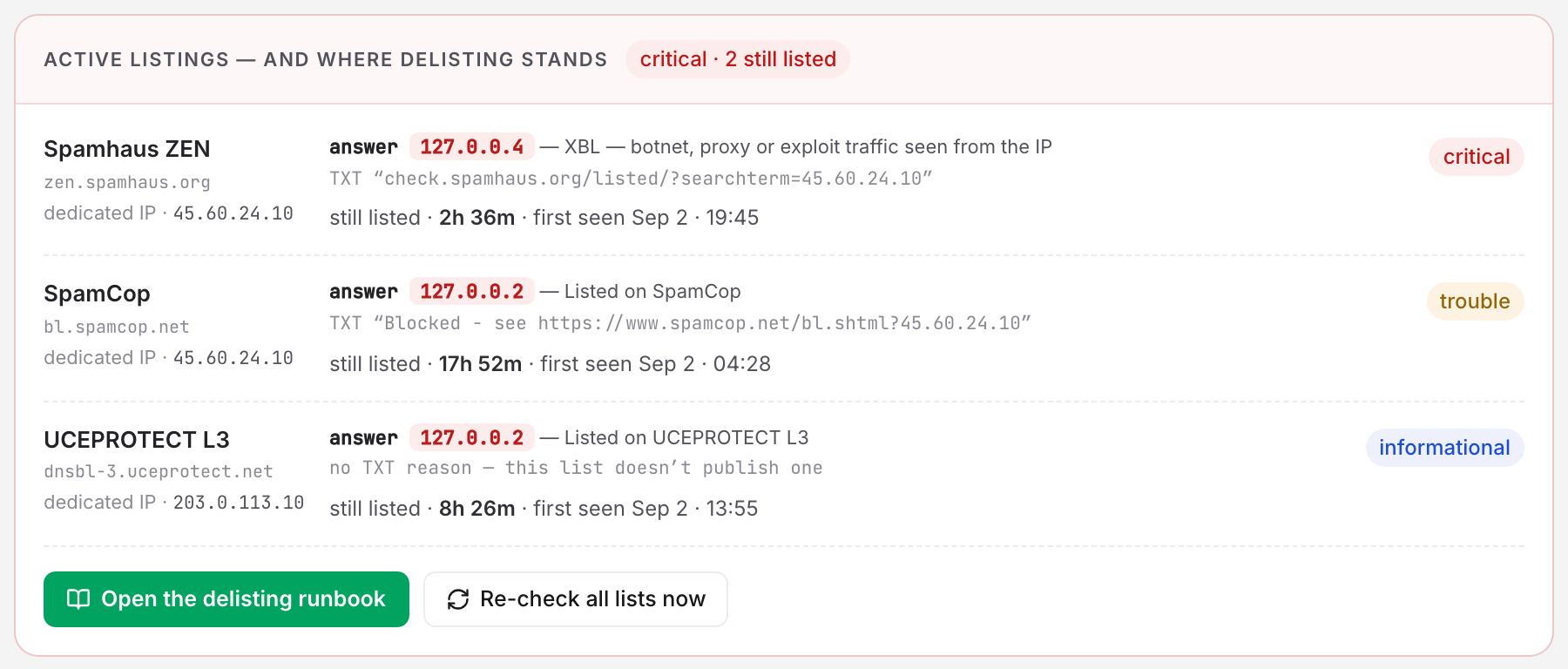
Open the monitor from Monitoring → Blacklist. The Active listings — and where delisting stands card carries one row per open episode:
- The list name and its DNS zone, and the resource the answer was about, with the exact address frozen at detection.
- The answer code and its decode. Other lists decode as "Listed on list", and Spamhaus codes are decoded individually:
127.0.0.2reads "SBL — curated spam source".127.0.0.3reads "CSS — automated: usually a compromised host or account".127.0.0.4–.7read "XBL — botnet, proxy or exploit traffic seen from the IP".
- The TXT record the list published. It usually carries the reason and a removal URL. When the list publishes no TXT record, the row reads "no TXT reason — this list doesn't publish one".
- The verification state, either "still listed · 3d 4h · first seen …" or "clearing — 2 of 3 consecutive clean answers · first clean …".
Why One Clean Answer Does Not Clear a Listing
Blacklist mirrors go out of sync. A zone mid-removal can answer clean once and go back to listed, so a listing resolves only after a run of consecutive clean answers. Set that run per monitor in the Lists & alerts card, under Treat a listing as resolved after. The choices are 1 clean answer, 3 consecutive clean answers (the default) or 5 consecutive clean answers.
- Each clean answer adds 1 to the streak; the first one is recorded as the "first clean" timestamp.
- A listed answer resets the streak to zero. The episode stays open.
- Check errors neither advance nor reset it. A DNS failure such as a SERVFAIL, a timeout, or a Spamhaus reply that says you are being rate-limited freezes the listing where it stands until the zone can be read again.
Each answer is one sweep apart, so the streak spans wall-clock time, and the editor shows that span next to the dropdown:
| Clean answers required | Sweep every 15 minutes | Sweep every 30 minutes | Sweep every 1 hour |
|---|---|---|---|
| 3 (default) | 30 minutes | 1 hour | 2 hours |
| 5 | 1 hour | 2 hours | 4 hours |
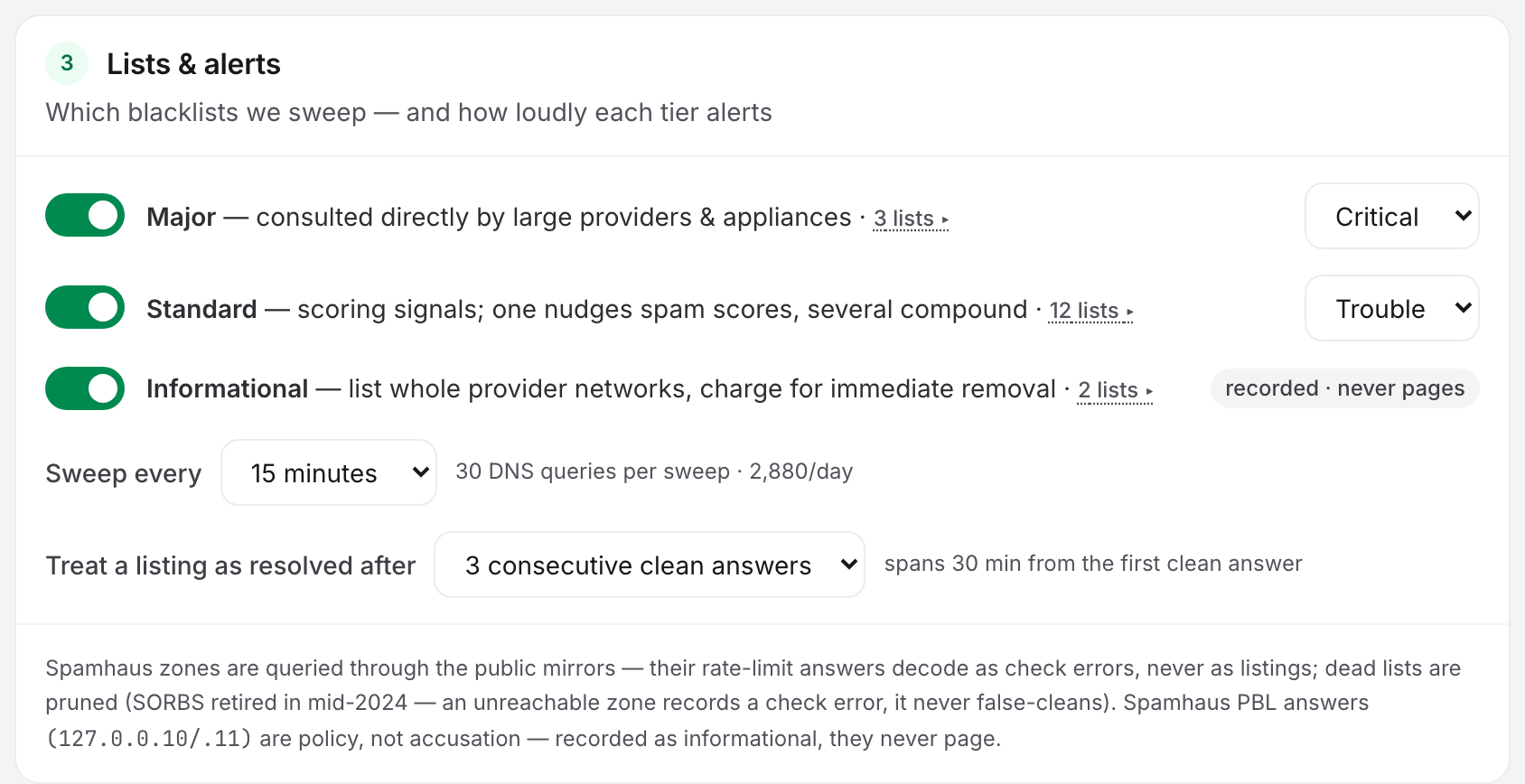
At 1 clean answer the listing resolves the moment a zone answers clean.
While the streak runs the listing is still active and the incident is still open. The row is what changes: it swaps "still listed" for "clearing — 2 of 3 consecutive clean answers". The card and the stat strip keep the color of the worst listing still active, so a clearing critical listing stays red until the episode closes.
"Cleared ✓" Versus "Removed From Watch"
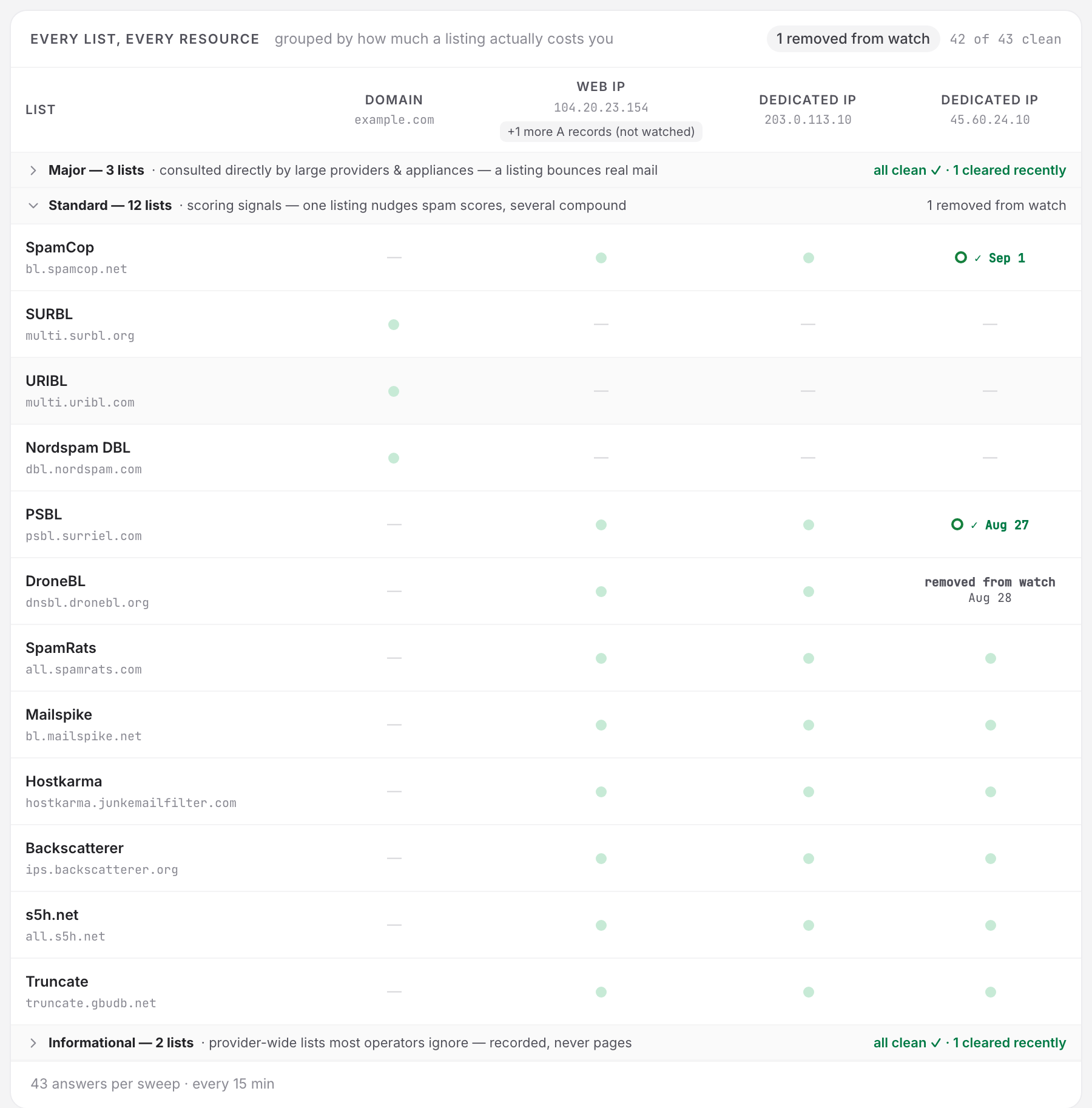
An episode can stop being active for five reasons, and only one of them is a delisting. The page renders them apart. A green cleared ✓ claims a blacklist answered clean about your address, and Uptimia never makes that claim about an episode that no clean answer verified.
| How the episode closed | How it renders | Recovery alert |
|---|---|---|
| The zone answered clean the required number of times | Green cleared ✓ on the wall, delisted · verified ✓ in History, counted in "N cleared recently" | Yes, when it was the last alertable listing open |
| The watched slot held no IPv4 for 30 minutes and a sweep read cleanly | Gray removed from watch | No |
| The slot resolves to a different address | Gray removed from watch; a fresh episode opens against the new address | No |
| You changed the target, removed a dedicated IP or disabled the tier | Gray removed from watch | No |
| A maintenance window closed it | Gray removed from watch | No |
Both markings sit on the Every list, every resource wall for 7 days after the close, then the cell goes back to plain clean. Hovering a gray cell names the reason:
- "the watched slot stopped existing"
- "the slot now holds a different IP"
- "a config change — target, tier or dedicated IP"
- "a maintenance window closed it"
Which Alert Fires When a Listing Closes
There is no per-list delisting alert. Recovery belongs to the incident, and it fires once:
- The last alertable listing verifies clean closes the incident as verified and sends the recovery alert: subject "…Delisted After duration", chat and webhook text "delisted — verified clean". The episodes need not verify on the same sweep. What counts is that an episode completed its clean streak on the sweep that empties the incident. This honors the monitor's Alert when every listing is verified clean toggle, which is on by default.
- One list clears while others stay listed: no alert. The listing disappears from the active card, the incident stays open at the worst remaining severity.
- The incident empties for any other reason and closes silently: a slot vanished, an address changed, or a config edit or a maintenance window took the last episode. No channel receives anything, and Uptimia purges any queued down-alert. Where such a close is rendered, the alert email labels it CLEARED / "Cleared at" instead of DELISTED / "Delisted at", and adds a verification line naming the cause:
- "Not verified — the listing left the watch" for a vanished slot or a changed address.
- "Not verified — a configuration change closed the incident" after an edit.
- "Not verified — a maintenance window closed the incident" after a window.
- Informational listings never touch the incident, so a UCEPROTECT entry opening or closing sends nothing either way.
If you want a reminder while a listing stays open, attach an escalation policy with a bounded repeat. There is no separate "remind me daily" switch on the monitor.
Working the Delisting Runbook
Each listing carries the same runbook, behind Open the delisting runbook at the bottom of the active-listings card. Work it in order. A removal request filed before the cause is fixed gets you relisted, and spends goodwill you'll want later.
- Find the leak before asking for removal. Check the SMTP auth log for a compromised mailbox, look at web contact forms and plugins, and rule out an open relay. A campaign to a purchased list is its own answer.
- Stop it. Disable the account, rotate its credentials, flush the outbound queue.
- Then work each list its own way. Spamhaus CSS and XBL expire on their own once the flow stops, and
check.spamhaus.orgshows the current status. SpamCop expires its own entries within a day of the last report. Barracuda has a removal form. Removal is free at every reputable list. Never pay a third-party "delisting service". - Warm back up gradually. A full-volume send straight after a delisting re-trips the traps that caught the spam.
- Let the sweeps confirm it. The monitor keeps sweeping on its cadence, and the listing clears once the streak completes.
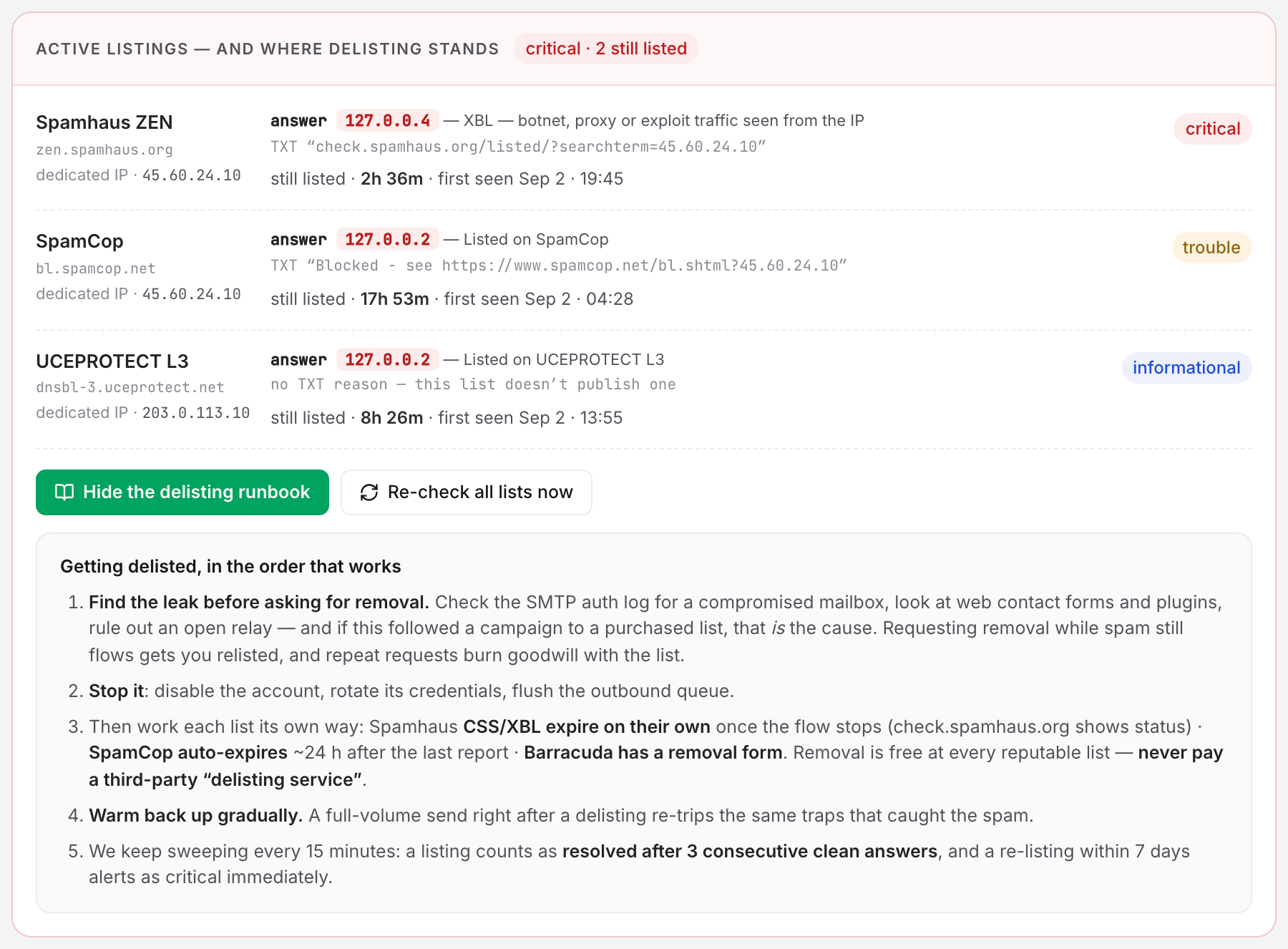
To skip the wait for the next scheduled sweep, click Re-check all lists now. It queues a sweep that runs within 60 seconds. The limit is 10 re-checks a minute per account, and Uptimia refuses the re-check on a paused, suspended or in-maintenance monitor, because that sweep would never run.
Whitelist Answers Are Not Listings
A whitelist answer is good news. Two standard-tier zones publish good-sender records in the same 127.0.0.0/8 range they use for their accusations: Hostkarma (127.0.0.1, 127.0.0.5) and Mailspike (127.0.0.17–127.0.0.20). Uptimia decodes those against the zone that sent them, records them as whitelisted and opens no incident, and the Raw answers modal shows them as a good finding, never as a listing.
Spamhaus PBL Is About the Range, Not About You
A PBL answer means the IP sits in a range its own network operator has declared should not send direct SMTP, a residential or dynamic pool. The answer is a policy statement about the address space, never a judgement on your mail, so Uptimia forces PBL answers to informational, whatever severity the major tier carries. If your mail server does live on that IP, the fix is with the network operator, or a move to a sending range. A removal request will not help.
Re-Listed Within 7 Days Comes Back as Critical
If the same list lists the same address again within 7 days of a verified delisting, the new episode opens as critical, no matter which severity you set for the tier. A relist that fast means the cause was not fixed. It earns a page even from a list you normally rank as trouble.
Only a verified delisting arms this. An episode that was force-closed proved nothing, so it can never make the next detection critical. Afterwards, lowering the tier's severity does not undo the escalation. On save, every surviving listing keeps the higher of its current severity and the new tier severity, so a relist-escalated listing stays critical until it closes. A PBL answer is the one exception, forced back to informational whatever the tier says.
When Your A or MX Record Changes While a Listing Is Open
Each episode is tied to one exact address, so moving your infrastructure starts a new episode instead of clearing the old one:
- The slot resolves to a different address. The old episode closes as removed from watch and a fresh episode opens against the new address in the same sweep. A delisting on one address of a round-robin set says nothing about another.
- The slot resolves to nothing. A slot must hold no IPv4 for 30 continuous minutes. The sweep that force-closes it must also have read every zone cleanly: one unreadable answer vetoes the close. Until then the listing stays active and alertable.
- The MX host and the A record resolve to the same IPv4. The mail slot folds into the web slot immediately, and the address stays watched under the web column. Nothing is lost from the watch.
- The target resolves to nothing at all, with no A, no AAAA and no MX-derived IPv4. The whole sweep freezes rather than recording partial results. After several such sweeps the detail page shows a banner naming the reason and the time it started, so an unreadable monitor stops looking like a healthy one.
Reading the History Card
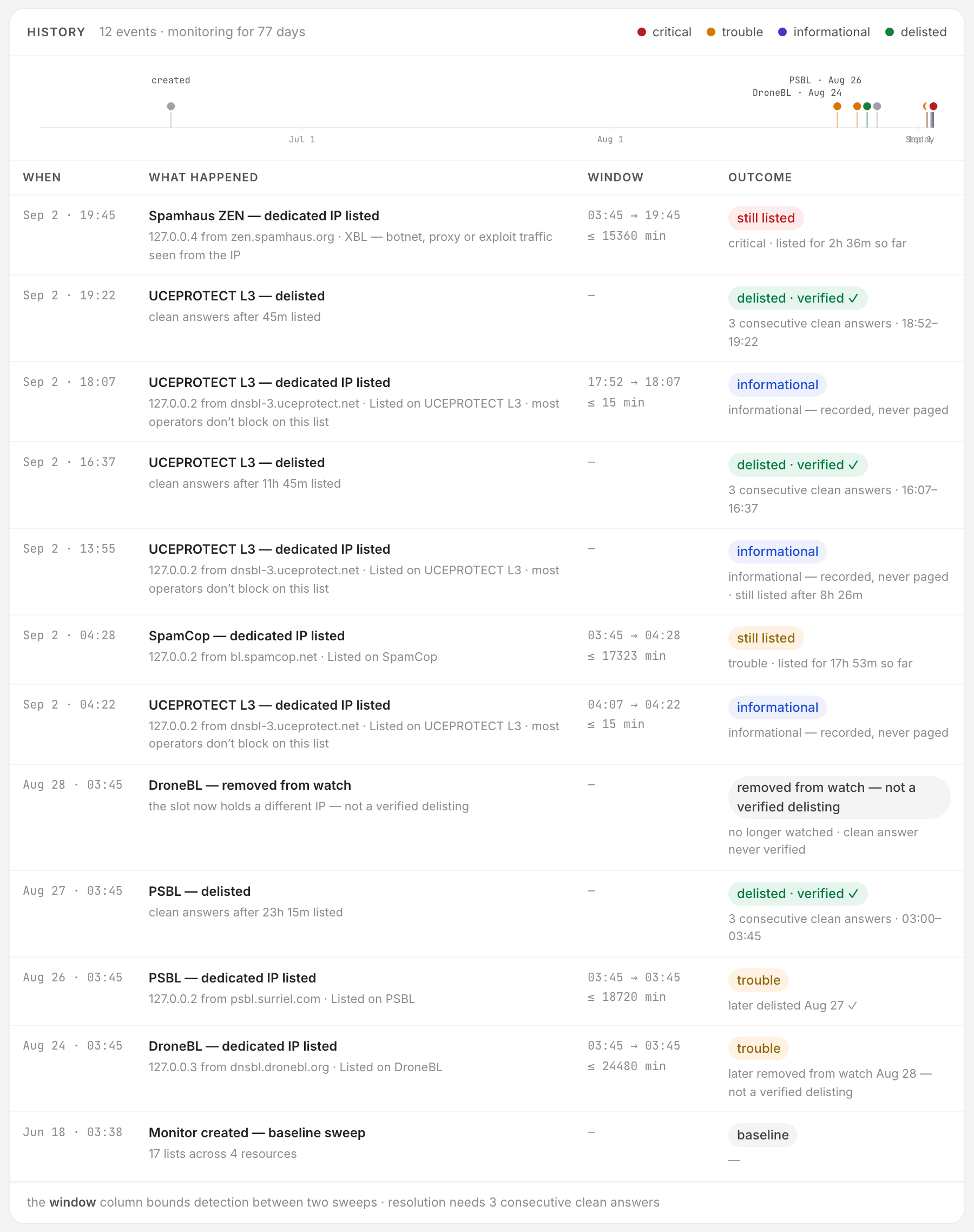
History holds the listing record. On the detail page it shows a 90-day timeline followed by an events table with the columns When / What happened / Window / Outcome, and nothing else lands there: incident alerts live in the separate Incidents card below it.
- Every detection and every close is a row. A verified close adds a second, green row: "list — delisted", badged delisted · verified ✓.
- The Window column states the detection bound as "≤ N min": the gap between the last clean sweep and the first listed one. Lists do not publish when they add you, so that interval is the tightest true answer.
- The table pages 25 rows at a time, over the last 90 days on the timeline. Uptimia keeps episodes for the life of the monitor, so the record outlives your plan's log retention.
What an Exported Sweep Contains
Each row of the Check log card is one sweep, and clicking a row opens the check drawer. It holds that sweep's counters (queried, listed, informational, clean, errors) and the per-list answers, each naming the zone, the watched address, the 127.0.0.x code and its decode. Export → Download PDF or Download HTML saves that one sweep.
The clean answers are only a count. Uptimia stores only informative answers per list: listings, informational entries, check errors and whitelist hits. A sweep that found nothing shows its clean count in the counter strip, and where the per-list table would be, it prints the line "Every one of the N zones queried answered clean — no listing, no whitelist hit, no error". Uptimia cannot name the clean zones, on screen or in the export. That matters when the export is going to a list operator or an auditor.