
A security questionnaire, a procurement review or a DPA request mostly asks for documents Uptimia already publishes. Data at rest sits in EU data centers in France and Germany. 5 server-enforced roles decide who on your team sees what. For anything contractual beyond the published documents, contact support with the specifics: a countersigned DPA, a residency clause in your own paper, or a DORA sub-contracting term.
The Documents That Are Already Published
The standard set needs no ticket. All of these are public and current.
| Document | Where | What it answers |
|---|---|---|
| Data Processing Agreement (DPA) | https://www.uptimia.com/legal/dpa |
The Article 28 processor terms. Review it any time. No request required. |
| Privacy Policy | https://www.uptimia.com/legal/privacy |
What personal data Uptimia holds, why, and for how long. |
| Cookie Policy | https://www.uptimia.com/legal/cookies |
Which cookies the website and control panel set. |
| Terms and Conditions | https://www.uptimia.com/legal/tos |
The service contract. |
| Imprint | https://www.uptimia.com/legal/imprint |
Company identification and registered address. |
| GDPR statement | https://www.uptimia.com/gdpr |
The compliance summary, including the data-residency statement below. |
| DSA notice form | https://www.uptimia.com/dsa-notice |
The EU Digital Services Act reporting channel, for reporting illegal content hosted on the service. |
One thing still goes through support: a countersigned copy of the DPA for your records. The sub-processor list does not need a ticket. Uptimia publishes it as Annex C of the DPA.
Where Your Data Is Stored
Uptimia's public GDPR statement makes a named residency commitment. Uptimia is an EU-based company, and it stores customer data, monitoring results and billing records in EU data centers in France and Germany. Everything it holds at rest stays in the EU:
- The application database at OVH in France.
- The time-series store on the same footprint.
- Screenshot, invoice and export blobs in AWS S3 eu-central-1 in Frankfurt.
The probe layer is the exception. Name it on the questionnaire. Checks run from probes inside and outside the EEA, and those probes keep nothing at rest. The DPA covers the non-EEA legs provider by provider, under the EU-US Data Privacy Framework or the Standard Contractual Clauses (Annex C.2 and Annex D).
Separate two categories when you scope a request:
- Monitoring and account data: the monitors you configure, their check results and incidents, your contacts, team members and billing records.
- RUM visitor data: performance measurements collected from your own site's visitors by the Real User Monitoring snippet.
Some requirements go past the published statement: a contractual residency clause, a named-facility commitment, or a restriction on a specific data category. Put those to support in writing before you deploy, and get the answer in writing. The published statement describes how Uptimia runs today; only your own contract binds it to your account.
What Uptimia Processes, By Monitor Type
A DPA scoping description has to list every monitor type you run. There are 12 families, and 5 of them did not exist when most scoping lists were written.
| Monitor type | What Uptimia receives and stores |
|---|---|
| Uptime | The target URL, host or IP, status codes, response times, and any request headers or POST body you configure. Also the first 1,000 characters of the response the probe received, which Uptimia clears from the check row after 7 days, separately from your plan's history window. When an outage is confirmed, the incident record also stores the response body, a screenshot of the failing page and a traceroute to the target. |
| Transaction | A recorded browser journey: the step URLs and every field value you enter, which can include test-account credentials. |
| API | An ordered chain of requests: URLs, headers, request bodies and any tokens or keys they carry. |
| Heartbeat | The inbound pings your cron job or worker sends, and their arrival times. |
| Server | Metrics reported by an agent you install on your own host: CPU, memory, disk and inode usage, load average, swap, process count and network I/O. Also the host's hostname, IP address, OS and kernel version, and the agent version. |
| Speed | Full page-load timings and the resource waterfall for one URL. |
| Real User | Page-load timings, geography, browser and device breakdown, and JavaScript errors from your visitors' browsers. |
| SSL | Certificate contents, chain and expiry for one host. |
| Domain | Registration, registrar and nameserver facts for one domain. |
| DNS | Zone records queried at the authoritative nameservers, plus the baseline they are compared against. |
| Virus | The scanned URL and the scan verdict. |
| Blacklist | The sending domain or IP being checked, and the DNSBL results. |
Note: Transaction, API and Server monitors change the processing picture most: transaction steps and API steps store values you typed, including credentials, and Server monitors pull metrics off machines you own. Name all three explicitly when you describe processing to your DPO.
GDPR and Real User Monitoring Visitor Data
Real User Monitoring works by adding a JavaScript snippet to your site. The snippet passively collects performance data from your visitors as they browse; there are no scheduled checks.
For that visitor data you are the data controller and Uptimia is the processor, so informing your visitors and establishing a lawful basis for the collection are your obligations as the site owner. Uptimia processes the data under the DPA. See RUM Installation and Privacy for the snippet's collection behavior and the limits of its error capture.
Sub-Processors
Uptimia publishes the current sub-processor list as Annex C of the DPA, grouped by function. Payments and hosting are two of those groups; the annex also covers authentication, security screening and the alert-delivery channels you configure yourself.
- Payments and billing: Stripe, PayPal, easybill.
- Hosting and probe infrastructure: OVH, AWS, GCore, DigitalOcean, Akamai/Linode, EDIS, Scaleway, Contabo, Vultr.
Every row names the sub-processor, its legal entity, its location, its function and the transfer mechanism it relies on. Which rows are in scope for your account depends mostly on which alert channels you have configured: Annex C.5 applies only once you turn a channel on.
DORA and Security Questionnaires
DORA (Regulation (EU) 2022/2554) covers EU financial-sector organizations. If you are in scope, your ICT third-party requirements are specific and contractual: register-of-information entries, exit provisions, sub-contracting terms and audit rights. Uptimia makes no blanket DORA-compliance claim here, because what it can meet varies with your tier and your obligations. Send sales or support the clauses you need to place. The published DPA is the starting document.
Access Control: Use the Five Roles, Not a Shared Login
Uptimia enforces a five-role model on the server, so nobody needs the owner login to get visibility.
| Role | Give it to | What it can do |
|---|---|---|
| Owner | The account holder. Exactly one per account. | Everything, including billing, plan changes and account deletion. |
| Admin | Operations leads. | Monitors, alerting, status pages, the team, integrations and API keys. No billing, no ownership transfer. |
| Editor | Engineers who configure monitoring. | Creates and manages monitors, alerting, status pages and reports. No team, billing or API-key access. |
| Read-only | Auditors, contractors, stakeholders. | Sees dashboards, monitors, incidents and reports, and can still receive alerts. Changes nothing. |
| Accounting / Billing | Your accountant or finance team. | Invoices, plan and payment details only. No monitoring access, and never receives monitor alerts. |
For a least-privilege review:
- An unrecognized role becomes Read-only, the least-privileged seat. A member invited without a role becomes Read-only too. One exception: a seat created before roles shipped keeps the legacy meaning of its empty role, which is Admin, so check those seats.
- The Accounting / Billing seat is free and does not consume a paid seat, so there is no cost argument for handing finance a monitoring login.
- Editor and Read-only seats can be scoped to monitor groups. A scoped member sees only monitors in their groups, and the server enforces that scope, not just the interface. Owner, Admin and Accounting / Billing seats are never scoped. See Limiting a Member to Monitor Groups.
See User Roles and Permissions for the full capability matrix, role by role, as the account enforces it. The control panel shows the same matrix on its own roles page, so you can also read it straight off your account.
The Account Audit Log
Uptimia keeps a per-account audit trail of who changed what. Go to People → Audit Log. Only the Owner and Admins can see it.
Each row records the acting member, the action, the object and the time. Covered actions are create, edit, delete, pause/resume and maintenance start/end. They span all 12 monitor types plus maintenance windows, teams and monitor templates. An edit row also names which fields changed. Rows are retained for 12 months and can be exported to CSV.
That answers the "do you keep an audit trail of administrative actions?" line item. It is separate from Logs in the sidebar, which holds check results rather than account changes. Data and Log Retention covers retention for those.
API Keys Are a Credential Class
API keys sit under Settings → API Keys, and the tab renders only for the Owner and Admins.
- A key inherits the identity of the seat that minted it. An owner-minted key carries full owner authority and is never scoped. A key minted by a team member carries that member's role and monitor-group scope, so demoting or re-scoping the seat takes effect immediately.
- A key belonging to a removed seat stops working. Uptimia rejects it outright, with no fallback to owner authority.
- The secret is shown once, at creation. Afterwards the list shows a masked value alongside Name, Created, Requests and Last Used. If you lose the secret, delete the key and generate a new one.
- Deleting the account deletes every key.
For a service integration that should not carry owner authority, mint the key from a Read-only or group-scoped seat instead: Read-Only and Group-Limited API Keys.
Two-Factor Authentication Is Per Identity
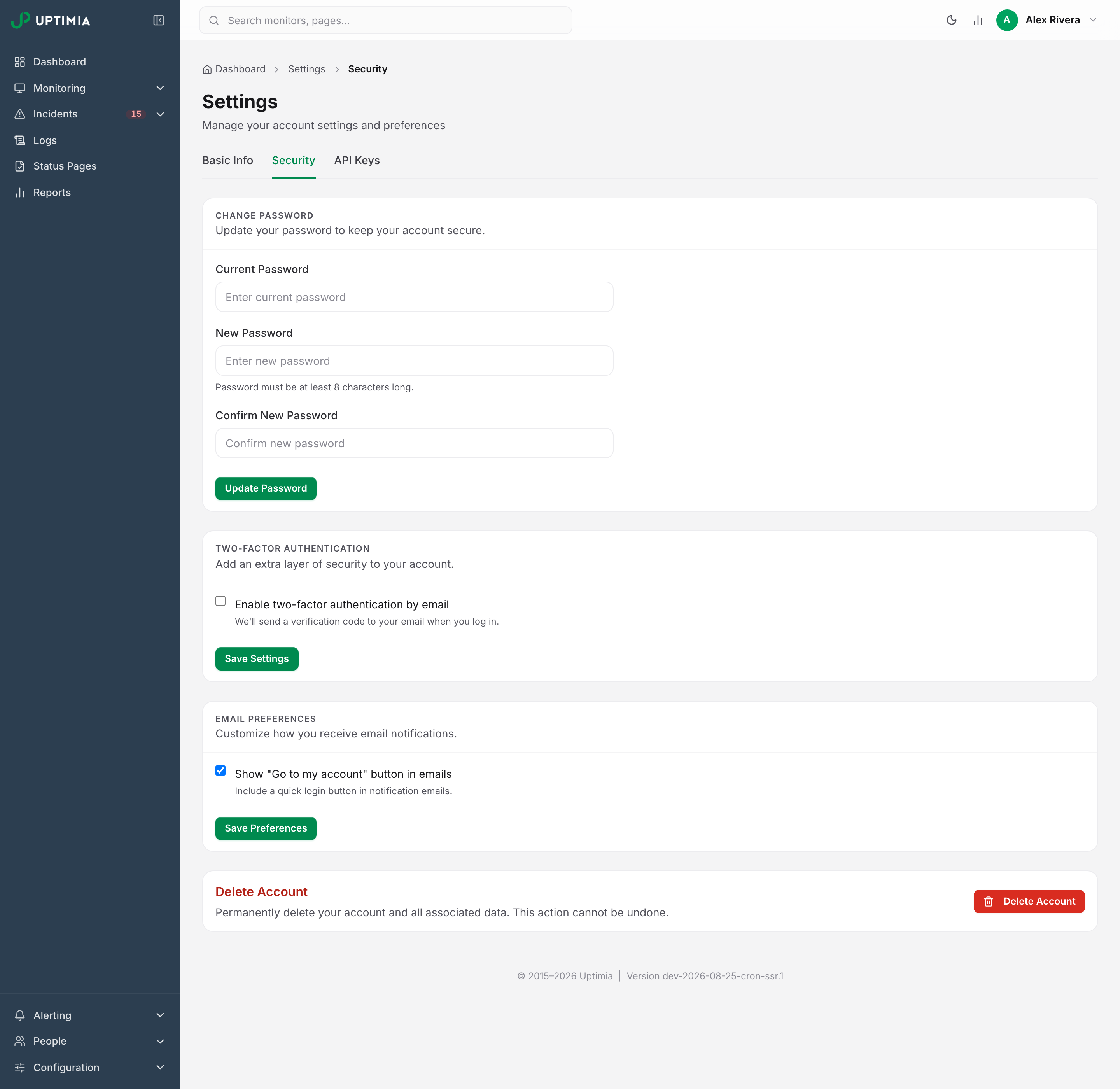
Two-factor authentication is an email one-time code, set per identity under Settings → Security. A member's code goes to their own address, not the owner's. There is no TOTP authenticator-app option, no hardware-key option and no SAML single sign-on, so if app-based 2FA or SSO is a rollout requirement, tell support.
A pending 2FA session grants nothing. Until you verify the code, the control panel sends you back to the code screen, and requests made with that session are refused as well. Disabling 2FA requires the current password. An Owner or Admin can clear a locked-out member's factor from People → Users. See Two-Factor Authentication for the mechanics.
Sign-In Protection and Bot Defense
- Progressive lockout: after 5 failed sign-ins, Uptimia refuses further attempts on that identity. Each additional failure lengthens the lockout window.
- Rate limiting: sign-in is capped at 20 attempts per 15 minutes per IP, and password-reset requests at 5 per hour per IP. Two-factor requests share one budget of 30 per 15 minutes per IP, covering both sending a code and checking one.
- IP blocklist: addresses on Uptimia's manual blocklist are refused on the standard sign-in path (email/password and token logins). Uptimia does not apply it at signup or to social logins, and it does not block requests anywhere else on the site.
- Bot defense: signup and the public contact, DSA and cancellation forms run a self-hosted Altcha proof-of-work challenge served from Uptimia's own domain. Sign-in and password reset carry a honeypot field and a signed single-use time token. Password reset also runs an MX deliverability check on the address. There is no reCAPTCHA and no Google site key anywhere in the configuration.
Cookie and Session Security
Session and authentication cookies carry three attributes and a 30-day lifetime:
- HttpOnly: page JavaScript cannot read them, which limits the damage from cross-site scripting.
- Secure: HTTPS only.
- SameSite=Lax: limits cross-site sending, which reduces CSRF exposure.
The pending 2FA cookie is separate, HttpOnly and expires in 1 hour.
Changing your password deletes every other active session and leaves only the session you changed it from. On a team-member seat that covers that member's own sessions. Done by the account owner, it covers the whole account, so every team member is signed out too. That is the sign-out-everywhere control. There is no per-device session list.
Every page also carries X-Content-Type-Options: nosniff, and every page that does not declare its own framing policy carries X-Frame-Options: SAMEORIGIN. Public status pages hosted on uptimia.com run instead under a Content-Security-Policy that allows only Uptimia's own scripts and a single nonced inline script, so custom HTML or CSS a page owner adds can never escalate into script execution. That policy also carries frame-ancestors 'self', which supersedes X-Frame-Options. The password-gate page bans inline script entirely.
Responsible Disclosure
Report a suspected vulnerability privately to support rather than disclosing it publicly. Include the affected URL, the steps to reproduce and the time you observed it. Earlier reports led Uptimia to tighten both its session-cookie attributes and its response security headers.
Data Deletion and Data-Subject Requests
To delete a specific slice of data, contact support and name exactly what should be removed: one monitor's history, RUM data for a site, or a visitor's records in response to a data-subject request.
Closing the account is self-service, under Settings → Security. It is an erasure. Deletion cancels any Stripe or PayPal subscription first and aborts if that fails, so no account is left deleted and still billed. It then anonymizes the user record and hard-deletes sessions, API keys, integrations, team seats, two-factor logs and the transaction/API step rows that hold values you typed. Finally it queues the monitoring time-series and both audit trails for the purge job.
There is no separate step to cancel your subscription first: deletion does it. Uptimia retains invoices already issued for tax purposes.
Warning: Account deletion cannot be undone. There is no restore path, and the confirmation requires your current password. See Deleting Your Account for the full sequence and what survives it.