
Deleting your Uptimia account cancels any paid subscription, stops every monitor, and erases your data. You do not need to cancel the plan first. Nothing afterward undoes it: there is no reactivation, and support cannot restore anything. If all you want is to stop the billing or the emails, unsubscribe, pause the monitors, or cancel the plan instead.
Before You Start
- Export anything you want to keep. Incidents, check logs and reports export as CSV, PDF or HTML. See Exporting Your Data. After deletion there is nothing left to export.
- Only the account owner can delete the account. Every seat's Security tab shows the Delete Account card. Uptimia still refuses the confirmation from an Admin, Editor, Read-only or Accounting / Billing member.
- You need the account owner's password. Uptimia checks the confirmation against it, so only someone who holds it can complete the deletion.
- If you sign in with Google or another social login, set a password first. Those accounts have no password for the confirmation to check, so the deletion fails every time. Use Change Password on the same Security tab to set one. That form does not ask for a current password. Then delete the account.
- Deletion is final. There is no reactivation and no support-side restore.
Deletion Cancels Your Subscription for You
Canceling the gateway subscription is the first thing deletion does, before any data is touched. Uptimia cancels the Stripe or PayPal subscription immediately, clears the stored subscription reference, and removes your saved card and PayPal details. If that cancellation fails, the whole deletion stops and nothing is removed, so nobody is ever left with a half-deleted account that is still being charged.
You do not need to cancel at Stripe, at PayPal, or on the Subscription page beforehand. Deleting is enough.
If what you want is to stop paying but keep the account, cancel or downgrade the plan instead. See Changing Your Plan.
Deleting the Account
- Open the avatar menu (top right) → Settings → Security tab.
- Scroll to the red Delete Account card at the bottom of the page and click Delete Account.
- In the Delete Account modal, type the account password into Enter your password to confirm.
- Click Delete My Account. You are signed out and returned to the sign-in page.

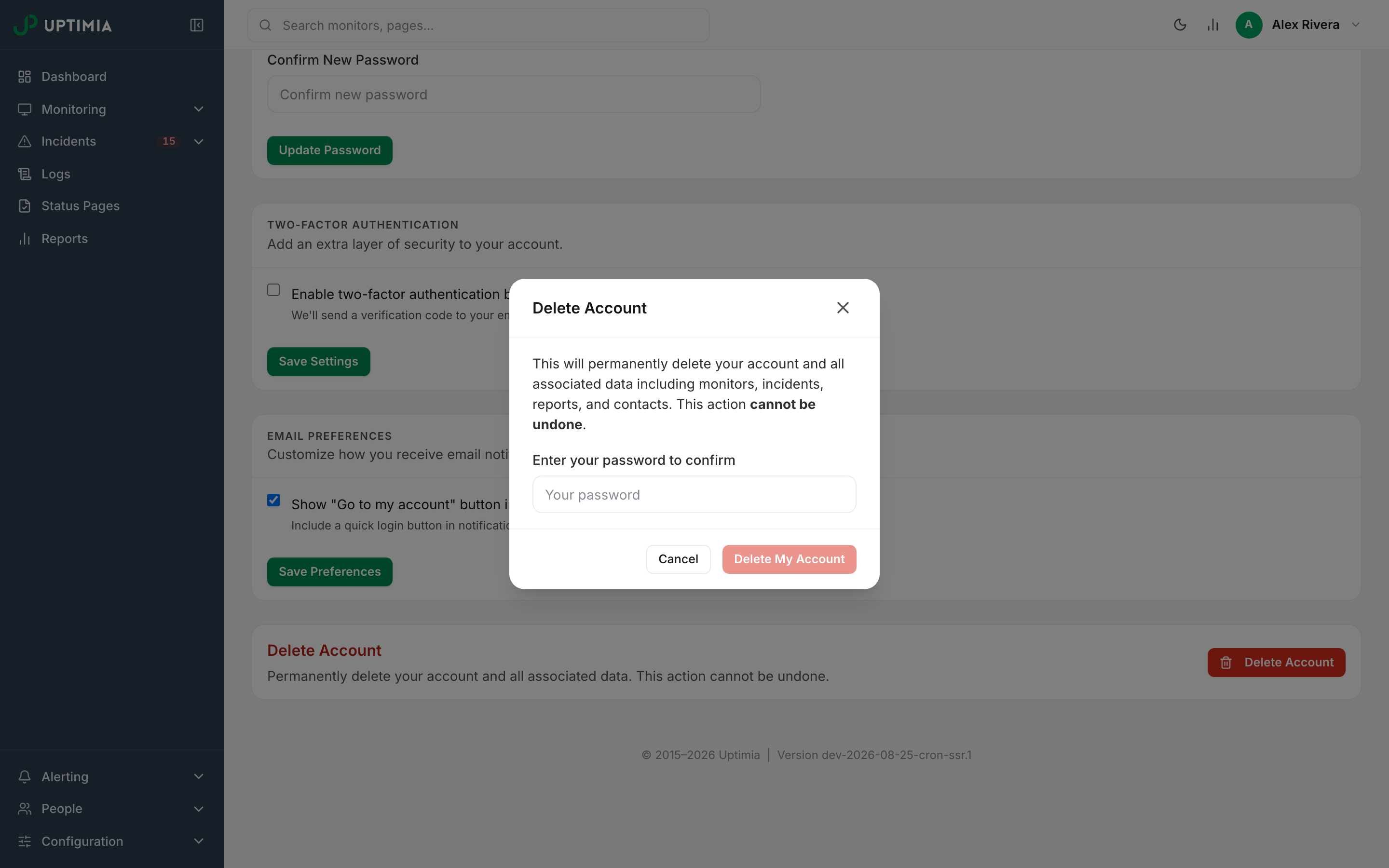
Warning: confirming is the point of no return. Uptimia replaces the account password with a random value nobody holds, rotates the login token behind remember-me cookies and email links, and refuses the account at sign-in from then on. Your monitoring data goes into the permanent-removal queue, not into a detached state.
What Gets Removed
Some of the data goes while you wait for the page to redirect. A daily job drains the rest at 04:00, starting with the next run, and a large queue can take more than one night to clear.
| What is removed | When |
|---|---|
| The Stripe or PayPal subscription, the stored card and the PayPal connection | Immediately |
| Every monitor of all 12 families, so probing stops at once | Immediately |
| Sessions everywhere, and every API key | Immediately |
| Two-factor sign-in logs, including the IP addresses and browsers they recorded | Immediately |
| Transaction-monitor and API-monitor step data (target URLs, request headers, form values and any credentials in them) | Immediately |
| Team members and their access | Immediately |
| Contacts | Immediately |
| Integration and webhook profiles | Immediately |
| Status pages, with their incident, maintenance and announcement threads and every update posted to them | Immediately |
| Monitor templates | Immediately |
| Uploaded logo files, both report-branding and status-page logos | Immediately |
| Each monitor's check results, incidents, reporting rows, maintenance records and pauses | Next nightly purge |
| Monitor groups and their memberships | Next nightly purge |
| Maintenance windows | Next nightly purge |
| Scheduled reports, their recipients and their branding themes | Next nightly purge |
| Teams, SMS credits and queued notifications | Next nightly purge |
| Both audit trails (the account activity log and the team audit log) | Next nightly purge |
| Outstanding password-reset links | Next nightly purge |
Everything waiting for the nightly purge is inert from the moment you confirm: the monitors it belongs to are already gone, the sessions are already dead, and nothing can read it.
Everyone on the Account Loses Access
Deletion removes every team member on the account, owner included. There is no per-member carve-out and no handover: when the deletion completes, every seat is gone, along with the audit trails that recorded what those members did. Tell your team before you confirm.
If the Deletion Does Not Go Through
| Message | Cause | Fix |
|---|---|---|
| Please enter your password | The field was left empty | Type the account password |
| We couldn’t delete your account. Please confirm your password is correct, or contact support if the problem persists. | The password did not match, the subscription cancellation did not complete, or you are not the account owner | Nothing has been deleted and the account is intact. Retype the account owner's password and try again. If you no longer have it, reset it first. If it keeps failing, contact support |
What Survives
- Your invoices. Amount, date, name, invoice reference and document id are kept for accounting and tax purposes. No usable account sits behind them.
- A tombstone row carrying a marked-as-deleted copy of your former email. It does not reserve the address. You can sign up again later with the same email, but you get a new, empty account with none of your old data.
Uptimia blanks everything else identifying on that row in the same step. That covers your name, the Stripe customer id, both stored IP addresses, your phone number, your reporting email, and every billing address, company-name and VAT field.
A confirmation email with the subject Your account has been deleted goes to the address the account used before erasure. That message is genuine, not a phishing attempt. If you receive one and did not delete anything, contact [email protected].
Note: For accounts that are not deleted, the account activity log and the team audit log are kept for 12 months and then removed automatically. Monitoring history has its own per-plan window. See Data and Log Retention.
There Is No Restore Path
Support cannot bring a deleted account back. Because the credential is destroyed rather than disabled, sign-in refuses the account on every path, including remember-me cookies and direct-access email links. Any API key that survived a backup restore is refused as well. If you might come back, cancel or downgrade the plan instead of deleting.
Erasure Requests and GDPR
Deleting your account from the Security tab is the self-serve route to erasure. If you need a formal erasure request answered in writing, a copy of your data, or a record of what was retained and why, contact support before you delete. Deletion leaves nobody to correspond with. Security, Privacy and Compliance covers Uptimia's processor role, the data processing agreement and the residency position.
Unsubscribing, Pausing and Deleting Are Different
- Unsubscribing from an Uptimia email, using the link at the bottom of a newsletter, stops that kind of message. Your account, monitors, alerts and plan all continue.
- Pausing a monitor, or canceling the plan, stops the checks or the charges while the account and its history stay intact and readable. Cancellation runs to the end of the paid period, and you can reverse it with Reactivate subscription on the Subscription page.
- Deleting the account ends everything: access, data, team and subscription. It cannot be reversed.