
Uptimia checks your site from a network of monitoring locations, called checkpoints or probes. Which probes a given monitor uses is a saved-set question, answered in Location Profiles.
Which Monitors Have a Location Setting
Six of the 12 monitor families let you choose probes. The other six have no Locations tab, because nothing about those checks varies by where they run from.
| Family | Probe selection | What it means in practice |
|---|---|---|
| Uptime | Yes | Each check runs from one of the selected probes, and the probe varies from check to check |
| Speed | Yes | Each check loads the page in a browser from one of the selected probes |
| Transaction | Yes | Each run replays the recorded journey from one of the selected probes |
| API | Yes | Each run sends the request chain from one of the selected probes, rotating through the set |
| SSL | Yes | Each check opens the TLS connection from one of the selected probes |
| DNS | Yes, from the DNS-capable fleet only | One sweep queries your nameservers from one selected location, rotating through the set |
| Domain | — | Queries the registry, not your server |
| Virus | — | Queries the Google Web Risk API about your URL |
| Blacklist | — | Queries DNSBLs about your domain or IP |
| Heartbeat | — | Your job calls Uptimia; Uptimia never calls out |
| Server | — | The agent on your host reports in |
| Real User | — | Data arrives from your visitors' own browsers |
A domain, virus, blacklist, heartbeat, server or Real User monitor has no Locations tab at all.
The Probe Network
The catalog holds 179 probes across 7 regions and 69 countries, as of 2026-08-31. 62 of those countries host a probe machine. Seven probes are the only entry for their country and run from a machine across the border:
- Bratislava runs from Budapest
- Buenos Aires and Panama City run from Sao Paolo
- Manamah, Doha and Cairo run from Istanbul
- Riyadh runs from Tel Aviv
If a check has to originate physically inside a named country, confirm with support which machine serves that probe before you rely on it.
| Region | Probes | Countries |
|---|---|---|
| Europe | 90 | 39 |
| North America | 44 | 3 |
| Asia | 23 | 13 |
| South America | 7 | 5 |
| Oceania | 7 | 2 |
| Middle East | 5 | 5 |
| Africa | 3 | 2 |
DNS monitors draw from a smaller pool. 88 of those probes carry the DNS sweep tooling, and a DNS monitor can be pinned only to those. Its Locations tab shows that fleet, not the full 179.
How Probes Are Picked for One Monitor
The Locations tab offers three modes under the heading How should we pick probes?:
- All probes (recommended: every Uptimia location, and new probes join automatically)
- Saved profile: a location set reused across monitors, so you edit the profile once and every monitor follows
- Custom selection: probes hand-picked for this monitor only
How profiles propagate is in Location Profiles.
All probes is the default, and it has no minimum. It means the whole fleet, whatever size it is on the day the check runs.
The 6-probe floor applies to Custom selection. A live counter sits above the region grid: once you are clear it reads N of 179 probes selected · minimum 6, and while you are short it reads N selected — minimum 6 · pick K more probes. While you are still choosing the counter is amber, and it turns red after a save is blocked. Saving under the floor is refused with Please select at least 6 monitoring probes (or use all probes).
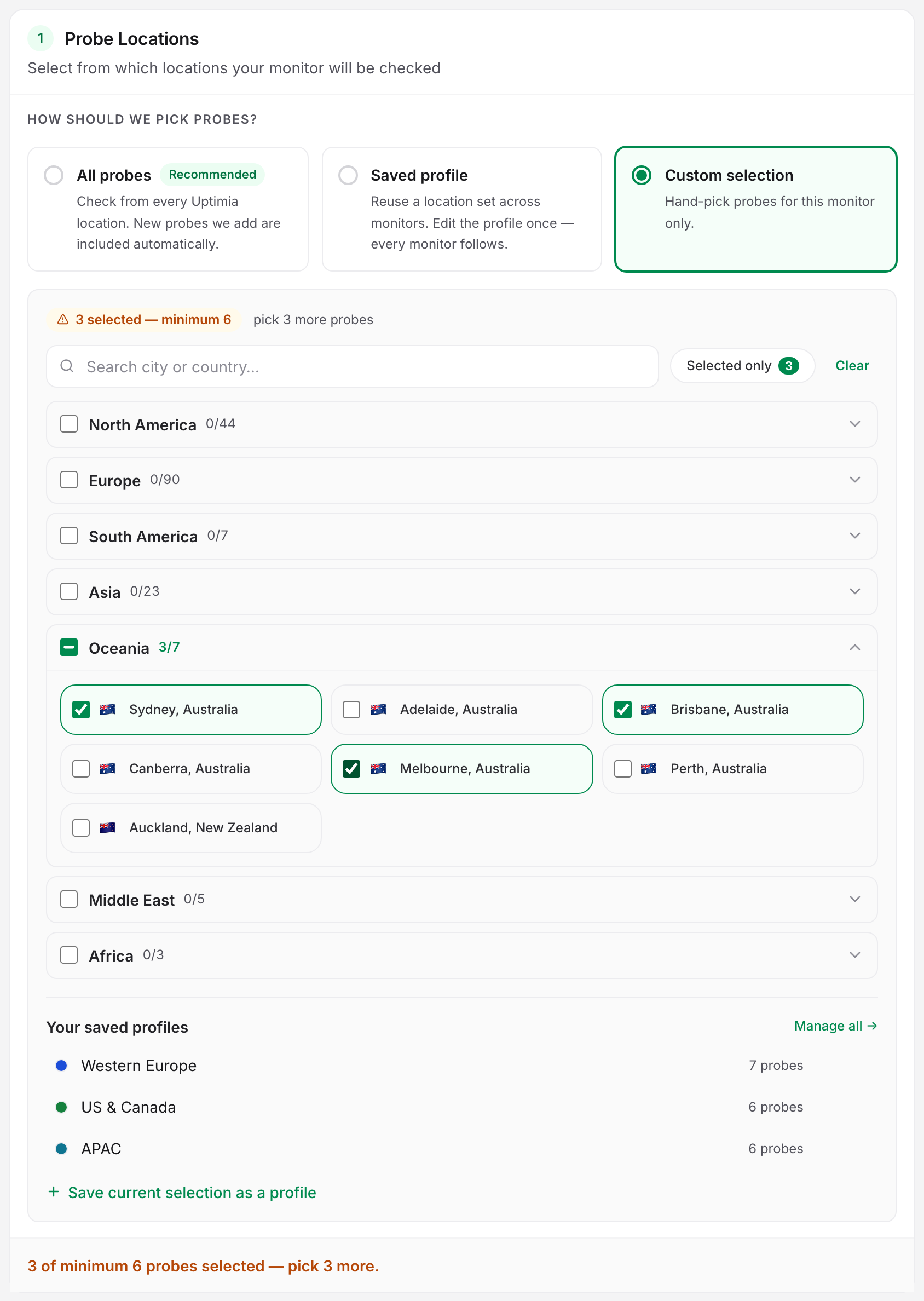
The floor exists because confirmation must come from probes other than the one that saw the failure. Uptimia enforces the floor on save, and again when a location profile is applied to a monitor.
How many probes have to agree is a separate per-monitor setting. Confirmations required lives in the Outage confirmation card on the editor's Advanced tab, where the range is 1–3, the default and recommended value is 3, and the control renders for uptime, SSL, Speed, Domain, Transaction, API and DNS monitors. Across those seven, three counting rules apply. Read the option label the editor shows you.
| Family | What N counts | At N = 1 |
|---|---|---|
| Uptime, SSL, Speed, Domain, Transaction | N distinct backup probes must also fail, the reporting probe excluded | One backup probe confirms, then the incident opens |
| API | N total failing observations, the primary run included | The first failed run opens the incident with no second opinion |
| DNS | N other probes must re-sweep the zone and see the same change | The sweep that spots the change alerts on its own |
Recovery needs only one passing check, whatever the threshold. The reason is in How Uptimia Monitoring Works.
Regional Monitoring Is Self-Service
To focus a monitor on one region, open Configuration → Location Profiles. Apply one of the seven built-in profiles: Europe, North America, Asia, Middle East & Africa, South America, Oceania and EU / GDPR. Or save your own set and reuse it across monitors. No support conversation is needed.
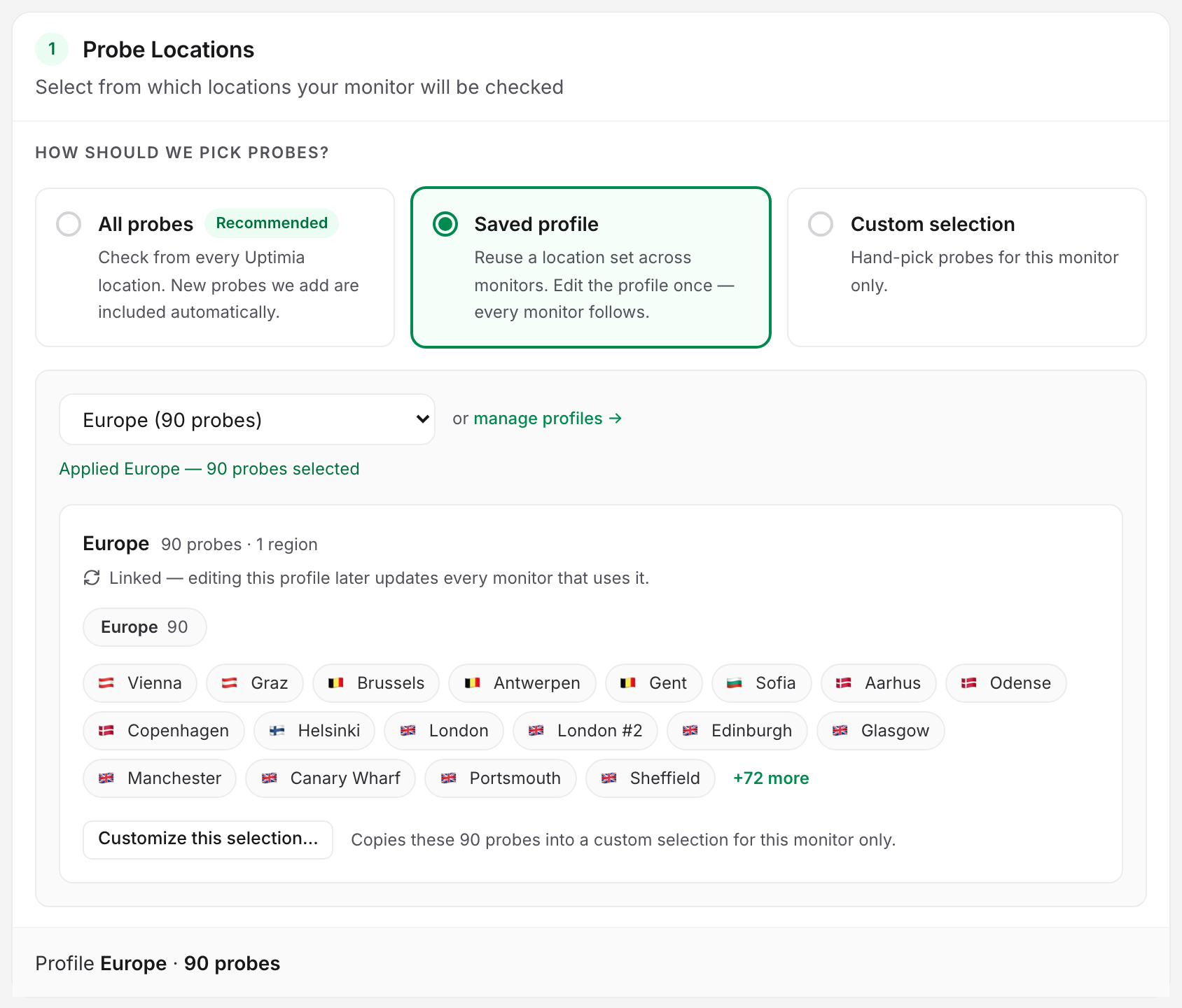
The 6-probe floor still applies to a profile. One that resolves to fewer than 6 probes cannot be applied, and the picker labels it — too few. That is why Middle East and Africa ship as a single combined built-in: 5 probes and 3, so neither clears the floor alone.
New Monitors on an EU Account Default to Europe
On an account whose region is Europe, a new uptime, SSL, speed, transaction or API monitor starts on the Europe probe set rather than All probes. A dismissible note in the editor says so. That answers "why is my brand-new monitor only checked from Europe": switch the mode card to All probes and save. For the full rule, including the fallback and the DNS exclusion, see Location Profiles.
What Probes Cannot Detect
Uptimia's probes run from datacenter IP addresses, not from residential or mobile consumer connections. That boundary decides what counts as an outage here.
- ISP-level or consumer-only blocks. If your site is unreachable for consumers on one ISP but fine from datacenters, the probes reach it and report it as up. One example is a site that fails from a home connection in one country and loads over a VPN, since the probes take the VPN-like path. Datacenter-based monitoring cannot confirm reachability from real consumer connections in a named market.
- Geo-fencing aimed at visitors. Restrictions that target consumer geographies or specific carriers may not appear on infrastructure routes.
- Anything inside a private network. A probe cannot reach a host with no public address. Use Monitoring Behind a Firewall to pick the right family instead.
Coverage Changes Over Time
Availability in some regions depends on third-party datacenter supply and local conditions, and the catalog moves most in Asia, Oceania, China, Russia and Africa, where a provider can deactivate a probe over sanctions or local restrictions. Before pinning a critical monitor to one country, open the Locations tab and confirm the location is listed there. The tab renders the live catalog.
What Weakens a Hand-Picked Selection
Several selectable cities are one physical probe. The fleet presents 179 selectable checkpoints from 138 physical probe machines, so one machine can appear as more than one city. Washington D.C. is New York City. Boston and Newark are New Jersey. Las Vegas, Baltimore and Cleveland are Los Angeles. Six hand-picked cities can therefore resolve to as few as 2 independent machines while passing every guard, so if independence is the point of your selection, spread it across regions rather than across nearby cities.
A very small selection widens itself for backup checks. When a monitor's selection resolves to 3 or fewer probe hosts, backup confirmation falls back to the whole fleet, so a down-confirmation can then come from probes you did not select. The count includes the duplicates an alias selection produces, which keeps an alias-heavy six-city pick above the threshold. Pick 4 or more distinct hosts.
Choosing Locations That Match Your Audience
- Select where your visitors are. A failure seen only from distant probes may not reflect what your visitors experience.
- Do not select probes in countries you deliberately block. A probe in a geo-blocked country correctly receives a 403 and reports a problem. That is a self-inflicted false positive.
- Keep enough spread for the confirmation quorum. Cover the regions you care about with independent locations rather than clustering inside one metro.
If probes in regions you do serve are being challenged or blocked, the cause is your edge security layer rather than your location choice. See Whitelisting Uptimia's Probe IPs.
You can change selected locations at any time from the monitor's editor. The change takes effect on the next check.