
For the figures tied to your own account (current plan, renewal date, next amount), open the avatar menu at the top right and choose Plans & Billing. Only the account owner and the Accounting / Billing seat see that entry. Every other role reads the plan name and usage counters from the Usage button in the top bar.
Do You Offer Nonprofit or Education Discounts?
Yes. Registered nonprofits, charities and educational institutions qualify. Contact support before you subscribe or before your next renewal, and send your organization's name and website, proof of status such as a registration number, and the plan you want. Support confirms the terms and the reduction that applies to your account.
Where Are My Invoices, and How Do I Correct the Details on One?
Invoices live on the Billing History tab, one row per invoice with Date, Reference, Plan, Amount and Status.
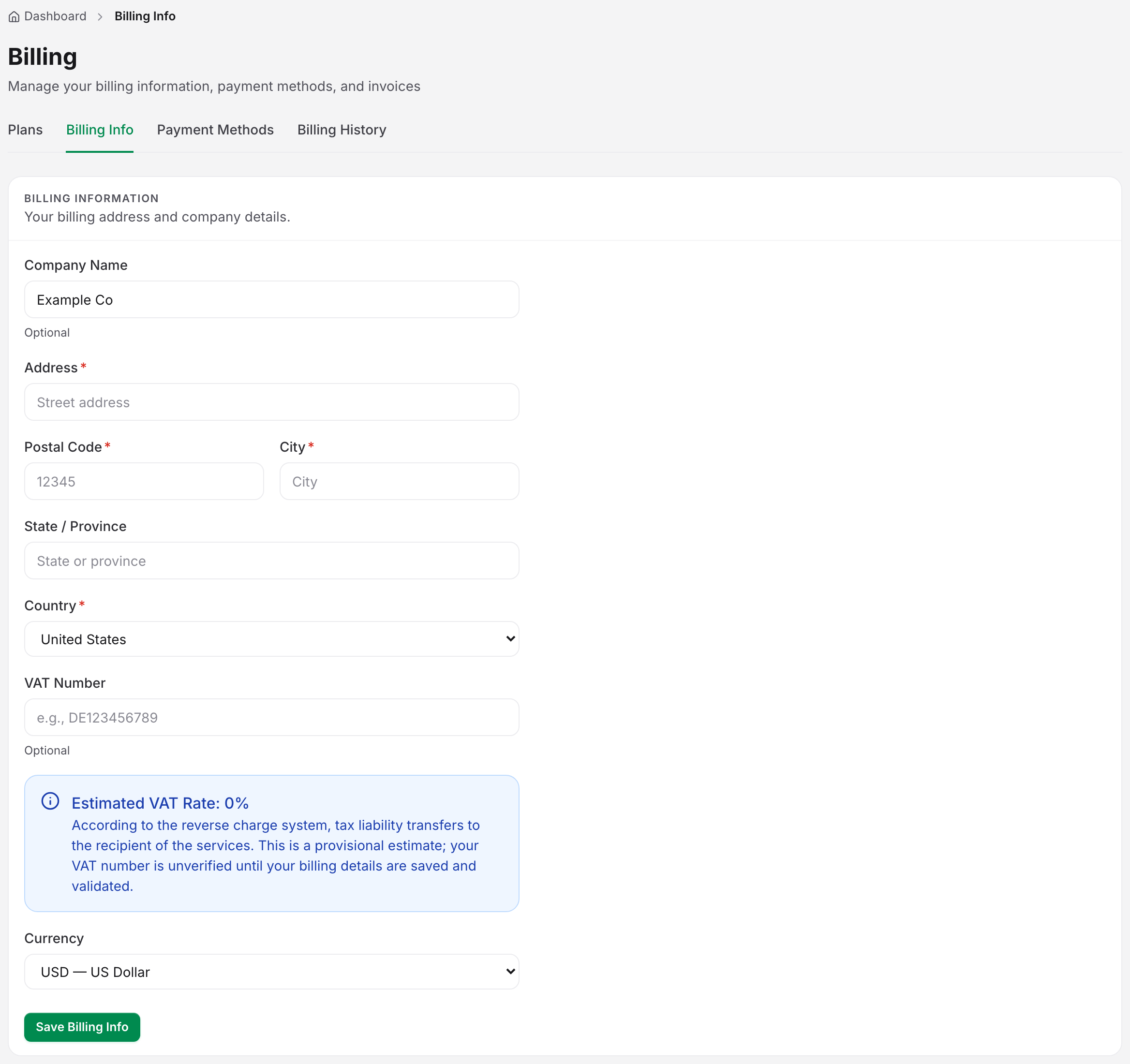
- Open the Billing Info tab and fix the wrong details: company name, address, city, postal code, state or province, country, VAT number.
- Open the Billing History tab, open the row menu on the invoice and choose Regenerate Invoice.
- Choose Download PDF.
If you download again without regenerating, you get the same file as before. Uptimia refuses to regenerate an invoice dated before 1 January 2026. Ask support to reissue that invoice by hand.
Why Was I Charged Less Than the Plan Price?
Because you upgraded mid-cycle on a card: Stripe charges the new plan's price minus a credit for the days you had already paid for on the old plan. Your invoice shows that credit on its own line as (incl. credit for N unused <Plan> days), for example "incl. credit for 12 unused Basic days". Uptimia creates the subscription at the full price, so the next renewal bills in full. PayPal upgrades get no credit. The full rule is in Understanding Your Bill.
I Downgraded, but Nothing Changed
That is expected on a card: a Stripe downgrade takes effect on your renewal date. Nothing is charged, your plan stays where it is, and no monitor is touched until then. The Subscription page carries a banner naming the date, with an Undo button that cancels the scheduled change. PayPal downgrades apply immediately instead. See Changing Your Plan.
My Renewal Payment Failed
Renewals usually fail for an ordinary reason: the card has expired, the funds fall short, or a 3D Secure (SCA) approval never reached you. Uptimia retries the charge over a three-week window, sends the next of four escalating emails after each failed attempt, and pauses monitors only late in that sequence. The notices already in your inbox tell you how far along the sequence you are.
- Open the Payment Methods tab and check the saved card is current.
- Add a replacement with Add Payment Method and set it as the default.
- Approve any pending verification in your banking app.
If the charge keeps failing on a card you know works, contact support with the date and amount.
I Was Charged, but My Account Still Shows as Suspended or on Trial
Contact support right away with the charge date and amount. Do not create a second account to work around it: that splits your monitors across two accounts and does not release the payment. Once the payment is confirmed, support reactivates the account and its suspended monitors, and can refund the charge if it should not have gone through.
I Think I Was Billed Twice
Check your card statement against the Billing History tab first. A pending authorization that later drops off is not a second charge, and a retried payment can look like one. If two genuine charges cover the same period, contact support with both dates and amounts, and support will refund the duplicate.
How Do I Cancel, and Can I Get a Refund?
Cancel from the Subscription page. Cancellation takes effect at the end of the period you have already paid for. Everything keeps running until then. The page shows a Cancellation scheduled banner with a Reactivate subscription button, which undoes the cancellation any time before that date. Uptimia emails a reminder three days before access ends.
You cannot request a refund yourself. Contact support with your account email and the reason. Uptimia reviews each request, and the clearest case for a refund is a charge that was unexpected, duplicated, or made against an account you could not use.
Can My Accountant Get the Invoices?
Yes. Invite them to the free Accounting / Billing seat, which does not count against your plan's user limit. Once they accept the invitation and set their password, they receive every billing email: invoices, receipts, failed-payment and dunning notices, refunds and subscription changes. They can open the billing area to download invoices and manage payment methods. They see no monitors and receive no alerts.
Can I Pay by Purchase Order or Bank Transfer?
Contact support or sales and describe what your finance team needs, including any region-specific requirements. Enterprise and Custom Pricing covers invoicing arrangements outside the standard checkout.